

Blink Home Monitor

5,000,000+
Installs
Immedia Semiconductor
Developer
-
Productivity
Category
-
Rated for 3+
Content Rating
-
https://apphelp.immedia-semi.com/en/privacy_policy.html
Privacy Policy
Screenshots
editor reviews
Blink Home Monitor is a security camera app designed for people who want a simple, wire-free way to keep an eye on their home. It belongs to the smart home and security category, and you mainly use it to view live feeds, record clips, and get motion alerts from Blink cameras you set up around the house. I downloaded it from the Google Play Store after buying a Blink Mini, mostly because setting up the camera without the app is just not an option. The install count is in the tens of millions, and the app itself is free, though you do need a subscription if you want cloud storage beyond the free trial. First impression after launch was decent—clean login screen, straightforward setup wizard that walks you through adding a camera by scanning a QR code. No annoying registration wall if you already have an Amazon account, but you do need one to get started.
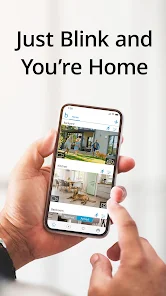
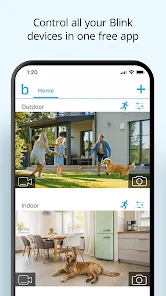
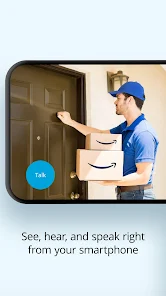
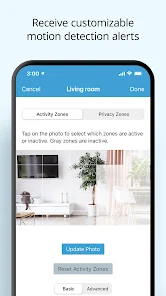
Once inside, the interface is pretty minimal. You land on the home screen where all your cameras show up as small tiles with a snapshot. Tapping one opens the live view, which takes a second or two to load, but once it connects, the video is smooth at 1080p. Onboarding is surprisingly easy—you plug in the camera, the app finds it over Bluetooth, and within a few minutes it's connected to your Wi-Fi. Common daily use goes like this: you get a push notification for motion, open the app, tap the camera tile, and either watch live or scroll through recorded clips. The clip library is organized by date and time, which is fine for most people, but scrolling through long timelines feels a bit sluggish. One practical tip: if you set up motion zones in settings, you cut down on false alerts from tree branches or passing cars. The app also supports two-way audio, but the sound quality is a bit tinny on both ends.
After using it for a couple of months, I think it works well for apartment dwellers or renters who can't drill holes for wired cameras. The battery-powered models are genuinely easy to reposition, and the app's arming and disarming schedule is handy. That said, if you need 24/7 continuous recording or super sharp night vision, you're better off looking at something like Ring or Eufy. The lack of an on-device microSD slot in the cheaper models means you either pay monthly or live with only saving clips when motion is detected. I kept it installed because it's low-maintenance and the alerts are fast, but I can see someone uninstalling if they hate the idea of paying for a subscription just to keep more than a few seconds of footage. It's a decent pick for basic security, not for heavy surveillance.
features
- 🎥 The standout feature is the completely wire-free design on most models. Unlike the Ring Stick Up Cam or the Wyze Cam v3, which need a power cable or a wired connection for continuous use, Blink runs on two AA lithium batteries that last up to two years. That means you can stick a camera on a fence post or a window ledge without any cables at all. The app handles battery management well, giving you a percentage readout for each cam so you know when to swap them out.
- ⚡ Customizable motion detection is another strong point. You can set activity zones right inside the app to ignore parts of the frame, and you can adjust the sensitivity slider per camera. Compared to the Google Nest Cam, which only gives you basic person/animal/vehicle detection without fine-tuning, Blink lets you dial in exactly what trips the recording. It's not perfect at distinguishing a dog from a burglar, but for basic filtering it works.
- 🔋 The app's integration with Alexa is seamless. If you have an Echo Show or Fire TV, you can say "Alexa, show me the front door" and the live feed pops up instantly. The Ring app also works with Alexa, but Blink cameras don't require a separate hub or base station for voice commands, which simplifies the setup. No extra hardware means less clutter and one fewer device to plug in.
pros
- 👍 Battery life is the biggest win here. The Ring Stick Up Cam needs recharging every few months, and the Wyze Cam v3 has to be plugged in all the time. Blink's two-year battery shelf life on the same lithium cells is genuinely impressive. I have one camera on a shed that I haven't touched since I installed it eight months ago.
- 👍 The app's simple interface makes it easy for anyone to use. My parents, who struggle with tech, figured out how to arm the system and view clips without help. The Eufy Security app has more features but a steeper learning curve with all its nested menus, so Blink wins on pure usability for non-techy households.
- 👍 Local storage option via the Sync Module 2 is a smart touch. You can plug a USB drive into the module and store clips locally, no cloud subscription needed. That puts it ahead of the Arlo Essential cameras, which require a monthly plan for anything beyond basic live viewing. The app lets you browse local clips just as easily as cloud ones.
cons
- 👎 The free cloud storage is too limited. You only get a few seconds of clip length with the free plan, and all clips are deleted after 30 days. The Wyze Cam gives you 14 days of free cloud storage with longer clips and more robust motion tagging, so Blink feels stingy here. If you want more than a scrap of footage, you're forced into a subscription.
- 👎 No continuous recording option. Unlike the Eufy Cam 2 Pro or the Ring Stick Up Cam Wired, Blink cameras only record when they detect motion. That means you'll never catch something happening right before the alert triggers. The app has no pre-roll or buffer feature, so you get the clip starting exactly when motion is sensed, often missing the first second or two.
- 👎 The app's live view delay is a bit annoying. From tapping the camera tile to seeing video, it takes 2-3 seconds consistently, and sometimes up to 5 seconds if the Wi-Fi is weak. The Google Nest Cam app is almost instant in comparison, which matters if you're checking on a package thief or a pet in real time. Blink's slow wake-up can make you miss the action.
- 👎 Night vision quality is just okay. The IR LEDs light up the scene well enough, but faces and license plates are blurry beyond about 15 feet. The Wyze Cam v3 has a starlight sensor that gives much clearer color night vision, and Blink's app doesn't even offer a color night mode option. For nighttime security, it's serviceable but not great.
Recommended Apps
![]()
Japevox - Funny Prank Sound
SecureTool4.3
![]()
AstroMatrix Birth Horoscopes
AstroMatrix4.7
![]()
Personalized Call from Santa (
www.PackageFromSanta.com4.3![]()
Prank Call - Fake Call & Chat
Bravestars Casual4.1![]()
Persona: Beauty Camera
TICKET TO THE MOON, INC.4.5![]()
Peacock TV: Stream TV & Movies
Peacock TV LLC4.5![]()
Instant Buttons Soundboard App
Snow Peak Apps2.1![]()
GPS Speedometer: Speed Tracker
SM Infotech3.2![]()
Subway®
SUBWAY Restaurants4.2![]()
Find Your Phone By Clap
Trusted App Global4.5![]()
Gorilla Skins for Monkey Arena
Dumitru Boico4![]()
Vimeo
Vimeo.com, Inc.3.8![]()
Vinted - Buy and sell clothes
Vinted4.6![]()
Galaxy Starry Keyboard Backgro
Fun Keyboard Theme for Android4.7![]()
Chat AI - Ask AI anything
AI Chat Bot, Ask AI4.4















Disclaimer
1.Apklifts does not represent any developer, nor is it the developer of any App or game.
2.Apklifts provide custom reviews of Apps written by our own reviewers, and detailed information of these Apps, such as developer contacts, ratings and screenshots.
3. All trademarks, registered trademarks, product names and company names or logos appearing on the site are the property of their respective owners.
4.Apklifts abides by the federal Digital Millennium Copyright Act (DMCA) by responding to notices of alleged infringement that complies with the DMCA and other applicable laws.
5.If you are the owner or copyright representative and want to delete your information, please contact us [email protected].
6.All the information on this website is strictly observed all the terms and conditions of Google Ads Advertising policies and Google Unwanted Software policy.
7.Apklifts.com is an independent, information-only website which is 100% free to all the users.













