
Gmail

10,000,000,000+
Installs
Google LLC
Developer
-
Social
Category
-
Rated for 3+
Content Rating
-
http://www.google.com/policies/privacy
Privacy Policy
Screenshots
editor reviews
Gmail is Google's own email app, and it's basically the default way most people manage their inboxes on Android phones. It's a free download on both Google Play and the App Store, usually pre-installed on Android devices, with over 10 billion installs on Play alone. When you first open it, you're asked to sign in with a Google account, which is pretty straightforward if you already have one. The first impression is clean and minimal, with a white background, a red accent for unread counts, and a prominent compose button at the bottom. You don't need to register separately since your Google account does all the work, and while there are no forced ads, Google does scan your emails to show contextual ads in the web version, though the mobile app itself avoids being cluttered with them. Most people download it because it just works with their existing Google services, and the initial setup takes less than a minute.
Once you start using it, the interface feels like a standard mailbox with a twist. You get a primary inbox that sorts emails into categories like Social and Promotions automatically, which is handy but sometimes misplaces important messages. Onboarding is quick: you tap the compose button, type the recipient, subject, and message, then hit send. Common actions include swiping left to archive or delete an email, and pressing the search bar to find older threads. One small tip: if you enable Smart Reply, the app suggests quick responses like “Got it” or “Thanks,” which saves time for busy days. The threading function groups emails by conversation, but if you're not careful, replies can get buried in long chains. Overall, the experience is smooth, though some users find the category tabs confusing when personal and work emails mix.
After using it for a while, I'd say Gmail shines for people who are already in Google's ecosystem, like if you use Drive, Calendar, or Photos. It's less ideal if you hate automatic sorting or want full privacy control without Google scanning your emails, since Outlook or ProtonMail might feel safer. Compared to the default email app on iPhones, Gmail offers better search features and labels, but the Apple Mail app is simpler and integrates more tightly with iOS. Gmail stands out with its 15GB of free storage shared across Google services, which is generous, but I've met people who uninstall it because they prefer a basic mail client without promotions tabs. Honestly, I keep it because the spam filter is solid and I can organize emails with labels, but if you're tired of Google's data habits, you might switch after a few months.
features
- 🎯 Smart filters: Gmail's automatic categorization into Primary, Social, and Promotions tabs is smarter than most apps. Apple Mail, for example, just throws everything into one inbox, while Gmail reduces noise by separating newsletters and alerts.
- 🔍 Powerful search: You can find any email by typing keywords like “attachment” or “from:John” in the search bar. Outlook's search is slower and less intuitive, often missing old threads. Gmail also supports operators like “has:attachment” for quick filters.
- 📎 Deep Google integration: Clicking a meeting invite in an email adds it directly to Google Calendar, and attachments save to Drive with one tap. Apple Mail lacks this seamless connection with Google services, making multi-tasking harder for Android users.
- 👍 Smart Reply and Nudges: The app suggests quick replies based on message context, and it nudges you to follow up on unanswered emails. These are missing in ProtonMail, which focuses more on encryption than convenience.
pros
- 🌟 15GB free storage: Unlike Outlook's measly 5GB free tier, Gmail gives you enough space for emails and Drive files combined. ProtonMail offers only 500MB for free, so Gmail wins for heavy users.
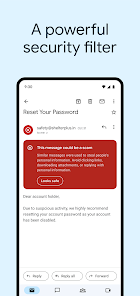
- 🌟 Spam filtering: Google's machine learning catches 99% of junk mail. Apple Mail's spam filter is weak, often missing phishing attempts that Gmail blocks instantly.
- 🌟 Cross-platform support: Gmail works flawlessly on Android, iOS, and web, while iCloud Mail is tied to Apple devices only. This flexibility makes it the best choice for people using multiple devices.
cons
- ⚠️ Privacy concerns: Google scans email content for ad targeting, which apps like ProtonMail avoid entirely. If you prioritize anonymity, this is a big drawback compared to Tutanota.
- ⚠️ No end-to-end encryption: Unlike ProtonMail's automatic encryption, Gmail only uses TLS in transit, leaving emails readable by Google. Enterprise users often prefer Outlook's Office 365 compliance features.
- ⚠️ Cluttered interface: The tabs and labels can overwhelm new users. Apple Mail keeps things simpler with a single inbox, making it easier for non-tech-savvy folks to manage emails.
- ⚠️ Offline limitations: Gmail's offline mode requires browser settings and isn't as robust as Outlook's offline caching. If you travel often, Outlook handles drafts better without a connection.
Recommended Apps
![]()
BetterMe: Health Coaching
BetterMe Limited4.3
![]()
Walli - HD, 4K Wallpapers
Tap AI4.4![]()
Future Self - Old Age Filter
Vidler Koiter1.6
![]()
AI Photo Editor, Collage-Fotor
AI Art Photo Editor | Everimaging Ltd.4.3![]()
AI Face Swap: MagicFace &Photo
Braly JSC0![]()
QR Code Reader: QR Scanner
WECHOICE MOBILE4.3![]()
Lip Fall Challenge: Fun Filter
Braly JSC0![]()
Funny Reverse Audio - Singing
PlayStudioInc0![]()
Birthday Secrets
shasunder4.4![]()
Live Wallpapers HD 4K
Wallpaper app4.4![]()
Find Your Phone By Clap
Trusted App Global4.5![]()
Wizz - Expand Your World
Wizz3.8![]()
NCAA March Madness Live
NCAA Digital4.7![]()
Hulu: Stream TV shows & movies
Disney4.5![]()
Lethal Love: a Yandere game
AniByte!4.4















Disclaimer
1.Apklifts does not represent any developer, nor is it the developer of any App or game.
2.Apklifts provide custom reviews of Apps written by our own reviewers, and detailed information of these Apps, such as developer contacts, ratings and screenshots.
3. All trademarks, registered trademarks, product names and company names or logos appearing on the site are the property of their respective owners.
4.Apklifts abides by the federal Digital Millennium Copyright Act (DMCA) by responding to notices of alleged infringement that complies with the DMCA and other applicable laws.
5.If you are the owner or copyright representative and want to delete your information, please contact us [email protected].
6.All the information on this website is strictly observed all the terms and conditions of Google Ads Advertising policies and Google Unwanted Software policy.
7.Apklifts.com is an independent, information-only website which is 100% free to all the users.














