
AI ARTA: Art & Photo Generator

1,000,000+
Installs
AIBY Inc.
Developer
-
Art & Design
Category
-
Rated for 3+
Content Rating
-
https://aiby.mobi/ai_art_android/privacy/
Privacy Policy
Screenshots
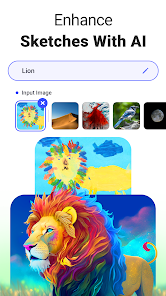
editor reviews
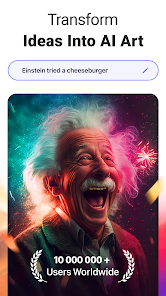
AI ARTA is one of those image generation apps that popped up all over the app stores, riding the wave of AI art tools. It's basically a mobile app that lets you turn text prompts or even your own photos into artwork in various styles, from realistic portraits to anime and oil paintings. You download it from the App Store or Google Play for free, and it's been installed a decent number of times, though I wouldn't call it a top-tier download. I came across it while looking for something quick to mess around with on my phone. The first time I launched the app, I got a bright, colorful interface with a bunch of style options right on the home screen. It felt friendly and not too intimidating, but I could already tell there might be a paywall waiting for the more impressive features.
Once you start actually using it, the experience is a bit of a mixed bag. Onboarding was pretty straightforward: I tapped "Create" and typed in something like "a cat in a spacesuit." The app processed it within maybe ten seconds, which felt decent. You can also upload a photo and apply filters like "Fantasy" or "Cyberpunk," which is cool if you want to turn a selfie into something more dramatic. But I ran into hiccups. Sometimes the prompts didn't generate what I imagined—like it'd give me a blurry mess or something completely off track. You can adjust settings like style strength or aspect ratio, which helps, but it's not super intuitive at first. I also noticed ads pop up after every few generations, which got annoying fast. A tip: if you stick to simple prompts, the results are noticeably better.
After a couple of weeks, I have mixed feelings. It's fine for casual dabbling—like if you want to make a cool profile picture or a funny meme for friends. But it doesn't hold a candle to more polished apps like Midjourney or even Dream by Wombo in terms of quality and control. The free version runs out of credits quick, and in-app purchases feel pricey for what you get. I can see someone with zero experience keeping it installed as a toy, but power users will uninstall it fast. It's also not great for serious projects, since the output resolution is low unless you pay. Compared to others, it's less impressive but easier to pick up.
features
- : The style variety is genuinely broad. You get options like "Anime," "Realistic," "Fantasy," "Sketch," and even "Cyberpunk." It's not just a few filters slapped on top. In comparison, a competitor like Dream by Wombo offers fewer base styles and relies more on community presets. Here, you can switch from a watercolor look to a 3D render without leaving the screen, which feels more flexible for quick experiments.
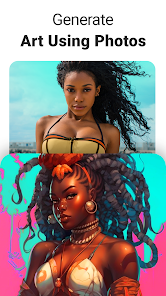
- : The photo-to-art feature is surprisingly decent for a free app. You upload a selfie, choose "Cartoon" or "Oil Painting," and it generates an edited version in seconds. Picsart has something similar, but it often comes out looking like a cheap filter. AI ARTA gives you a bit more control over how much the AI alters the original, so the final image can actually look intentional rather than glitchy.
- : The interface is clean and doesn't bombard you with settings. Unlike Leonardo AI which feels like a desktop app crammed into a phone, AI ARTA keeps things simple. There's no learning curve for someone who just wants to type a sentence and get a picture. But that simplicity also means you lose advanced features like negative prompts or layer editing, which is fine for casual use but limiting for anyone serious about the craft.
pros
- : The quick generation speed is a big plus. Typing a prompt and getting a result in under ten seconds beats most rivals. Dream by Wombo often takes longer, especially during peak hours. For someone just killing time, this speed keeps the app feeling responsive and not like a chore.
- : The app is genuinely beginner-friendly. You don't need to learn technical terms like "sampling steps" or "CFG scale." Just pick a style and go. Midjourney requires a Discord account and a whole new workflow, which is a huge barrier. AI ARTA removes that completely, making it accessible for grandparents or kids who just want to play.
- : The regular updates do add new styles and features. I noticed a "3D Render" option appear after a month that wasn't there before. Not every app does that—Stable Diffusion mobile ports often stagnate after launch. So it shows the developers are paying attention, even if the core engine isn't as powerful as desktop alternatives.
cons
- : The biggest weakness is the aggressive credit system. You start with something like 5 free generations, then hit a paywall. Apps like Dream by Wombo give you unlimited free generations with ads, which is far more user-friendly. Here, you feel forced to subscribe if you want to use it for more than a few minutes.
- : The output resolution is stuck at a low default. Even on the paid tier, images come out around 1024x1024, which isn't great for printing or wallpapers. Midjourney produces much higher resolution results by default. For a "Pro" feature, it's disappointing that you can't export high-quality files without significant loss in detail.
- : The app crashes occasionally, especially when switching styles or loading a new model. I've had it freeze mid-generation a couple of times. Picsart's AI tools, while less impressive, are more stable overall. This makes it feel unpolished compared to more mature apps in the same space.
- : The style consistency is hit or miss. You might generate a "Cyberpunk" city scene that looks solid, but try the same prompt again and get a completely different, often worse result. Competitors like Leonardo AI offer seed control to ensure repeatability. Without that, it's frustrating for any project where you want a specific look more than once.
Recommended Apps
![]()
BetterMe: Health Coaching
BetterMe Limited4.3
![]()
Walli - HD, 4K Wallpapers
Tap AI4.4![]()
Future Self - Old Age Filter
Vidler Koiter1.6
![]()
AI Photo Editor, Collage-Fotor
AI Art Photo Editor | Everimaging Ltd.4.3![]()
AI Face Swap: MagicFace &Photo
Braly JSC0![]()
QR Code Reader: QR Scanner
WECHOICE MOBILE4.3![]()
Lip Fall Challenge: Fun Filter
Braly JSC0![]()
Funny Reverse Audio - Singing
PlayStudioInc0![]()
Birthday Secrets
shasunder4.4![]()
Live Wallpapers HD 4K
Wallpaper app4.4![]()
Find Your Phone By Clap
Trusted App Global4.5![]()
Wizz - Expand Your World
Wizz3.8![]()
NCAA March Madness Live
NCAA Digital4.7![]()
Hulu: Stream TV shows & movies
Disney4.5![]()
Lethal Love: a Yandere game
AniByte!4.4















Disclaimer
1.Apklifts does not represent any developer, nor is it the developer of any App or game.
2.Apklifts provide custom reviews of Apps written by our own reviewers, and detailed information of these Apps, such as developer contacts, ratings and screenshots.
3. All trademarks, registered trademarks, product names and company names or logos appearing on the site are the property of their respective owners.
4.Apklifts abides by the federal Digital Millennium Copyright Act (DMCA) by responding to notices of alleged infringement that complies with the DMCA and other applicable laws.
5.If you are the owner or copyright representative and want to delete your information, please contact us [email protected].
6.All the information on this website is strictly observed all the terms and conditions of Google Ads Advertising policies and Google Unwanted Software policy.
7.Apklifts.com is an independent, information-only website which is 100% free to all the users.














