

Ticketmaster-Buy, Sell Tickets

10M+
Installs
Ticketmaster L.L.C.
Developer
-
Entertainment
Category
-
Rated for 3+
Content Rating
-
https://www.ticketmaster.com/h/privacy.html
Privacy Policy
Screenshots
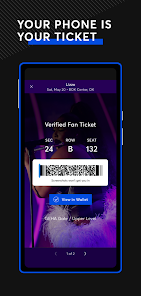
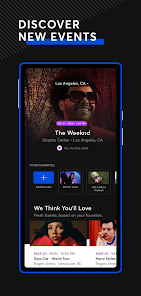
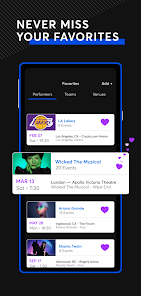

editor reviews
Ticketmaster is the kind of app you begrudgingly install when your favorite band announces a tour and you know the general sale is going to be a bloodbath. It's a massive ticket marketplace and event discovery platform, owned by Live Nation, and it's basically the default destination for major concerts, sports games, theater shows, and festivals in the US and many other countries. You download it from Google Play or the App Store for free, and while there's no mandatory registration to browse events, you'll eventually need to create an account or log in to actually buy or transfer tickets. The moment you launch it, you're hit with a clean, dark-themed interface that shows trending events near you, which is actually pretty slick. But then you remember the horror stories about surge pricing, hidden fees, and the dreaded spinning wheel of death during checkout, and that first impression quickly turns into a mix of excitement and dread.
Actually using the app is a rollercoaster. The interface itself is well-organized, with a handy search bar and filters for location, date, and category. Onboarding is straightforward, and logging in with Google or Apple is a breeze. Once you find an event, you tap through to see a variety of ticket options, including standard, VIP, and resale listings. The map view of the venue is a nice touch, letting you see seat locations before committing. But here's where the fun begins. During a high-demand on-sale, the app can lag, crash, or kick you into a waiting room. You'll see that countdown timer, tap to buy, and then get stuck in a loop of "another fan beat you to these tickets." A practical tip: have your payment info saved in advance and be ready to spam the "continue" button like your life depends on it. Reselling is equally straightforward, though the fees will make you wince.
After using Ticketmaster for a few years, I have a complicated relationship with it. If you're a die-hard concert goer or someone who lives for live sports, you pretty much have to use it because so many venues and artists are locked into contracts with Live Nation. It's the only game in town for many major events, which gives it a monopoly feel. The app itself is functional, but the unpredictable pricing, the "platinum" and "official platinum" sections that feel like price gouging, and the aggressive fee structure make it hard to recommend wholeheartedly. Compared to StubHub, which also offers a robust resale market, Ticketmaster just feels more corporate and less friendly to the end user. I keep it installed out of necessity, but if a smaller, fairer competitor ever managed to break into the big leagues, I'd switch in a heartbeat.
features
- 🎫 Verified Ticket Marketplace: Unlike some third-party resale platforms where you have to wonder if the barcode is real, Ticketmaster is the original issuer. You know that any ticket you buy directly through the app, whether new or resale, is legitimate and will scan at the door, which removes a lot of the anxiety around getting scammed.
- 📲 Seamless Transfer and Resale: The app makes it dead simple to transfer tickets to friends or list your extras for resale directly within the platform. You don't have to mess with PDFs or screenshot barcodes, everything lives in your account. StubHub has a similar feature, but Ticketmaster's integration feels more native since it's handling the original ticket.
- 🗺️ Interactive Seat Map: This is honestly one of the better visual features. Instead of a static list of sections and rows, you get a heatmap-style view of the venue. You can see what's still available at each price point and zoom into the stage, making it much easier to decide if those "obstructed view" seats are actually worth the discount, which is something AXS also does well.
pros
- ⚡ Primary Market Dominance: Ticketmaster's biggest strength is its unrivaled access. For major arena tours, Broadway shows, and NFL games, it holds the exclusive right to sell the first wave of tickets. No competitor like StubHub or Vivid Seats can offer the same face-value inventory on day one, so you're stuck using it if you want the best chance at a good seat for the original price.
- ⚡ Event Discovery Hub: The app pairs ticket sales with a solid event discovery engine. It shows you what's coming to your city, recommends similar artists based on your purchase history, and even integrates with your calendar. This makes it a one-stop shop for planning your weekend, which is something that a resale-only app like SeatGeek doesn't do quite as naturally.
cons
- 💸 Aggressive Fee Structure: This is the number one complaint. The advertised price never includes the service fees, processing fees, and facility charges. A $50 ticket can end up costing $75 by the time you hit "purchase." StubHub and Vivid Seats also have fees, but Ticketmaster's feel particularly egregious because they have a monopoly on the initial sale.
- 💸 Dynamic and Platinum Pricing: Ticketmaster has moved to a model where ticket prices fluctuate in real-time based on demand, similar to airline tickets. "Platinum" seats are essentially premium-priced standard seats that aren't resale, but they cost hundreds more. It feels like a sneaky way to pocket extra cash, and it's hard to tell the difference between a fair price and gouged price until it's too late.
- 💸 Poor Customer Service During High Demand: When a huge event goes on sale, the app frequently crashes, forces you into long waiting rooms, or shows phantom inventory that disappears when you try to check out. Competitors like AXS have more robust systems for handling high-traffic sales, making Ticketmaster's infrastructure feel outdated and unreliable.
Recommended Apps
![]()
BetterMe: Health Coaching
BetterMe Limited4.3
![]()
Walli - HD, 4K Wallpapers
Tap AI4.4![]()
Future Self - Old Age Filter
Vidler Koiter1.6
![]()
AI Photo Editor, Collage-Fotor
AI Art Photo Editor | Everimaging Ltd.4.3![]()
AI Face Swap: MagicFace &Photo
Braly JSC0![]()
QR Code Reader: QR Scanner
WECHOICE MOBILE4.3![]()
Lip Fall Challenge: Fun Filter
Braly JSC0![]()
Funny Reverse Audio - Singing
PlayStudioInc0![]()
Birthday Secrets
shasunder4.4![]()
Live Wallpapers HD 4K
Wallpaper app4.4![]()
Find Your Phone By Clap
Trusted App Global4.5![]()
Wizz - Expand Your World
Wizz3.8![]()
NCAA March Madness Live
NCAA Digital4.7![]()
Hulu: Stream TV shows & movies
Disney4.5![]()
Lethal Love: a Yandere game
AniByte!4.4















Disclaimer
1.Apklifts does not represent any developer, nor is it the developer of any App or game.
2.Apklifts provide custom reviews of Apps written by our own reviewers, and detailed information of these Apps, such as developer contacts, ratings and screenshots.
3. All trademarks, registered trademarks, product names and company names or logos appearing on the site are the property of their respective owners.
4.Apklifts abides by the federal Digital Millennium Copyright Act (DMCA) by responding to notices of alleged infringement that complies with the DMCA and other applicable laws.
5.If you are the owner or copyright representative and want to delete your information, please contact us [email protected].
6.All the information on this website is strictly observed all the terms and conditions of Google Ads Advertising policies and Google Unwanted Software policy.
7.Apklifts.com is an independent, information-only website which is 100% free to all the users.














