

Reface: Face Swap & AI Videos

100M+
Installs
NEOCORTEXT, INC.
Developer
-
Entertainment
Category
-
Rated for 16+
Content Rating
-
https://hey.reface.ai/privacy/
Privacy Policy
Screenshots


editor reviews
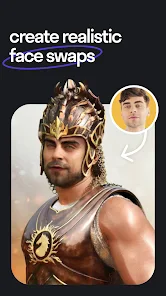
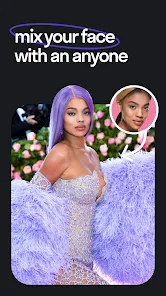
Reface is a face-swapping and AI video generation app that's been pretty popular on both Google Play and the App Store. You basically take a selfie or upload a photo, and the app maps your face onto existing video clips, GIFs, or images, letting you see yourself in famous movie scenes, funny memes, or even as a historical figure. It's free to download and use for a few swaps per day, but there are in-app purchases for unlimited access and premium features. After launching it, the first thing you notice is how polished the UI looks — it's colorful, with big buttons and previews that immediately make you want to try something. The onboarding doesn't force you to read a manual; you just pick a popular clip, snap a selfie, and within a few seconds you're watching yourself act out a scene. It's this instant payoff that hooks most people, and the app's overall aesthetic feels modern and playful.
When you actually start using it, the experience is pretty smooth. The app guides you through taking a photo or picking one from your gallery, then it processes the swap almost instantly. The main screen shows a feed of trending templates — like viral video snippets or popular movie quotes — and you just tap on one to get started. After the swap, you can share it directly to social media or save it to your camera roll. One thing I noticed is that the face mapping works best with front-facing, well-lit photos; darker images or side angles sometimes produce wonky results. The app also includes an AI video generator that turns a still image into a short animated clip, but that feature requires more patience and feels a bit more experimental. Overall, moving through the app is intuitive, though ads pop up after a few free swaps, which can interrupt the flow.
After using it for a while, I'd say Reface is best for casual fun — people who enjoy making quick, shareable content for laughs. It's not something you'd use for serious video editing or professional content. Compared to apps like FaceApp or Snapchat's face filters, Reface focuses more on swapping faces onto pre-existing videos rather than adding effects to your own. That makes it more niche — great for specific meme-worthy moments, but limited if you want to create original videos from scratch. Some users might keep it installed just to show friends at parties, but others might uninstall after the novelty wears off because of the daily swap limit and the paywall for unlimited access. It's a well-made app for what it does, but it's definitely a toy, not a tool.
features
- 🎥 Face swap onto any video — You pick a clip from the massive library, snap a photo, and the app maps your face onto the character in real time. It feels like magic the first time you see yourself in a movie scene, and it's way more polished than older alternatives like Zao, which often looked glitchy.
- 🖼️ AI-generated avatars from a single photo — Unlike Snapchat or Instagram filters that need a live camera feed, Reface can turn a static selfie into a short animated video where your face moves, talks, or sings. It's not perfect — sometimes the mouth movements feel off — but it's still ahead of what most free apps offer.
- 📲 Instant social sharing — After creating a clip, you can save it without watermarks or share it directly to TikTok, Instagram, or WhatsApp. This built-in sharing flow makes it easier than FaceApp, where you often have to save and upload manually.
pros
- 🛠️ Ease of use — The whole process takes under 10 seconds. No complex settings or file importing. In contrast, apps like Doublicat require you to upload your face multiple times for different templates.
- 🎬 Huge template library — Reface updates its collection weekly with viral videos and memes. Competitors like Reface's own older versions had fewer choices and slower updates.
- ⚡ Fast rendering — Most swaps process in 2-3 seconds even on mid-range phones, while older apps like Zao often froze or crashed on the same hardware.
cons
- 🔒 Strict daily limit — Free users get only 3-5 swaps per day. Snapchat or Instagram offer unlimited face filters for free, making Reface feel stingy if you're just experimenting.
- 💸 Expensive subscription — Unlimited access costs around $5-10 per month, which is steep for a novelty app. FaceApp's premium one-time purchase feels more reasonable.
- 😐 Inconsistent face tracking — The app struggles with side profiles, glasses, or hats. Even TikTok's basic face filters handle these better without paying.
- 📺 Ads after every swap — You can't avoid them on the free tier. The app forces a 15-30 second ad after each creation, which breaks the fun flow compared to ad-free paid alternatives like Reface's own premium plan.
Recommended Apps
![]()
BetterMe: Health Coaching
BetterMe Limited4.3
![]()
Walli - HD, 4K Wallpapers
Tap AI4.4![]()
Future Self - Old Age Filter
Vidler Koiter1.6
![]()
AI Photo Editor, Collage-Fotor
AI Art Photo Editor | Everimaging Ltd.4.3![]()
AI Face Swap: MagicFace &Photo
Braly JSC0![]()
QR Code Reader: QR Scanner
WECHOICE MOBILE4.3![]()
Lip Fall Challenge: Fun Filter
Braly JSC0![]()
Funny Reverse Audio - Singing
PlayStudioInc0![]()
Birthday Secrets
shasunder4.4![]()
Live Wallpapers HD 4K
Wallpaper app4.4![]()
Find Your Phone By Clap
Trusted App Global4.5![]()
Wizz - Expand Your World
Wizz3.8![]()
NCAA March Madness Live
NCAA Digital4.7![]()
Hulu: Stream TV shows & movies
Disney4.5![]()
Lethal Love: a Yandere game
AniByte!4.4















Disclaimer
1.Apklifts does not represent any developer, nor is it the developer of any App or game.
2.Apklifts provide custom reviews of Apps written by our own reviewers, and detailed information of these Apps, such as developer contacts, ratings and screenshots.
3. All trademarks, registered trademarks, product names and company names or logos appearing on the site are the property of their respective owners.
4.Apklifts abides by the federal Digital Millennium Copyright Act (DMCA) by responding to notices of alleged infringement that complies with the DMCA and other applicable laws.
5.If you are the owner or copyright representative and want to delete your information, please contact us [email protected].
6.All the information on this website is strictly observed all the terms and conditions of Google Ads Advertising policies and Google Unwanted Software policy.
7.Apklifts.com is an independent, information-only website which is 100% free to all the users.














