

Fulldive VR - Virtual Reality

10M+
Installs
Browser by Fulldive Co.
Developer
-
Entertainment
Category
-
Rated for 3+
Content Rating
-
https://fulldive.com/privacy-policy.html
Privacy Policy
Screenshots
editor reviews
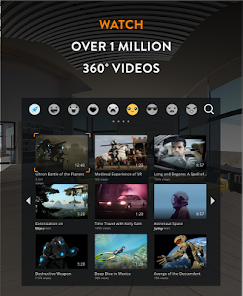
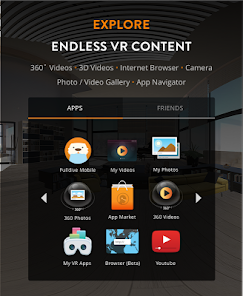
Fulldive VR is a virtual reality browser and content platform that tries to turn your phone into a passable VR headset without needing a dedicated device like a Quest or Vive. You can wander around 360-degree videos, check out 3D photos, and even browse regular websites in a floating window environment. The whole thing is pretty lightweight, which makes sense since most people aren't going to bother with complicated setups. I downloaded it because I was curious whether a free app could actually make VR feel accessible on a phone I already owned. After launching it, the first thing I noticed was the clean layout with clear categories for videos, photos, and apps. No sign-up required initially, which is a relief. It does show ads, but they weren't overwhelming during my first few minutes.
Once I actually put my phone into a cheap cardboard viewer and started navigating, the experience was mixed. The interface relies heavily on gaze control you look at a button for a second to press it, which works but feels sluggish when you're trying to browse quickly. The onboarding is minimal: a quick tutorial pops up showing how to look around and select items, but it's over in about ten seconds. For daily use, I found myself mostly scrolling through 360-degree travel videos from the built-in library. The video player is decent, with clear playback controls, but buffering was noticeable on slower connections. One small tip: if you're browsing regular websites, you can pinch to zoom in VR mode, which helps when text is too small. The app also supports side-by-side VR videos from local storage, which is handy if you have your own content. However, the overall smoothness depends heavily on your phone's processor older models stutter noticeably during complex 3D scenes.
After spending a few days with Fulldive VR, I think it works best for casual users who want to dip their toes into VR without spending any money or buying extra hardware. If you already own a cardboard or similar viewer, this app is a no-brainer for checking out random 360 content. That said, anyone who's used a dedicated headset like the Oculus Quest will immediately notice the difference in tracking accuracy and immersion. The app feels more like a tech demo than a full VR experience. What sets it apart from something like Google Cardboard is that Fulldive actually curates content and offers a social feed of public VR photos and videos, which keeps things interesting. I'll probably keep it installed for when friends want to try VR for the first time, but I doubt I'll use it regularly on my own. The ads and occasional lag just break the magic too often for heavy use.
features
- 🌐 Built-in VR Browser – Unlike many VR apps that lock you into specific video feeds, Fulldive includes a web browser that works in VR mode. You can load any site, though text-heavy pages are a pain to read. In comparison, Google Cardboard's browser, while functional, has a much smaller content library and fewer filters for finding 360-degree media.
- 🎥 Curated 360 Video Library – The app comes with a decent selection of travel, nature, and music videos from partners like Vimeo. You can also upload your own 360 photos and videos, creating a personal gallery. This is a standout feature, because free VR browsers like VR Player or Mobile VR Station focus more on file playback than on offering a ready-made content hub.
- 📱 Lightweight Setup – No account creation is required to browse content, and you can start watching things immediately. The gaze-based navigation is intuitive, even if it's slow. This lowers the barrier to entry compared to apps like Within or Jaunt VR, which often push sign-up walls or require specific content purchases.
- 📂 Local File Support – Fulldive plays side-by-side VR videos and 3D photos stored on your device. This is a big plus for power users who have their own 360 camera footage or downloaded VR movies. Alternatives like CineVR offer similar playback but lack the browsing and social features.
pros
- ✅ Completely free with no hidden costs – Unlike Cardboard Camera or VRSE, which sometimes gate premium content behind paywalls, Fulldive gives you the full browser and video library for free. Ads are present, but they're small banners that don't ruin the experience.
- ✅ Active content updates – The app adds new curated videos and photos regularly. This keeps the feed fresh, unlike Google's own VR services, which have stagnated in recent years. You won't run out of things to look at quickly.
- ✅ Cross-platform availability – It works on both Android and iOS, which is rare for VR browsers. Cardboard apps on iOS are notoriously limited, so Fulldive fills a real gap for iPhone users who want a decent VR browsing experience.
cons
- ❌ Gaze control feels laggy – The input delay makes browsing websites a chore. Apps like Oculus Browser on Quest have far snappier pointer-based navigation, while Fulldive relies on a one-second stare that gets tiresome fast.
- ❌ Video quality degrades quickly – Unless you have top-tier Wi-Fi, streams buffer constantly even at 720p. Jaunt VR and Within handle adaptive bitrate better, so you rarely see a frozen screen during playback.
- ❌ No controller support – You're stuck with head movement alone. For apps like AltspaceVR or Bigscreen, having a bluetooth controller makes a huge difference, but Fulldive ignores that input method entirely, limiting immersion for advanced users.
Recommended Apps
![]()
BetterMe: Health Coaching
BetterMe Limited4.3
![]()
Walli - HD, 4K Wallpapers
Tap AI4.4![]()
Future Self - Old Age Filter
Vidler Koiter1.6
![]()
AI Photo Editor, Collage-Fotor
AI Art Photo Editor | Everimaging Ltd.4.3![]()
AI Face Swap: MagicFace &Photo
Braly JSC0![]()
QR Code Reader: QR Scanner
WECHOICE MOBILE4.3![]()
Lip Fall Challenge: Fun Filter
Braly JSC0![]()
Funny Reverse Audio - Singing
PlayStudioInc0![]()
Birthday Secrets
shasunder4.4![]()
Live Wallpapers HD 4K
Wallpaper app4.4![]()
Find Your Phone By Clap
Trusted App Global4.5![]()
Wizz - Expand Your World
Wizz3.8![]()
NCAA March Madness Live
NCAA Digital4.7![]()
Hulu: Stream TV shows & movies
Disney4.5![]()
Lethal Love: a Yandere game
AniByte!4.4















Disclaimer
1.Apklifts does not represent any developer, nor is it the developer of any App or game.
2.Apklifts provide custom reviews of Apps written by our own reviewers, and detailed information of these Apps, such as developer contacts, ratings and screenshots.
3. All trademarks, registered trademarks, product names and company names or logos appearing on the site are the property of their respective owners.
4.Apklifts abides by the federal Digital Millennium Copyright Act (DMCA) by responding to notices of alleged infringement that complies with the DMCA and other applicable laws.
5.If you are the owner or copyright representative and want to delete your information, please contact us [email protected].
6.All the information on this website is strictly observed all the terms and conditions of Google Ads Advertising policies and Google Unwanted Software policy.
7.Apklifts.com is an independent, information-only website which is 100% free to all the users.














