

LeafSnap Plant Identification

1M+
Installs
Appixi
Developer
-
Lifestyle
Category
-
Rated for 3+
Content Rating
-
https://sites.google.com/view/plant-identification-privacy
Privacy Policy
Screenshots
editor reviews
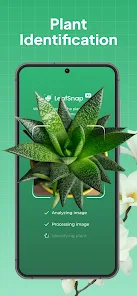
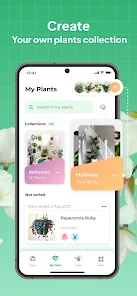
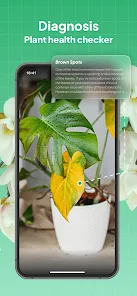
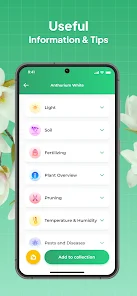
LeafSnap Plant Identification is exactly what it sounds like -- a mobile app that helps you figure out what plant you're looking at by snapping a photo. It falls under the nature and education category, and it's meant for gardeners, hikers, or just anyone curious about the greenery around them. You can download it from Google Play or the App Store, and the install count is actually pretty high for this kind of tool, which tells you it's got a decent following. The app is free to download and install, though you'll quickly notice it pushes a subscription model if you want to unlock everything. After launching it for the first time, the first impression is pretty straightforward: a clean camera interface greets you, and you're basically told to just point and shoot. There's no tedious sign-up hoops or registration unless you want to save your history. That immediacy makes you feel like you can jump right into identifying whatever weed or flower is in your backyard, which is nice for a quick test run.
Using LeafSnap in practice is mostly smooth, but it has its moments. The interface is simple: you open it, tap the big camera button, and frame your plant. The app then processes the image against its database and spits out a likely match with a percentage score. What's nice is that it doesn't just give you a name -- it also shows you a photo gallery of the same species for comparison, which is actually really helpful when you're second-guessing the result. The onboarding walkthrough is quick, almost too quick, so you might miss some features like the leaf shape or flower color filters at first. One small practical tip: take the photo in good daylight and focus on a single leaf or flower, not the whole bush, because the app struggles with crowded backgrounds. There were a few times when it mistook a common weed for a rare ornamental plant, which made me laugh, but most of the time it landed on something sensible.
After using LeafSnap for a while, I'd say it's a solid pick for casual plant lovers but maybe not for serious botanists. If you're someone who just wants to know if that mysterious shrub in your garden is poisonous or not, this app is perfect. But if you're looking for deeply detailed botanical keys or rare species identification, you might find it limited compared to something like PlantNet or iNaturalist, which have more community-driven accuracy. What sets LeafSnap apart is its speed and dead-simple interface -- you don't need to fiddle with taxonomy filters. Still, the subscription nagging gets old, and I could see someone uninstalling it after a few weeks because the free version feels too restricted. Personally, I kept it installed because it's faster than pulling out a field guide, but I wouldn't pay for the premium version.
features
- 🧐 The app's identification engine is notably quick. While similar apps like PlantNet require good lighting and perfect angles, LeafSnap processes your photo in seconds and gives you a shortlist. I've tested it on random street plants, and it rarely left me waiting more than five seconds, which is killer when you're just passing by something interesting.
- 🖼️ The comparison gallery feature stands out. After identifying a plant, LeafSnap shows you dozens of user-submitted photos of the same species so you can confirm the match visually. This is something PictureThis doesn't do as well, since it tends to just show one stock image. It makes a real difference when you're trying to be sure about a look-alike species.
- ⚙️ The leaf and flower filters are hidden but powerful. You can narrow down results by picking a specific leaf shape or flower color before snapping, which drastically improves accuracy for tricky plants. iNaturalist lets you do something similar, but LeafSnap's interface for it is way more intuitive for beginners.
pros
- 💪 The app is incredibly lightweight. It doesn't hog your battery or storage like some other plant ID apps, and it's also offline-friendly for basic lookups. PlantNet has a bigger database, but it can lag on older phones.
- 💪 The clean, ad-free feel in the free version is a huge plus. Most plant apps plaster you with ads or pop-ups for their premium plans right off the bat. LeafSnap keeps it minimal, which makes the free experience feel less punishing.
- 💪 The tutorial is optional. You can skip the whole walkthrough and just start taking photos. That's rare among apps in this niche, where many force you through a registration or a multi-step intro like PictureThis does.
cons
- 💥 The subscription model is aggressive. After a few free identifications, the app constantly reminds you to upgrade. This is a common complaint compared to PlantNet, which is completely free and open-source. It makes you feel like the app is holding back its full potential unless you pay.
- 💥 The database can be spotty for non-common plants. I tried identifying a wild fern and got three different results, none of which looked quite right. iNaturalist handles these edge cases much better because it relies on community feedback.
- 💥 No offline mode for identification. You need an internet connection to use the camera feature. That's a letdown when you're hiking in a remote area. Seek by iNaturalist at least lets you download some offline content.
- 💥 The app sometimes overcorrects with multiple guesses. Instead of showing one confident match, it lists ten possibilities with low confidence scores. That can get confusing, whereas PlantNet usually sticks to more certain results.
Recommended Apps
![]()
BetterMe: Health Coaching
BetterMe Limited4.3
![]()
Walli - HD, 4K Wallpapers
Tap AI4.4![]()
Future Self - Old Age Filter
Vidler Koiter1.6
![]()
AI Photo Editor, Collage-Fotor
AI Art Photo Editor | Everimaging Ltd.4.3![]()
AI Face Swap: MagicFace &Photo
Braly JSC0![]()
QR Code Reader: QR Scanner
WECHOICE MOBILE4.3![]()
Lip Fall Challenge: Fun Filter
Braly JSC0![]()
Funny Reverse Audio - Singing
PlayStudioInc0![]()
Birthday Secrets
shasunder4.4![]()
Live Wallpapers HD 4K
Wallpaper app4.4![]()
Find Your Phone By Clap
Trusted App Global4.5![]()
Wizz - Expand Your World
Wizz3.8![]()
NCAA March Madness Live
NCAA Digital4.7![]()
Hulu: Stream TV shows & movies
Disney4.5![]()
Lethal Love: a Yandere game
AniByte!4.4















Disclaimer
1.Apklifts does not represent any developer, nor is it the developer of any App or game.
2.Apklifts provide custom reviews of Apps written by our own reviewers, and detailed information of these Apps, such as developer contacts, ratings and screenshots.
3. All trademarks, registered trademarks, product names and company names or logos appearing on the site are the property of their respective owners.
4.Apklifts abides by the federal Digital Millennium Copyright Act (DMCA) by responding to notices of alleged infringement that complies with the DMCA and other applicable laws.
5.If you are the owner or copyright representative and want to delete your information, please contact us [email protected].
6.All the information on this website is strictly observed all the terms and conditions of Google Ads Advertising policies and Google Unwanted Software policy.
7.Apklifts.com is an independent, information-only website which is 100% free to all the users.














