
ThemeKit - Themes & Widgets

10M+
Installs
ThemeKit
Developer
-
Productivity
Category
-
Rated for 3+
Content Rating
-
https://doc.themekit.live/Privacy-Policy.html
Privacy Policy
Screenshots

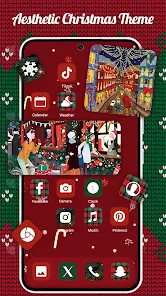

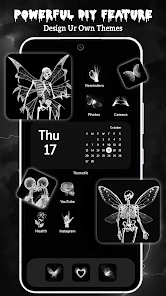
editor reviews
ThemeKit is one of those customization apps you stumble upon when you're bored with how your phone looks. It's basically a one-stop shop for Android theming tools, letting you change up icons, wallpapers, fonts, and even add widget packs. I downloaded it from Google Play because I wanted something fresh without rooting my device, and the install count seemed decent enough to give it a shot. After launching it, my first impression was mixed — the interface looks pretty modern with dark mode support, but there's a lot going on. It's free to download, though you'll bump into in-app purchases and occasional ads. Registration isn't mandatory right away, which I appreciated since I just wanted to test it out.
Once I started poking around, the actual hands-on experience felt a bit clunky at first. The onboarding walks you through granting permissions for theme installation, which is standard for this type of app. But navigating the main screen, I found myself scrolling past tons of themes that looked flashy but didn't always preview well. When I picked a widget pack, applying it took a few extra steps — you have to manually install a separate app for widgets to work. That part threw me off. On the bright side, the font changer worked smoothly, and the icon packs applied without crashing. A small tip: check the previews carefully before downloading because some themes don't adapt to all launchers. Daily use feels okay if you're patient, but I wouldn't call it seamless.
After spending a week with ThemeKit, I think it's best for casual users who want quick visual changes without diving into complex launchers like Nova. People who enjoy tinkering might find it limiting compared to apps like X Icon Changer or KWGT, which offer more granular control. What sets ThemeKit apart is the variety — it bundles multiple customization types in one place, so you don't need five different apps. Still, the ad frequency bugs me, and some features feel tacked on. I can see keeping it installed for occasional background swaps, but I'd probably uninstall if I found a cleaner alternative. It's fine, but nothing revolutionary.
features
- 🎨 Integrated customization hub — ThemeKit bundles icon changers, wallpaper managers, font tools, and widget packs into one app. Unlike KLWP, which focuses only on live wallpapers, this one tries to cover everything. You can't go that deep, but it's handy for quick makeovers.
- 📱 Widget variety — The widget collection includes clock, weather, and music styles that look decent on stock Android. Compared to KWGT, which requires manual setup, ThemeKit's widgets are more plug-and-play. Just pick one, adjust size, and drop it on your home screen.
- 🔄 Frequent theme updates — The library refreshes often with seasonal and trending themes. Go themes on the Play Store rarely update, but here you'll find new packs every week. That keeps things from getting stale.
- 💾 Backup and restore — You can save your current setup and switch back if you don't like a new theme. Most similar apps, like Candy Launcher, skip this feature entirely. It's a small thing but saved me from resetting everything once.
pros
- 🎨 All-in-one convenience — You don't need separate apps for icons, fonts, and widgets. That's a big plus over Google's own theme engine, which only touches system accents and not much else. Everything lives under one roof.
- 📱 Smooth integration with stock launchers — Unlike Nova Launcher, which requires manual icon pack selection, ThemeKit applies changes directly to your existing launcher without extra steps. The font tool also worked with One UI, which surprised me.
- 🔄 Free core features — You can use basic themes and widgets without paying. That's better than apps like Moonshine Icon Pack, which charge upfront. Ads are there, but they're not aggressive enough to ruin the experience.
cons
- 🎨 Limited deep customization — You can't edit individual elements like in KWGT or Zooper. If you want to tweak widget colors or resize icons precisely, ThemeKit frustrates. It's more of a pick-and-apply tool.
- 📱 Additional app installations — To use widgets, you must install a separate companion app. That's annoying compared to Action Launcher, which handles everything natively. It also eats up storage space unnecessarily.
- 🔄 Theme quality inconsistency — Some themes look polished, others feel pixelated or misaligned. Icon packs from Nox or PixBit are more consistent. You end up previewing many packs before finding one that fits your screen.
- 💾 Ads in free version — While the core is free, you'll see banner ads and occasional full-screen promos. Apps like Hyperion Launcher offer a cleaner free experience. The ads aren't terrible, but they disrupt browsing.
Recommended Apps
![]()
Japevox - Funny Prank Sound
SecureTool4.3
![]()
AstroMatrix Birth Horoscopes
AstroMatrix4.7
![]()
Personalized Call from Santa (
www.PackageFromSanta.com4.3![]()
Prank Call - Fake Call & Chat
Bravestars Casual4.1![]()
Persona: Beauty Camera
TICKET TO THE MOON, INC.4.5![]()
Peacock TV: Stream TV & Movies
Peacock TV LLC4.5![]()
Instant Buttons Soundboard App
Snow Peak Apps2.1![]()
GPS Speedometer: Speed Tracker
SM Infotech3.2![]()
Subway®
SUBWAY Restaurants4.2![]()
Find Your Phone By Clap
Trusted App Global4.5![]()
Gorilla Skins for Monkey Arena
Dumitru Boico4![]()
Vimeo
Vimeo.com, Inc.3.8![]()
Vinted - Buy and sell clothes
Vinted4.6![]()
Galaxy Starry Keyboard Backgro
Fun Keyboard Theme for Android4.7![]()
Chat AI - Ask AI anything
AI Chat Bot, Ask AI4.4















Disclaimer
1.Apklifts does not represent any developer, nor is it the developer of any App or game.
2.Apklifts provide custom reviews of Apps written by our own reviewers, and detailed information of these Apps, such as developer contacts, ratings and screenshots.
3. All trademarks, registered trademarks, product names and company names or logos appearing on the site are the property of their respective owners.
4.Apklifts abides by the federal Digital Millennium Copyright Act (DMCA) by responding to notices of alleged infringement that complies with the DMCA and other applicable laws.
5.If you are the owner or copyright representative and want to delete your information, please contact us [email protected].
6.All the information on this website is strictly observed all the terms and conditions of Google Ads Advertising policies and Google Unwanted Software policy.
7.Apklifts.com is an independent, information-only website which is 100% free to all the users.













