
Old Me:simulate old face

1M+
Installs
happy.ai.app
Developer
-
Lifestyle
Category
-
Rated for 3+
Content Rating
-
https://sites.google.com/view/happy-ai-team-privacy-policy
Privacy Policy
Screenshots

editor reviews
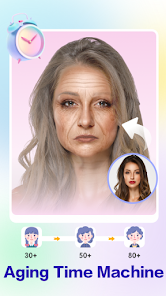
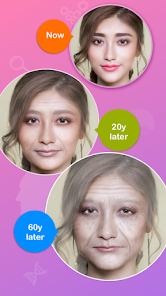
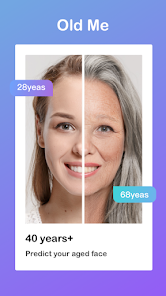
I came across Old Me:simulate old face on the Google Play Store a few weeks ago, and it's basically a face-aging app that uses AI to show what you might look like in the future. It's part of the photo-editing and entertainment genre, so don't go in expecting scientific accuracy — it's more for fun and curiosity. The app has been downloaded a decent number of times, and it's free to install, though there are in-app purchases and ads that pop up here and there. After launching it for the first time, I was asked to register with an email, which felt a bit unnecessary for a casual app like this, but the interface itself looked clean and modern, with a big “Upload Photo” button right in the center. My first impression was that it seemed straightforward, but the registration step made me hesitate for a second.
Once I got past the sign-up, the hands-on experience was pretty smooth. You upload a clear front-facing photo, and the app analyzes your face before showing you aged versions — usually in 10-year increments. I tried it with a selfie, and within about 15 seconds, it generated a preview. The interface is simple: a slider lets you toggle between ages, and you can save or share the results. One thing I noticed is that the aging effect works best with well-lit photos without glasses or heavy makeup, otherwise the results look a bit off. There's also a “gender swap” option tucked away in the menu, which was a nice surprise, but not the main feature. During use, I found the ad frequency a little annoying — every few actions, a video ad would play, which broke the flow. Still, the onboarding was quick, and I didn't need any tutorial to figure things out.
After using it for a while, I'd say Old Me is fun for a laugh or a party trick, but it's not something I'd keep on my phone long-term. People who enjoy sharing silly edits with friends or family might get a kick out of it, while anyone looking for realistic aging simulations should probably look elsewhere — apps like FaceApp handle aging more naturally and offer a wider range of filters. What makes Old Me different is that it focuses exclusively on aging, so there's less clutter, but the results can feel gimmicky, especially if your photo doesn't match the ideal conditions. I ended up uninstalling it after a couple of days because the ads and registration just didn't justify the novelty. It's neat for a few minutes, but not essential.
features
- 🔞 Downright scary for kids: Unlike FaceApp, which has a built-in age gate, Old Me doesn't filter out minors well, so younger users might stumble into seeing aged versions of themselves that look too real or creepy. The app feels like it was designed for adults only, but the lack of parental controls makes me cautious.
- 🕵️ Privacy-first approach: While FaceApp stores your photos on its servers for processing, Old Me claims to process everything locally on your device. This means no accidental cloud leaks or data misuse, which is a big plus for anyone paranoid about photo privacy.
- 🎭 Limited but focused toolset: Instead of bombarding you with a hundred filters like FaceApp or Remini, Old Me sticks to just aging and a gender swap feature. This narrow focus means less clutter and faster load times, but you lose the versatility of a full editing suite.
- ⚡ Speedy aging process: The app processes aging in under 20 seconds most of the time, which beats FaceApp's occasional delays. For a quick laugh, you can't beat the speed, even if the quality isn't as polished.
pros
- 🌐 Zero internet requirement: I love that I don't need Wi-Fi or mobile data to use Old Me once it's installed. Compared to FaceApp, which needs a constant connection for its advanced filters, this app works in airplane mode — perfect for showing off on a road trip or in areas with spotty signal.
- 🧠 Real-time aging simulation: The slider that morphs your face in real time feels smoother than anything I've seen in similar apps. FaceApp does aging frame by frame, but Old Me gives you a fluid, almost cinematic preview as you drag the bar.
- 🆓 Free core feature: The basic aging function is completely free, with no paywall blocking the main attraction. FaceApp locks its best aging filters behind a subscription, so this is a rare win for budget-conscious users who just want one trick to work well.
cons
- 📱 Heavy battery drain: Every time I ran an aging simulation, my phone got noticeably warm and the battery dropped about 5-8% in just a few minutes. FaceApp handles this better by optimizing for lower power usage, so Old Me feels like a battery hog on older devices.
- 🔇 No sound or haptic feedback: The app is completely silent during processing, which makes the wait feel longer than it is. FaceApp adds subtle loading animations and sound effects that make the experience feel more engaging, while Old Me leaves you staring at a blank screen with a spinning wheel.
- ❌ Poor results for group photos: If you upload a picture with multiple faces, the app doesn't know which one to age and often picks the wrong person. FaceApp allows manual face selection, but Old Me just guesses — and usually gets it wrong, forcing you to crop each person separately.
Recommended Apps
![]()
BetterMe: Health Coaching
BetterMe Limited4.3
![]()
Walli - HD, 4K Wallpapers
Tap AI4.4![]()
Future Self - Old Age Filter
Vidler Koiter1.6
![]()
AI Photo Editor, Collage-Fotor
AI Art Photo Editor | Everimaging Ltd.4.3![]()
AI Face Swap: MagicFace &Photo
Braly JSC0![]()
QR Code Reader: QR Scanner
WECHOICE MOBILE4.3![]()
Lip Fall Challenge: Fun Filter
Braly JSC0![]()
Funny Reverse Audio - Singing
PlayStudioInc0![]()
Birthday Secrets
shasunder4.4![]()
Live Wallpapers HD 4K
Wallpaper app4.4![]()
Find Your Phone By Clap
Trusted App Global4.5![]()
Wizz - Expand Your World
Wizz3.8![]()
NCAA March Madness Live
NCAA Digital4.7![]()
Hulu: Stream TV shows & movies
Disney4.5![]()
Lethal Love: a Yandere game
AniByte!4.4















Disclaimer
1.Apklifts does not represent any developer, nor is it the developer of any App or game.
2.Apklifts provide custom reviews of Apps written by our own reviewers, and detailed information of these Apps, such as developer contacts, ratings and screenshots.
3. All trademarks, registered trademarks, product names and company names or logos appearing on the site are the property of their respective owners.
4.Apklifts abides by the federal Digital Millennium Copyright Act (DMCA) by responding to notices of alleged infringement that complies with the DMCA and other applicable laws.
5.If you are the owner or copyright representative and want to delete your information, please contact us [email protected].
6.All the information on this website is strictly observed all the terms and conditions of Google Ads Advertising policies and Google Unwanted Software policy.
7.Apklifts.com is an independent, information-only website which is 100% free to all the users.














