
Photoleap: AI Photo Generator

10M+
Installs
Lightricks Ltd.
Developer
-
Generative AI
Category
-
Everyone
Content Rating
-
Photoleap.Android.support@lightricks.com
Developer Email
-
https://static.lightricks.com/legal/privacy-policy.html
Privacy Policy
Screenshots

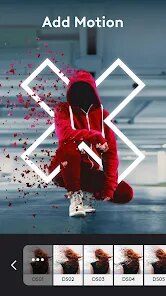
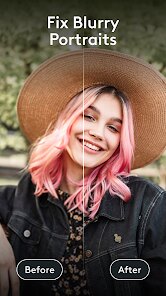
editor reviews
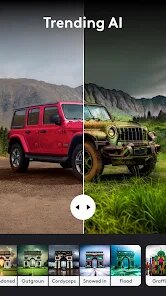
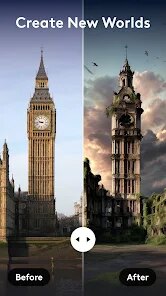
Photoleap is one of those AI photo editing apps that feels like it belongs to a new generation of creative tools. Instead of just offering filters and basic adjustments, it lets you generate images from text prompts, remove backgrounds, and blend photos in ways that would have required hours in Photoshop just a few years ago. I stumbled across it on the App Store while looking for something to quickly edit some vacation shots, and the install count was high enough that I figured it was worth a try. The first thing I noticed after launching the app was how polished everything looked, bright colors, smooth animations, and a clear free-to-start loading screen that didn't push a subscription in my face right away. You can download it for free, but some tools are locked behind a paywall, and there are occasional ads unless you upgrade.
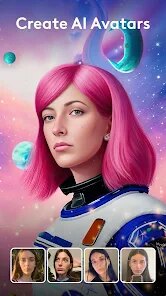
Once I actually started using Photoleap, I was surprised by how easy it was to jump in. The onboarding shows you a few example edits, and then you're free to pick an image from your camera roll or start from a blank canvas. I tried the AI Image generation first, typing in something like "a cat wearing sunglasses on a beach," and within seconds it spat out a handful of options that looked surprisingly decent. The interface is pretty straightforward, with the main actions like Remove, Cutout, and Edit sitting right at the bottom. I did run into a moment of confusion when I tried to use the erase tool, it worked, but the selection wasn't as precise as I hoped, and I had to zoom in and paint over small areas manually. One tip I picked up: if you want the AI to actually match your prompt, keep it simple with just a few keywords instead of long sentences. The app handles stuff like color grading and text overlays smoothly, and I found myself messing around with the Blend feature, stacking two images together, which gave some pretty cool results.
After spending a few days with Photoleap, I can see why people like it, but I also notice where it falls short. If you're someone who enjoys playing around with AI art or needs quick edits for social media without learning complex software, this app will probably stay on your phone. But if you're a professional photographer or someone who demands pixel-level control, you might find the app limiting, especially since the high-end features like full-resolution exports and unlimited generations require a subscription. Compared to something like Picsart or Snapseed, Photoleap leans way heavier into generative AI, which is both its strength and its weakness. The AI is impressive, but sometimes it misses the mark and gives you weird artifacts or distorted faces. That said, I kept it installed because it's fun to experiment with, and the text-to-image feature is genuinely a blast to use when you're bored. I just wish the free version didn't feel like a teaser, because you hit that paywall pretty fast.
features
- 🎨 The standout feature here is definitely the AI Image generation, which works similarly to Midjourney or DALL-E but inside a mobile app. You type a prompt, pick a style like Cinematic or Anime, and the app generates multiple variations in seconds. It's not as detailed as what you'd get from a desktop tool, but for quick creative bursts, it's surprisingly solid.
- 🖼️ The Cutout and Background Removal tools are super handy for someone like me who doesn't want to mess with layer masks. You tap once, and the app isolates your subject. Compared to apps like Remove.bg, it does a decent job on clean backgrounds, but tricky edges like hair can get messy.
- ✨ The Blend mode lets you overlay two photos with adjustable opacity and blending effects, which is something I haven't seen done this smoothly in other mobile editors. It reminds me of what you'd do in Photoshop's layer blending, but way easier to pull off with just a few swipes.
pros
- 🌟 One big strength is how fast the app loads and processes edits. I've used Picsart and Snapseed, and they sometimes lag when applying heavy filters, but Photoleap handles AI generation and cutting tasks without much waiting, even on an older phone.
- 🌟 The interface is genuinely beginner-friendly. Unlike Adobe Photoshop Express, which can feel cluttered with dozens of tools, Photoleap keeps everything clean and guides you naturally. I never felt lost, even when trying the more advanced features.
- 🌟 The creative potential with AI-driven edits is way higher than standard editors. You can turn a boring photo into something surreal or artistic in seconds, something apps like VSCO or Lightroom can't really do without lots of manual work.
cons
- ⚠️ The biggest weakness is the aggressive subscription model. The free version gives you a taste, but many core features like HD export and unlimited generations are locked behind a $7.99 weekly payment. Apps like Snapseed are completely free and offer solid basic editing without any paywall.
- ⚠️ The AI can be inconsistent, especially with human faces or complex scenes. I've had it generate hands with weird finger counts or backgrounds that blur into nonsense. Midjourney or even free web tools like Bing Image Creator often give more reliable results.
- ⚠️ The app relies heavily on an internet connection for the AI features, so if you're offline or have a slow connection, you're stuck with basic editing tools. Other apps like Picsart let you access most filters and effects without needing constant online access.
Recommended Apps
![]()
Daily Horoscope
KADO Apps4.4
![]()
FOX Sports: Watch Live Games
Fox Digital Services, LLC3.7
![]()
Fake Call from Santa Claus
ThunderClap4.2![]()
Google Maps
Google LLC4.2![]()
PhotoLayers-Superimpose,Eraser
handyCloset Inc.4.6![]()
Healthy Benefits+
Solutran, Inc.4.5![]()
SuperMe - Avatar Maker Creator
THE.DEMON3.7![]()
Air Horn
Tenoku4.8![]()
Football Wallpaper HD 4K
Orange Infotech Studio4.6![]()
Artplay - AI Photo & Video
Hideaway Technology Limited4.5![]()
Horoscopes – Daily Zodiac Horo
Mail.Ru Group4.1![]()
Passport Parking
Passport Labs, Inc.2.5![]()
ParkMobile: Park. Pay. Go.
Parkmobile, LLC4.3![]()
FestAI: Ghost Detector App
Now Tech3.2![]()
Photo Tool
COLIFER LAB4





























