
Fake Police Prank Call & Chat

1M+
Installs
Pear Soft
Developer
-
Entertainment
Category
-
Rated for 3+
Content Rating
-
http://pearsoft.app/privacy-policy/
Privacy Policy
Screenshots
editor reviews
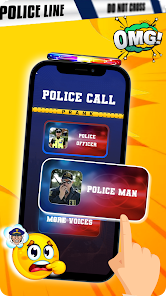
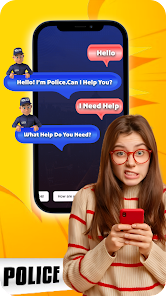
So, I stumbled upon this app called Fake Police Prank Call & Chat by Pear Soft, which is basically one of those simulation apps designed purely for goofing around with friends. You download it from the Google Play Store, and it's free to install — no registration needed, just a quick tap and you're in. The whole idea is pretty straightforward: it lets you simulate a fake police call or chat, complete with ringtones and pre-recorded messages, so you can prank someone into thinking they're actually getting a call from the authorities. The first time I opened it, the interface felt a bit rough around the edges, like a project thrown together over a weekend. The splash screen loads, and you're hit with some dated graphics and a few buttons. It's not exactly polished, but for a prank app that's been downloaded a decent number of times, it gets the job done without asking for money upfront. There are ads, though, which pop up pretty often, so that's something to keep in mind.
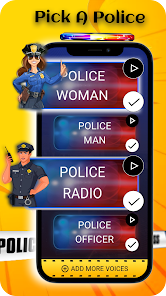
When I actually started using it, the experience was a mixed bag. You pick a scenario, like a fake incoming call from a police station, and the app plays a ringtone or a pre-set audio clip. The sounds are decent enough — they mimic that official tone — but the voices are robotic and clearly fake, so it only works if your friend's not paying close attention. The chat feature is even simpler: you type something, and it shows up in a fake conversation window. Onboarding is nonexistent; you literally tap around until you figure it out. For a normal user, you'd probably just launch it, select a prank, hand the phone to a buddy, and wait for their reaction. There's no smooth flow here — it's clunky, with occasional lag, and the buttons sometimes feel unresponsive. A practical tip: keep the volume low, because the ringtone blasts out loud by default. Honestly, it's more of a one-trick pony than a daily driver.
After messing with it for a while, I'd say this app is really only for people who love cheesy pranks or want a quick laugh at a party. If you're looking for something more sophisticated, like real-time voice changers or immersive simulations, you'd be better off with apps like Prank Calls or Fake Call Master, which have better audio quality and fewer ads. What makes Fake Police Prank Call & Chat stand out is its sheer simplicity — no accounts, no subscriptions, just a raw prank tool. But that simplicity is also its downfall; the audio is tinny, the graphics are dated, and the ads ruin the flow after every prank. I can see someone keeping it installed if they have a group of friends who fall for obvious tricks, but most people would probably uninstall it after a week because it gets old fast. It's fun for exactly one or two uses, then it's just taking up space.
features
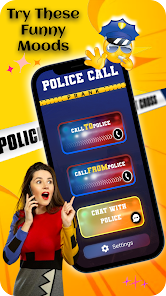
- 🛡️ The simulated police call feature uses pre-recorded ringtones and messages that mimic a call from a station, making it easy to prank someone quickly without any setup. Compared to a similar app like Fake Call Master, which offers customizable contact details, this one keeps it basic — no editing names or numbers, just a single tap and go.
- 🛡️ The fake chat interface is straightforward: you type a message and it appears in a conversation window with a police-style bubble. It's less versatile than Prank Calls, which lets you mimic entire chat histories, but it works for a quick joke without any menus or options to get lost in.
- 🛡️ No need to register or create an account, which is rare for these apps — most competitors like Prankster demand a login or at least an email. Here, you just install it and start pranking, ideal for those who value speed over depth.
- 🛡️ The UI is minimal and clear, with only a few buttons for calls and chats, so even someone who's not tech-savvy can figure it out in seconds. This beats apps like Fake Police Caller, which have cluttered layouts that can confuse users mid-prank.
pros
- 🌟 Its biggest strength is the no-frills approach — you don't need to tweak settings or create profiles, which makes it faster than something like Prank Calls, where you have to set up fake contacts first. Perfect for a spontaneous giggle.
- 🌟 The audio clips, despite being robotic, are loud and clear enough to catch someone off guard, especially in a quiet room. This edges out Fake Call Master, where the volume is often too low to be effective in public spaces.
- 🌟 It runs on older devices without lag, unlike Prankster which can crash on low-end phones. This makes it accessible for people using older Android models who just want a quick prank tool.
- 🌟 The ad frequency, while high, keeps the app free, unlike subscription-based prank apps like Prank Pro, offering a risk-free way to test it out before deciding if it's worth keeping.
cons
- ⚠️ The audio quality is terrible — the voices sound like a text-to-speech bot from 2005, which ruins the illusion if your friend has half a brain. Fake Call Master uses real human recordings, making its pranks way more convincing.
- ⚠️ Ads pop up constantly, often right after you finish a prank, breaking the flow and annoying both you and your target. Prank Calls has a paid version to remove ads, but this app doesn't even offer that option, so you're stuck with them.
- ⚠️ There's zero customization — no way to change the caller ID, the message text, or even the ringtone length. Prankster lets you pick from dozens of scenarios, so this app feels barebones in comparison.
- ⚠️ It's extremely limited in scope: only police-themed pranks, no other options like fake emergency calls or chat with different characters. Apps like Fake Police Caller offer variations like fire or ambulance, giving users more creative choices for their jokes.
Recommended Apps
![]()
BetterMe: Health Coaching
BetterMe Limited4.3
![]()
Walli - HD, 4K Wallpapers
Tap AI4.4![]()
Future Self - Old Age Filter
Vidler Koiter1.6
![]()
AI Photo Editor, Collage-Fotor
AI Art Photo Editor | Everimaging Ltd.4.3![]()
AI Face Swap: MagicFace &Photo
Braly JSC0![]()
QR Code Reader: QR Scanner
WECHOICE MOBILE4.3![]()
Lip Fall Challenge: Fun Filter
Braly JSC0![]()
Funny Reverse Audio - Singing
PlayStudioInc0![]()
Birthday Secrets
shasunder4.4![]()
Live Wallpapers HD 4K
Wallpaper app4.4![]()
Find Your Phone By Clap
Trusted App Global4.5![]()
Wizz - Expand Your World
Wizz3.8![]()
NCAA March Madness Live
NCAA Digital4.7![]()
Hulu: Stream TV shows & movies
Disney4.5![]()
Lethal Love: a Yandere game
AniByte!4.4















Disclaimer
1.Apklifts does not represent any developer, nor is it the developer of any App or game.
2.Apklifts provide custom reviews of Apps written by our own reviewers, and detailed information of these Apps, such as developer contacts, ratings and screenshots.
3. All trademarks, registered trademarks, product names and company names or logos appearing on the site are the property of their respective owners.
4.Apklifts abides by the federal Digital Millennium Copyright Act (DMCA) by responding to notices of alleged infringement that complies with the DMCA and other applicable laws.
5.If you are the owner or copyright representative and want to delete your information, please contact us [email protected].
6.All the information on this website is strictly observed all the terms and conditions of Google Ads Advertising policies and Google Unwanted Software policy.
7.Apklifts.com is an independent, information-only website which is 100% free to all the users.














