
Anime AI - Photo Maker

1M+
Installs
Brilliant Games Private Ltd.
Developer
-
Generative AI
Category
-
Rated for 3+
Content Rating
-
playredandblue@gmail.com
Developer Email
-
https://sites.google.com/view/playredandblue/
Privacy Policy
Screenshots
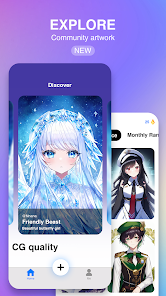
editor reviews
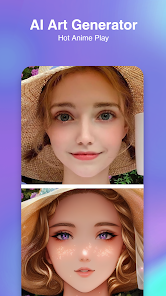
I stumbled upon Anime AI - Photo Maker on the Google Play Store a few weeks ago, and honestly, it felt like a fun way to kill time. It's basically an app that takes your regular photos or selfies and turns them into anime-style illustrations, which is a pretty specific niche but a cool one if you're into Japanese animation or just want to see yourself as a cartoon character. You download it, install it, and it's free to start using, though there are in-app purchases and ads that pop up here and there. My first impression after launching it was mixed—the interface looked bright and inviting, but I immediately noticed a few cluttery buttons asking me to subscribe or watch a video for credits. Still, the core idea hooked me enough to give it a real shot.
Once I got past the initial setup, the actual experience was pretty straightforward. You pick a photo from your gallery, and the app processes it into an anime version using AI. The main screen has a big “Create” button, and after uploading, you can choose between different art styles—like a classic Studio Ghibli look or a more modern, sharp anime style. I tried a selfie first, and the result came out in about 15 seconds, which felt decently fast. The output wasn't perfect—my facial features were a bit exaggerated, like my eyes looked massive and cartoonish—but it was still fun to see. A small tip: for better results, use a well-lit, front-facing photo without glasses or heavy shadows. Navigation between sections is smooth, but the constant ads after every second creation got annoying real quick.
After using it for a few days, I'd say this app is perfect for casual users who want a quick laugh or a profile picture refresh, especially if you're into anime culture. But if you're looking for something more polished or professional-grade, you might be let down. Compared to apps like ToonMe or Picsart, Anime AI feels less refined—the outputs often have weird skin tones or messy hair details. What keeps me from uninstalling it is the sheer novelty of seeing myself as a character from my favorite shows, but the nagging ads and limited free uses (you only get a handful before hitting a paywall) make me hesitant to stick with it long-term.
features
- 🖌️ The standout feature here is the variety of anime art styles you can choose from. While similar apps like ToonMe focus on basic cartoon filters, Anime AI gives you options like “Manga Style” or “Watercolor Anime” that mimic different animation studios. I tried the “Vintage” style, and it actually looked like a frame from an old 80s anime—pretty neat for fans of that era.
- ⚡ The processing speed is surprisingly quick. Compared to Meitu's anime filter, which can take a minute or more, this app churns out a result in under 20 seconds. That speed made it easy to try multiple photos in one sitting without losing patience.
- 🎨 The quality of the AI's understanding of lighting and shadows stands out. When I uploaded a photo with strong sunlight, the app kept the highlights intact, turning my face into a cel-shaded look rather than a flat mess. That's something Anime AI does better than many free alternatives.
pros
- 🏆 The app handles expressions really well. Unlike Cartoonify, which often makes you look like a generic blank face, Anime AI captures your smile or raised eyebrow with surprising accuracy, so the anime “you” still feels alive.
- 🔒 It offers decent customization for hair color and eye size after the initial conversion, which I haven't seen in a free tier of apps like FaceApp. You can tweak your anime self without paying extra.
- 🎭 Background removal and replacement is a nice bonus. Other tools like Snapchat's anime filter just overlay a generic scene, but Anime AI lets you choose a cyberpunk or nature backdrop, making the final image feel more complete.
- 📱 The free version is too restrictive. You only get about 5 free creations before being forced to watch ads or subscribe. Apps like Picsart give you way more room to experiment without constant nagging.
- 🎞️ The output resolution is low. When I compared the final image to one from ToonMe, Anime AI's version was blurry when I zoomed in, almost like it was optimized for social media thumbnails rather than prints or wallpapers.
- 🔍 The AI struggles with group photos. If you upload a picture of two people, it often merges features or only converts one character, which is a letdown if you wanted a shared anime moment with friends.
cons
>
I stumbled upon Anime AI - Photo Maker on the Google Play Store a few weeks ago, and honestly, it felt like a fun way to kill time. It's basically an app that takes your regular photos or selfies and turns them into anime-style illustrations, which is a pretty specific niche but a cool one if you're into Japanese animation or just want to see yourself as a cartoon character. You download it, install it, and it's free to start using, though there are in-app purchases and ads that pop up here and there. My first impression after launching it was mixed—the interface looked bright and inviting, but I immediately noticed a few cluttery buttons asking me to subscribe or watch a video for credits. Still, the core idea hooked me enough to give it a real shot.
Once I got past the initial setup, the actual experience was pretty straightforward. You pick a photo from your gallery, and the app processes it into an anime version using AI. The main screen has a big “Create” button, and after uploading, you can choose between different art styles—like a classic Studio Ghibli look or a more modern, sharp anime style. I tried a selfie first, and the result came out in about 15 seconds, which felt decently fast. The output wasn't perfect—my facial features were a bit exaggerated, like my eyes looked massive and cartoonish—but it was still fun to see. A small tip: for better results, use a well-lit, front-facing photo without glasses or heavy shadows. Navigation between sections is smooth, but the constant ads after every second creation got annoying real quick.
After using it for a few days, I'd say this app is perfect for casual users who want a quick laugh or a profile picture refresh, especially if you're into anime culture. But if you're looking for something more polished or professional-grade, you might be let down. Compared to apps like ToonMe or Picsart, Anime AI feels less refined—the outputs often have weird skin tones or messy hair details. What keeps me from uninstalling it is the sheer novelty of seeing myself as a character from my favorite shows, but the nagging ads and limited free uses (you only get a handful before hitting a paywall) make me hesitant to stick with it long-term.
- 🖌️ The standout feature here is the variety of anime art styles you can choose from. While similar apps like ToonMe focus on basic cartoon filters, Anime AI gives you options like “Manga Style” or “Watercolor Anime” that mimic different animation studios. I tried the “Vintage” style, and it actually looked like a frame from an old 80s anime—pretty neat for fans of that era.
- ⚡ The processing speed is surprisingly quick. Compared to Meitu's anime filter, which can take a minute or more, this app churns out a result in under 20 seconds. That speed made it easy to try multiple photos in one sitting without losing patience.
- 🎨 The quality of the AI's understanding of lighting and shadows stands out. When I uploaded a photo with strong sunlight, the app kept the highlights intact, turning my face into a cel-shaded look rather than a flat mess. That's something Anime AI does better than many free alternatives.
- 🏆 The app handles expressions really well. Unlike Cartoonify, which often makes you look like a generic blank face, Anime AI captures your smile or raised eyebrow with surprising accuracy, so the anime “you” still feels alive.
- 🔒 It offers decent customization for hair color and eye size after the initial conversion, which I haven't seen in a free tier of apps like FaceApp. You can tweak your anime self without paying extra.
- 🎭 Background removal and replacement is a nice bonus. Other tools like Snapchat's anime filter just overlay a generic scene, but Anime AI lets you choose a cyberpunk or nature backdrop, making the final image feel more complete.
- 📱 The free version is too restrictive. You only get about 5 free creations before being forced to watch ads or subscribe. Apps like Picsart give you way more room to experiment without constant nagging.
- 🎞️ The output resolution is low. When I compared the final image to one from ToonMe, Anime AI's version was blurry when I zoomed in, almost like it was optimized for social media thumbnails rather than prints or wallpapers.
- 🔍 The AI struggles with group photos. If you upload a picture of two people, it often merges features or only converts one character, which is a letdown if you wanted a shared anime moment with friends.
Recommended Apps
![]()
Daily Horoscope
KADO Apps4.4
![]()
FOX Sports: Watch Live Games
Fox Digital Services, LLC3.7
![]()
Fake Call from Santa Claus
ThunderClap4.2![]()
Google Maps
Google LLC4.2![]()
PhotoLayers-Superimpose,Eraser
handyCloset Inc.4.6![]()
Healthy Benefits+
Solutran, Inc.4.5![]()
SuperMe - Avatar Maker Creator
THE.DEMON3.7![]()
Air Horn
Tenoku4.8![]()
Football Wallpaper HD 4K
Orange Infotech Studio4.6![]()
Artplay - AI Photo & Video
Hideaway Technology Limited4.5![]()
Horoscopes – Daily Zodiac Horo
Mail.Ru Group4.1![]()
Passport Parking
Passport Labs, Inc.2.5![]()
ParkMobile: Park. Pay. Go.
Parkmobile, LLC4.3![]()
FestAI: Ghost Detector App
Now Tech3.2![]()
Photo Tool
COLIFER LAB4





























