Wave - Mobile Money

10M+
Installs
Wave Mobile Money
Developer
-
Finance
Category
-
Everyone
Content Rating
-
https://www.wave.com/en/privacy/index.html
Privacy Policy
Screenshots
editor reviews
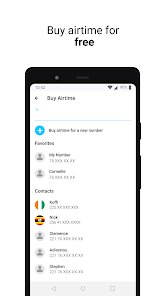
Wave is a mobile money app from Senegal that's taken off across West Africa, especially in places like Senegal and Ivory Coast. It's not a traditional bank account—it's more like a digital wallet you run through your phone, and the main draw is sending and receiving money fast without paying those annoying high fees. I downloaded it from Google Play after a friend in Dakar said it's cheaper than Orange Money for everyday transfers. The install was quick, under 20 MB, and it's free to download with no hidden charges upfront. First impression after launch? Clean, no clutter, and everything's in French or English depending on your region. No forced registration wall either—you can peek at the home screen before signing up. You do need a phone number to create an account, and you'll see a small prompt about in-app purchases, but honestly, the only thing you buy is airtime or bundle top-ups. Ads are nonexistent, which surprised me for a free app with 10 million+ installs.
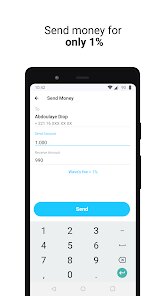
Once you're in, the onboarding is straightforward—enter your phone number, get a PIN via SMS, and you're set. The interface is lean: a home screen with big icons for Send Money, Request Money, Buy Airtime, and Pay Bills. I sent money to a local merchant by tapping Send, typing the recipient's phone number, confirming the amount, and entering my PIN. The whole thing took maybe 30 seconds. A cool tip is you can save frequent contacts, which cuts down typing later. Sometimes the network lagged during peak hours, but transactions mostly processed in seconds. Navigation feels intuitive—every button does exactly what it says, no buried menus. One small annoyance: the transaction history only shows the last 20 or so entries, so if you're tracking spending, you might need to screenshot regularly.
After using Wave for a couple of weeks, I think it's perfect for anyone who regularly sends small amounts home or pays local vendors in cash-heavy economies. It's much lighter than a formal banking app, and the fee structure is transparent—most transfers cost nothing or a flat negligible fee, unlike something like M-Pesa which can charge a percentage. I keep it installed because it's genuinely useful for splitting dinner bills or paying a babysitter without hunting for change. But if you need loan features or advanced budgeting tools, you'd be better off with something like Kuda or Chime. Wave's simplicity is its double-edged sword—it does one thing well but doesn't pretend to be your whole financial life. I'd uninstall only if I moved somewhere where mobile money isn't common. For its niche, it's hard to beat.
features
- 💸 Zero-fee transfers to other Wave users: Unlike M-Pesa which often charges 1-3% for person-to-person payments, Wave lets you send money to any other Wave account totally free. This is huge for daily micro-transactions like buying street food or sending pocket money to kids. The only catch is both sender and recipient must be on Wave.
- 📱 No smartphone required for basic transactions: You can dial a USSD code on any feature phone to check balance or send money, which is a game-changer in rural areas where smartphones aren't common. M-Pesa has this too, but Wave's USSD interface feels faster and less cluttered with marketing messages.
- 🔒 PIN-based security with no hidden biometrics: You set a 5-digit PIN during setup, and that's it—no fingerprint scanning or facial recognition needed. Some users might miss biometric login speed, but for old phones or shared devices, this basic approach actually reduces friction and privacy risks.
pros
- ✅ Lower fees than Orange Money: Sending 5000 CFA through Orange Money costs about 150 CFA in fees, while Wave charges exactly zero if both parties use Wave. For daily micro-payments, those savings add up fast.
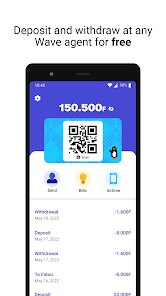
- ✅ Instant cash-out at agents: You can withdraw money from any Wave agent (usually corner shops) without needing a card, and the agent fee is capped at a flat 1%, much cheaper than M-Pesa's tiered system that can hit 3% for larger amounts.
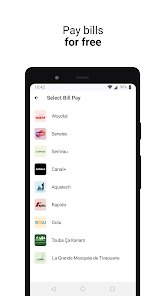
- ✅ Simple bill payment integration: Paying electricity or water bills takes three taps—select provider, enter account number, confirm. No need to register each biller separately like in Kuda or other neobanks.
cons
- ❌ No savings or loan features: Unlike M-Pesa's M-Shwari or Kuda's savings pockets, Wave offers zero interest on balances and no micro-loans. If you want to grow your money or borrow, you're stuck looking elsewhere.
- ❌ Limited to West Africa: You can't use Wave outside Senegal, Ivory Coast, and a handful of nearby countries. M-Pesa works across East Africa and parts of Asia, while Wave feels locked into its region with no expansion announcements.
- ❌ No customer service phone line: Support is only through in-app chat or email, which can be frustrating when you lose access to your PIN or get locked out. Orange Money has a toll-free number, which feels more reliable in emergencies.
Recommended Apps
![]()
Crafto
Kutumb App4.7

![]()
Google Calendar
Google LLC4.5![]()
Funny Gay Test
Test Master Lab4.2![]()
Neon Love Theme
Delicate theme for Android App4.6![]()
Google Translate
Google LLC4.2![]()
Prank Sounds Haircut Air Horn
BarabApps3.8![]()
iCut: Video Editor & Maker
iCut -Video Editor & Video Maker App3.8![]()
Blush: AI Dating Simulator
Blush AI4.3![]()
iControl: Easy Widgets Themes
Fancy keyboard for theme apps4.6![]()
AI Detector & Humanizer
Wallet Passes Alliance4.4![]()
Google Pay
Google LLC4.4![]()
Speak to Santa™ - Video Call
North Pole Command Centre Limited4.4![]()
Birthday Secrets
shasunder4.4![]()
Neku: OC character creator
Neku Avatar Studio4.6![]()
Fingerprint Scanner Personalit
Zabirko4.3













Disclaimer
1.Apklifts does not represent any developer, nor is it the developer of any App or game.
2.Apklifts provide custom reviews of Apps written by our own reviewers, and detailed information of these Apps, such as developer contacts, ratings and screenshots.
3. All trademarks, registered trademarks, product names and company names or logos appearing on the site are the property of their respective owners.
4.Apklifts abides by the federal Digital Millennium Copyright Act (DMCA) by responding to notices of alleged infringement that complies with the DMCA and other applicable laws.
5.If you are the owner or copyright representative and want to delete your information, please contact us [email protected].
6.All the information on this website is strictly observed all the terms and conditions of Google Ads Advertising policies and Google Unwanted Software policy.
7.Apklifts.com is an independent, information-only website which is 100% free to all the users.