
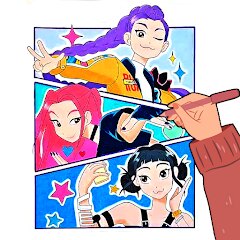
Kpop Demon Draw and Coloring

1K+
Installs
Youssoft LTD
Developer
-
Art & Design
Category
-
Everyone
Content Rating
-
https://mobydrop.com/privarcypolicy.html
Privacy Policy
Screenshots
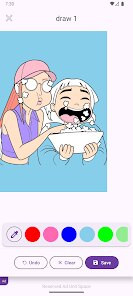
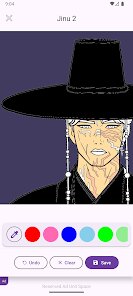
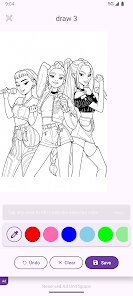
editor reviews
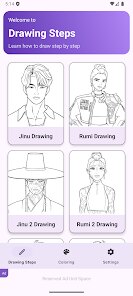
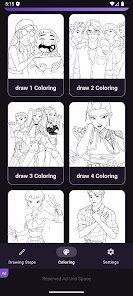
Kpop Demon Draw and Coloring is a digital coloring book app on Google Play that lets you color drawings of K-pop inspired characters with a demon or fantasy edge. It's basically a relaxation tool — you pick a line art image, choose colors from a palette, and tap or drag to fill in the spaces. I downloaded it because I've been into K-pop and wanted a low-stress activity for winding down after work. When I first launched the app, the home screen looked clean with a grid of thumbnails, but the overall design felt a bit basic, like a free app that hasn't been updated in a while. The install count seems moderate based on the reviews, and it's free to download, though there are in-app purchases for extra packs or to remove ads. Registration isn't required, which is nice for a quick try.
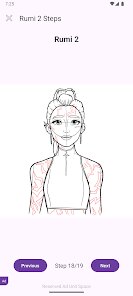
After opening a picture, the interface is straightforward — you get a canvas with the outlines, a color wheel or preset palette at the bottom, and a few tools like zoom, undo, and reset. The onboarding just shows a quick tip about tapping areas to fill, and then you're dropped right into coloring. In daily use, I usually scroll the gallery, pick a design, and then spend maybe ten minutes filling in each section. The fill tool works well most of the time, but sometimes it leaks into neighboring areas if the lines aren't perfectly closed, which gets a little annoying. A smooth moment is when the zoom feature lets me be precise on small details like eyes or accessories. A practical tip: always check the outline gaps before starting a big fill to avoid frustration.
After using it for a week, I'd say Kpop Demon Draw and Coloring works best for casual fans who just want to relax without thinking too hard. Hardcore K-pop fans might find the designs limited or not accurate to real idols, since these are generic demon-themed characters rather than actual group members. Compared to apps like Colorify or Happy Color, this one has a narrower appeal but a more unique style if you're into fantasy aesthetics. I kept it installed because it's good for short breaks, but I could see someone uninstalling it if they get bored of the small selection of free pictures or if the ads interrupt too often. It's not a bad app, just a niche one.
features
- 🎨 The coloring system is tap-to-fill with a color wheel and preset palettes, but compared to Colorify, the color selection feels limited. Colorify offers gradient fills and custom color picking from an image, while this app only gives basic solid colors, so you can't mix shades for more complex artwork.
- 🖼️ The gallery has around 30 free designs, all K-pop and demon themed. In contrast, Happy Color has thousands of images across dozens of categories like animals, landscapes, and mandalas. If you want variety or more realistic K-pop portraits, this app won't satisfy you.
- ✨ The standout feature is the zoom tool, which is more responsive than similar apps I've tried. It lets you pinch to magnify easily without lag, making it simpler to color tiny sections like hair strands or jewelry details — something Colorify sometimes struggles with on older phones.
pros
- 🌟 No registration required — you can open and start coloring immediately, unlike apps like Recolor that force you to create an account or log in with social media. This makes it great for quick, private use.
- ⏱️ Fast loading times — the app opens and loads designs in under two seconds on my mid-range phone. Happy Color sometimes takes five seconds to load the gallery, which feels slower when you just want to relax.
- 🆓 Free core experience — you can enjoy many designs without paying, whereas apps like Pigment lock most quality content behind a subscription. Here, ads are the only nuisance, and they're skippable.
cons
- ⚠️ Ad frequency is high — after every three fills, a 15-second video ad plays, which disrupts the flow. Colorify only shows ads when you switch categories, making it less intrusive.
- 🔴 Leaky fill tool — if the line art has tiny gaps, the color spills over to adjacent areas. This happens often with complex designs, and there's no way to manually adjust the fill tolerance, unlike in Pigment which has a threshold slider.
- 📉 Small design library — even after updates, I only count about 30 free pictures. Happy Color adds weekly themed packs, so you never run out of fresh content. For a niche app, this feels scarce.
- 🖌️ No undo button history — you can only undo the last action once, and if you accidentally tap the canvas, you lose progress. Recolor allows multiple undo steps, which is less stressful when experimenting with colors.
Recommended Apps
![]()
BetterMe: Health Coaching
BetterMe Limited4.3
![]()
Walli - HD, 4K Wallpapers
Tap AI4.4![]()
Future Self - Old Age Filter
Vidler Koiter1.6
![]()
AI Photo Editor, Collage-Fotor
AI Art Photo Editor | Everimaging Ltd.4.3![]()
AI Face Swap: MagicFace &Photo
Braly JSC0![]()
QR Code Reader: QR Scanner
WECHOICE MOBILE4.3![]()
Lip Fall Challenge: Fun Filter
Braly JSC0![]()
Funny Reverse Audio - Singing
PlayStudioInc0![]()
Birthday Secrets
shasunder4.4![]()
Live Wallpapers HD 4K
Wallpaper app4.4![]()
Find Your Phone By Clap
Trusted App Global4.5![]()
Wizz - Expand Your World
Wizz3.8![]()
NCAA March Madness Live
NCAA Digital4.7![]()
Hulu: Stream TV shows & movies
Disney4.5![]()
Lethal Love: a Yandere game
AniByte!4.4















Disclaimer
1.Apklifts does not represent any developer, nor is it the developer of any App or game.
2.Apklifts provide custom reviews of Apps written by our own reviewers, and detailed information of these Apps, such as developer contacts, ratings and screenshots.
3. All trademarks, registered trademarks, product names and company names or logos appearing on the site are the property of their respective owners.
4.Apklifts abides by the federal Digital Millennium Copyright Act (DMCA) by responding to notices of alleged infringement that complies with the DMCA and other applicable laws.
5.If you are the owner or copyright representative and want to delete your information, please contact us [email protected].
6.All the information on this website is strictly observed all the terms and conditions of Google Ads Advertising policies and Google Unwanted Software policy.
7.Apklifts.com is an independent, information-only website which is 100% free to all the users.














