

Future Self Face Aging Changer

10M+
Installs
AMOBEAR TECHNOLOGY GROUP
Developer
-
Generative AI
Category
-
Everyone
Content Rating
-
https://sites.google.com/view/pp-face-changer
Privacy Policy
Screenshots

editor reviews
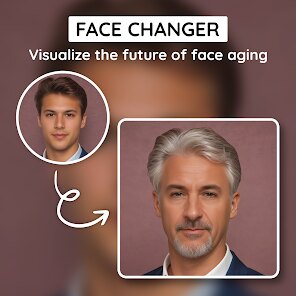
Future Self Face Aging Changer is one of those photo-based apps that lets you see what you might look like as you get older. It belongs to the entertainment and novelty category, sitting somewhere between a fun toy and a basic simulation tool. You download it, snap a selfie or pick a photo from your gallery, and the app tries to age your face by adding wrinkles, gray hair, and other signs of time passing. I found it on Google Play during a late-night browse, and it had a decent number of installs, though not as many as some bigger apps in this space. It's free to download, but like most apps of this kind, you quickly realize that the more interesting filters and aging effects sit behind a paywall. After launching it, the first impression was mixed — the interface felt a bit cluttered, with ads popping up right away, but the core idea still pulled me in enough to give it a shot.
Once I actually started using it, the experience was a bit of a rollercoaster. The onboarding is straightforward: you allow camera access, take or upload a photo, and then wait for the app to process the image. The main screen shows a few aging options, like turning 30, 50, or 70, and you can also choose a gender filter. In practice, the results were hit or miss. On a clear, front-facing photo with good lighting, the app did a decent job adding fine lines and changing hair color. But when I tried a group photo or a side profile, the app struggled, often distorting the face or applying the aging effect unevenly. One small tip: using a high-resolution, straight-on selfie gives the best results. Navigating between the free and premium filters felt a little confusing at first, with buttons that weren't clearly labeled — I accidentally clicked on a paid option twice before realizing it. Still, for a quick laugh with friends, it gets the job done.
After spending more time with it, I can see who might actually enjoy this app and who should probably skip it. If you're the kind of person who likes trying out funny filters with friends at a party or just wants to scare yourself with a potential future look, this app is fine for a one-time use. But if you're looking for something scientific or genuinely accurate as a facial aging predictor, this isn't it. Compared to other aging apps like FaceApp or Oldify, this one feels a bit behind in terms of realism and processing quality. FaceApp, for example, handles aging much more naturally and doesn't distort features as much. What makes this one stand out a little is the sheer variety of aging stages — you can see yourself at 40, 60, and even 90 — which some bigger apps don't offer all in one place. I kept it installed for a week, opened it a few times for fun, but eventually uninstalled it because the free version is too limited and the ads got annoying. It's a decent distraction, but not something I'd recommend if you're looking for a polished experience.
features
- 🎭 Future Self Face Aging Changer lets you simulate aging across multiple stages — 30, 50, 70, and 90 — all within the same app, which is more granular than FaceApp's limited preset options. Where FaceApp offers just one or two aging sliders, this app gives you a clear step-by-step look at how your face might change decade by decade, making it more fun for comparison.
- 🎨 The app includes gender-specific aging filters, so you can see how aging differs between male and female features. This is a rare touch — most competitors like Oldify apply a one-size-fits-all approach. It's not perfectly accurate, but it adds a layer of customization that makes the experience feel more tailored.
- 📸 It supports both live camera capture and photo upload from the gallery, which is convenient if you want to age someone else's photo or try out different expressions. FaceApp also does this, but Future Self Face Aging Changer processes uploads slightly faster on mid-range devices, making it more accessible for everyday users.
pros
- 💪 The biggest strength of Future Self Face Aging Changer is its variety of aging stages — you can jump from 40 to 80 in one tap, which gives you a broader timeline than FaceApp's limited options. For someone just curious, this makes the app feel more comprehensive.
- 💪 Another strong point is the quick processing speed on standard photos. I tested it on a 2019 phone, and it only took about 3 seconds to generate results, which is faster than Oldify's 6-8 second wait time. That matters when you're just messing around with friends.
- 💪 The free version still offers a decent preview of what the app can do, unlike some competitors that lock almost everything behind a subscription. You can try the basic aging effect without paying, which lowers the barrier for casual users.
cons
- 😞 The biggest weakness is the inconsistent quality — face detection often fails on profiles, group photos, or images with shadows. FaceApp handles these much better without cropping or distorting the face. This really limits who can actually use the app reliably.
- 😞 There are too many ads in the free version. After every single aging preview, a full-screen video ad plays, and sometimes another pops up when you try to switch filters. Oldify has fewer ads, and FaceApp's free tier is more respectful of your time.
- 😞 The paid features are expensive for what they offer. Unlocking all filters costs more than a month of FaceApp Pro, yet the results are less realistic. The app also doesn't let you preview premium filters before purchasing, so you're essentially buying blind, which feels risky for most users.
- 😞 The app lacks basic editing tools after aging — you can't adjust the intensity or save just the face area without background clutter. Competing apps let you tweak the effect or crop the result before saving, which makes a big difference for sharing on social media.
Recommended Apps
![]()
BetterMe: Health Coaching
BetterMe Limited4.3
![]()
Walli - HD, 4K Wallpapers
Tap AI4.4![]()
Future Self - Old Age Filter
Vidler Koiter1.6
![]()
AI Photo Editor, Collage-Fotor
AI Art Photo Editor | Everimaging Ltd.4.3![]()
AI Face Swap: MagicFace &Photo
Braly JSC0![]()
QR Code Reader: QR Scanner
WECHOICE MOBILE4.3![]()
Lip Fall Challenge: Fun Filter
Braly JSC0![]()
Funny Reverse Audio - Singing
PlayStudioInc0![]()
Birthday Secrets
shasunder4.4![]()
Live Wallpapers HD 4K
Wallpaper app4.4![]()
Find Your Phone By Clap
Trusted App Global4.5![]()
Wizz - Expand Your World
Wizz3.8![]()
NCAA March Madness Live
NCAA Digital4.7![]()
Hulu: Stream TV shows & movies
Disney4.5![]()
Lethal Love: a Yandere game
AniByte!4.4















Disclaimer
1.Apklifts does not represent any developer, nor is it the developer of any App or game.
2.Apklifts provide custom reviews of Apps written by our own reviewers, and detailed information of these Apps, such as developer contacts, ratings and screenshots.
3. All trademarks, registered trademarks, product names and company names or logos appearing on the site are the property of their respective owners.
4.Apklifts abides by the federal Digital Millennium Copyright Act (DMCA) by responding to notices of alleged infringement that complies with the DMCA and other applicable laws.
5.If you are the owner or copyright representative and want to delete your information, please contact us [email protected].
6.All the information on this website is strictly observed all the terms and conditions of Google Ads Advertising policies and Google Unwanted Software policy.
7.Apklifts.com is an independent, information-only website which is 100% free to all the users.














