
Eye Test

1K+
Installs
arabtok
Developer
-
Productivity
Category
-
Everyone
Content Rating
-
https://eyeshealthtest.com/privacy.html
Privacy Policy
Screenshots
editor reviews
Eye Test, an app from developer arabtok, sits firmly in the health and utility category on both Google Play and the App Store. It's designed for anyone who wants a quick, no-fuss check on their vision right from their phone. You can use it to test things like visual acuity, color perception, and even look for signs of astigmatism. The average person might download this because they notice some blurriness or just want to track changes between actual doctor visits. My first impression after launching was a bit mixed — the interface is stripped down, almost too simple, with a darker theme that feels functional but not particularly polished. It's free to install and doesn't require registration, which is a huge plus for a quick test. I noticed it does have some ads popping up, but they weren't overly intrusive during my initial run-through.
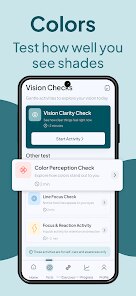
Getting into the actual experience, the app walks you through different tests step by step. For the visual sharpness check, you cover one eye and read letters that shrink with each line, similar to what you'd see at the optometrist. The color blindness test shows those classic Ishihara plates, and the astigmatism test is just a series of radiating lines. Navigating through these was smooth enough, though the onboarding could be clearer — it just throws you into the first test without much explanation. A small tip I picked up: make sure you're in a well-lit room and hold the phone about 40cm from your face for the results to be anywhere near accurate. I did find myself fumbling a bit when switching between tests because the buttons are small, but after a few minutes, the routine becomes obvious.
After using Eye Test for a few days, I can see where it fits and where it falls short. It's perfect for someone who just wants a casual benchmark before scheduling a real exam, or for travelers who want to keep tabs on their sight without visiting a clinic. But it's nowhere near a replacement for a professional checkup, and people with serious vision concerns should skip it for clinical tools. Compared to apps like EyeQue or Peek Acuity, this one feels more like a toy than a serious tool — the results are surface-level and lack the detailed logs or export features those offer. I kept it installed because it's handy for a quick baseline, but I can see many users uninstalling it after a week if they don't feel the results are meaningful for their daily life.
features
- 📊 Vision range checks — The app lets you test for nearsightedness, farsightedness, color blindness, and astigmatism all in one go. Unlike Peek Acuity, which focuses only on visual acuity, this covers more ground in a single session.
- 🩺 Quick baseline tool — It's designed for speed. You can run through all tests in under 5 minutes. EyeQue requires a special device to get readings, but this one works with just your phone and a steady hand.
- 📱 No account needed — You can open the app and start testing immediately without any sign-up. Many similar apps like Vision Test Pro force you to create a profile or pay for premium features before doing basic checks.
- 💡 Low-light mode — The dark background is easy on the eyes, especially if you're testing before bed. Most competitors like EyeCare use bright white screens that can mess with your adaptation.
pros
- 👍 Instant access — No registration, no email verification, just tap and test. Peek Acuity requires a login to save results, but Eye Test keeps it simple.
- 👍 Free with minimal ads — It's completely free to use, and the ads are mostly banner-style at the bottom. Apps like Color Blind Check charge for detailed reports after the initial test.
- 👍 Portable utility — You can use it anywhere without extra hardware. EyeQue relies on a clip-on lens accessory that costs extra, while this stays purely digital.
- 👍 Broad test variety — You get four different vision checks in one app. Vision Test Pro only offers two types unless you upgrade.
cons
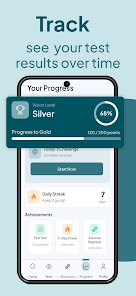
- 👎 No result history — After you close the app, your test results vanish. Competitors like EyeCare track and chart your progress over time.
- 👎 Inconsistent accuracy — The tests rely heavily on screen size and lighting conditions. Peek Acuity is more reliable because it's validated for clinical use.
- 👎 Poor explanations — The app doesn't tell you what your results mean practically. You get a score rating, but no guidance like "this is within normal range" unlike Vision Test Pro.
- 👎 No dark mode toggle — The default dark theme looks fine, but some users might want a light option. Apps like EyeQue let you switch themes for better visibility in different environments.
Recommended Apps
![]()
Japevox - Funny Prank Sound
SecureTool4.3
![]()
AstroMatrix Birth Horoscopes
AstroMatrix4.7
![]()
Personalized Call from Santa (
www.PackageFromSanta.com4.3![]()
Prank Call - Fake Call & Chat
Bravestars Casual4.1![]()
Persona: Beauty Camera
TICKET TO THE MOON, INC.4.5![]()
Peacock TV: Stream TV & Movies
Peacock TV LLC4.5![]()
Instant Buttons Soundboard App
Snow Peak Apps2.1![]()
GPS Speedometer: Speed Tracker
SM Infotech3.2![]()
Subway®
SUBWAY Restaurants4.2![]()
Find Your Phone By Clap
Trusted App Global4.5![]()
Gorilla Skins for Monkey Arena
Dumitru Boico4![]()
Vimeo
Vimeo.com, Inc.3.8![]()
Vinted - Buy and sell clothes
Vinted4.6![]()
Galaxy Starry Keyboard Backgro
Fun Keyboard Theme for Android4.7![]()
Chat AI - Ask AI anything
AI Chat Bot, Ask AI4.4















Disclaimer
1.Apklifts does not represent any developer, nor is it the developer of any App or game.
2.Apklifts provide custom reviews of Apps written by our own reviewers, and detailed information of these Apps, such as developer contacts, ratings and screenshots.
3. All trademarks, registered trademarks, product names and company names or logos appearing on the site are the property of their respective owners.
4.Apklifts abides by the federal Digital Millennium Copyright Act (DMCA) by responding to notices of alleged infringement that complies with the DMCA and other applicable laws.
5.If you are the owner or copyright representative and want to delete your information, please contact us [email protected].
6.All the information on this website is strictly observed all the terms and conditions of Google Ads Advertising policies and Google Unwanted Software policy.
7.Apklifts.com is an independent, information-only website which is 100% free to all the users.













