
GPS Map Camera - Timestamp

5M+
Installs
Sliver AI Photo Editor
Developer
-
Productivity
Category
-
Everyone
Content Rating
-
https://docs.google.com/document/d/e/2PACX-1vQ7Y9FW4r7ixX1mzXahMPH2gEliZwbNP9lmCBaryzyflmmX83TJ96Q8h7VOcuhPtFSOe4g0RuXxk8-l/pub
Privacy Policy
Screenshots


editor reviews
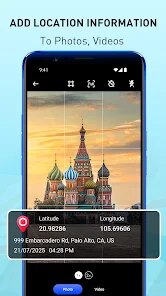
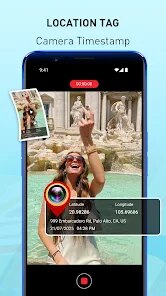
GPS Map Camera is a utility app that overlays location data, timestamps, and map details onto photos. It's essentially a camera tool with a built-in stamp, popular among travelers, surveyors, and social media users who want to prove where and when a shot was taken. On Google Play, it's been downloaded over 10 million times and is free to install, though it includes ads and in-app purchases for removing watermarks and unlocking extra map styles. When you first launch it, the interface feels straightforward but a bit cluttered—there's a viewfinder with location info displayed live, and you can tap to adjust the stamp format before snapping. The first impression is that it does exactly what it promises, but the abundance of settings can feel overwhelming if you just want a quick snapshot.
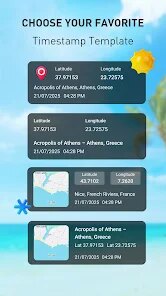
In daily use, the app guides you through a simple flow: allow location and camera permissions, then aim and shoot. After taking a photo, you can choose from different stamp templates—classic, modern, or minimalist—each showing GPS coordinates, address, date, and a small map. One smooth moment is how the map updates in real-time as you move, but a confusing one is the lack of a clear zoom function for the map thumbnail. A practical tip is to turn off the watermark in settings if you don't want the app's branding, though that requires a small fee. The gallery integration is decent, saving stamped photos separately, but the ad pop-ups after every few shots can break your rhythm. Overall, it's functional but not always fluid.
After a few weeks, I'd say GPS Map Camera is a solid pick for anyone who needs geotagged evidence for work or hobby—like real estate agents or hikers documenting trails. Casual users might find the ads annoying and the stamp options overkill, especially if they just want a date on their dog photos. Compared to similar apps like Timestamp Camera Basic, this one offers more map styles and a cleaner stamp layout, but the competition often has fewer ads. What keeps it on my phone is the precision of the location data, which feels more reliable than some rivals. That said, if you don't need GPS coordinates, you'd probably uninstall it after a week and stick with your phone's built-in editor.
features
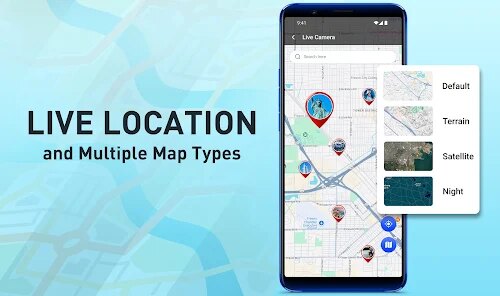
- 📍 The standout feature is the live map preview within the camera viewfinder. Unlike Timestamp Camera Basic, which only shows static coordinates, GPS Map Camera displays a small map that updates as you move. This is incredibly handy for travelers who want visual proof of their location—like snapping a picture of a trail sign with the exact terrain map embedded.
- 🕒 The timestamp customization is deep, letting you choose from multiple date formats and time zones. For someone logging work hours or documenting construction progress, this beats alternatives like GeoCam that only offer basic date stamps. You can even add a custom text watermark for personal branding.
- 🗺️ The app supports multiple map styles, including satellite and terrain views. This is rare in similar tools, which usually stick to a single street map. If you're in a remote area, switching to satellite mode makes your stamped photo far more useful for reference later.
- 📸 Batch stamping is available for existing photos—you can retroactively add GPS data to shots from your gallery. While not unique, the implementation here is faster than in apps like GPS Map Stamp, making it a time-saver for uploading old travel pics to a blog.
pros
- 🔍 Location accuracy is excellent, often within a few meters, thanks to deep GPS integration. Apps like Simple Timestamp sometimes drift in urban areas, but this one stays reliable even near tall buildings.
- 🎨 The stamp templates are more visually appealing than Timestamp Camera Basic's plain overlays. You get gradients, shadows, and font choices that make the photo look less cluttered—great for social media posts where presentation matters.
- 💾 Offline functionality works well once the map tile is cached. This beats GeoStamp's reliance on constant data for map previews, making it ideal for hikers in dead zones.
cons
- 📢 Too many ads interrupt the flow. After every three photos, a full-screen ad pops up, which is more intrusive than Timestamp Camera Basic's subtle banner ads. It's tolerable but annoying if you're shooting in bursts.
- 🔧 The free version saves a small watermark unless you pay. Competitors like GPS Map Stamp offer watermark-free use with a one-time purchase, while this app uses a subscription model that feels overpriced for casual users.
- 🖼️ Batch editing lacks preview options—you have to commit to a stamp style before seeing it on all selected photos. GeoCam lets you preview each image before exporting, which saves time in avoiding bad layouts.
Recommended Apps
![]()
Japevox - Funny Prank Sound
SecureTool4.3
![]()
AstroMatrix Birth Horoscopes
AstroMatrix4.7
![]()
Personalized Call from Santa (
www.PackageFromSanta.com4.3![]()
Prank Call - Fake Call & Chat
Bravestars Casual4.1![]()
Persona: Beauty Camera
TICKET TO THE MOON, INC.4.5![]()
Peacock TV: Stream TV & Movies
Peacock TV LLC4.5![]()
Instant Buttons Soundboard App
Snow Peak Apps2.1![]()
GPS Speedometer: Speed Tracker
SM Infotech3.2![]()
Subway®
SUBWAY Restaurants4.2![]()
Find Your Phone By Clap
Trusted App Global4.5![]()
Gorilla Skins for Monkey Arena
Dumitru Boico4![]()
Vimeo
Vimeo.com, Inc.3.8![]()
Vinted - Buy and sell clothes
Vinted4.6![]()
Galaxy Starry Keyboard Backgro
Fun Keyboard Theme for Android4.7![]()
Chat AI - Ask AI anything
AI Chat Bot, Ask AI4.4















Disclaimer
1.Apklifts does not represent any developer, nor is it the developer of any App or game.
2.Apklifts provide custom reviews of Apps written by our own reviewers, and detailed information of these Apps, such as developer contacts, ratings and screenshots.
3. All trademarks, registered trademarks, product names and company names or logos appearing on the site are the property of their respective owners.
4.Apklifts abides by the federal Digital Millennium Copyright Act (DMCA) by responding to notices of alleged infringement that complies with the DMCA and other applicable laws.
5.If you are the owner or copyright representative and want to delete your information, please contact us [email protected].
6.All the information on this website is strictly observed all the terms and conditions of Google Ads Advertising policies and Google Unwanted Software policy.
7.Apklifts.com is an independent, information-only website which is 100% free to all the users.













