
PND AI Photo Enhancer HD

100K+
Installs
PND AI 360
Developer
-
Generative AI
Category
-
Everyone
Content Rating
-
info@pndai.ai
Developer Email
-
https://pndai.ai/en/privacy.html
Privacy Policy
Screenshots


editor reviews
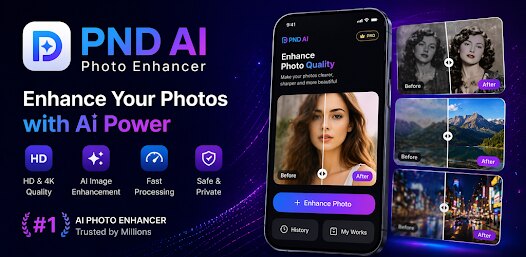
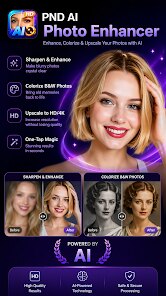
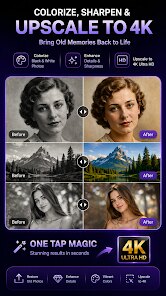
PND AI Photo Enhancer HD is a photo editing tool that focuses on using artificial intelligence to fix and improve the quality of your images. It falls under the utility and photography app category, and people mainly use it to turn blurry, pixelated, or low-resolution photos into sharper, clearer versions. A lot of users might download this from Google Play or the App Store because they have old pictures from early smartphones or scanned documents that look terrible on modern screens. The first impression after launching the app is pretty straightforward: you can hit that big "Start" button on the home screen, and it immediately makes sense. The install count seems decent for this type of tool, but I am not sure about the exact number. It is free to download, though some advanced features may require a small purchase or a subscription, and there are occasional ads that pop up rather than being intrusive. Registration is not forced on you, which I appreciate.
After loading a picture, the interface actually feels minimal and clean. The onboarding does not overwhelm you; it just shows a couple of swipeable screens explaining how the AI upscales the image. When you add a photo, the app immediately begins analyzing it, and you can choose between different enhancement modes like "Face," "General," or "HD". I noticed that for selfies and portraits, the face mode does a surprisingly good job, smoothing out noise without making everyone look like plastic dolls. The processing time can be a bit slow for larger files, maybe around 10 to 20 seconds, but you get a nice side-by-side comparison after it finishes. A practical tip I figured out is that you should always check the "Denoise" toggle if the lighting in the original was bad, as it saves you from having to run the filter twice. If you want to sharpen a document or a screenshot, the general mode is better, but it can sometimes add unwanted contrast to text. It is fairly intuitive to use, and you can save the improved version directly to your gallery or share it with the usual phone apps.
After spending some time with it, my personal take is that PND AI Photo Enhancer HD is perfect for casual users who need to fix up family photos, old memes, or screenshots. It is not for professional photographers or anyone doing heavy retouching work, since the control over finer details is limited. What makes it different from something like Remini or Pixelcut is its simplicity, but Remini does a much faster job and offers better batch processing. This app actually focuses more on HD enhancement for diverse use cases, while Remini leans heavily into portrait and face improvement. Someone might uninstall this because it can feel slow after a while, and the ads might get old during long editing sessions. However, if you only need an occasional fix for a picture that matters, this app is a worthy tool to keep around. I have kept it installed just for that one lost photo from a trip.
features
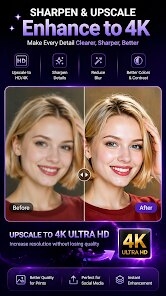
- 🔍 AI Upscaling: The main standout is the AI upscaling engine that increases image resolution without making it look blocky. I tried a 720p screenshot and it came out looking pretty crisp on a 4K monitor, which impressed me. In comparison, Remini tends to over-sharpen faces and can introduce odd textures, while this one keeps things more natural for landscapes and objects.
- 🎨 Multiple Enhancement Modes: You get three distinct modes: Face, General, and HD. This is more tailored than Adobe Lightroom's auto-enhancer, which just applies a blanket correction. The Face mode specifically targets eyes and skin without ruining the background, which is a rare touch in this price range.
- 🖼️ Batch Processing: A huge time-saver for people with many old photos. You can select up to 10 images from your gallery and have them processed in sequence. On Google Play, I saw users mention how this helps with digitizing old albums. Photoshop Fix does not have this, and even some paid tools charge extra for it.
- 🔄 Side-by-Side Preview: Every enhancement shows a before-and-after view in real-time before saving. This helps you decide if you want to keep the effect or try a different mode. On the App Store, people compare this favorably to Snapseed's compare button, which is not as interactive during edits.
pros
- 🌟 Easy to Use: You do not need any tutorial or experience to get started. The whole process is just pick a photo, tap a button, and wait. This avoids the steep learning curve of GIMP or even the basic Photoshop Express.
- 💰 Fair Free Tier: The base upscaling and denoise are free, with no required subscription. That's a big plus over apps like Topaz Gigapixel, which costs a lot upfront, or Remini, which locks essential features behind a paywall.
- 📦 Small App Size: It only takes up about 50MB, so it's great for phones with limited storage. Many competitors like Pixelcut or Picsart are bloated with extra features you never use.
- 🌐 Offline Capability: Once you download the AI models (a one-time 100MB download), you can process images without an internet connection. This is rare among photo enhancers; Remini and VanceAI both require you to be online.
cons
- ⏳ Slow Processing: The app can be sluggish, especially with high-resolution files or batches of 10 images. Remini and Topaz Gigapixel are much faster using cloud servers or optimized local models.
- 📺 Inconsistent Ad Frequency: While it is free, the ads pop up at awkward times, like after every single enhancement or when switching modes. Apps like Adobe Photoshop Express or Snapseed have no ads at all, which feels cleaner.
- 🔧 Limited Manual Controls: You cannot adjust the intensity of the AI enhancement or tweak specific parameters like sharpening or contrast separately. More capable tools like ON1 Resize AI give you sliders for detail smoothing and grain reduction; this app just does its own thing.
- 🖼️ Output Size Limits: The app has a hard cap on the output resolution, so photos over 4000x4000 pixels get downscaled first. Remini and similar services let you go higher if you pay extra, but here you are stuck with the limit regardless.
Recommended Apps
![]()
Daily Horoscope
KADO Apps4.4
![]()
FOX Sports: Watch Live Games
Fox Digital Services, LLC3.7
![]()
Fake Call from Santa Claus
ThunderClap4.2![]()
Google Maps
Google LLC4.2![]()
PhotoLayers-Superimpose,Eraser
handyCloset Inc.4.6![]()
Healthy Benefits+
Solutran, Inc.4.5![]()
SuperMe - Avatar Maker Creator
THE.DEMON3.7![]()
Air Horn
Tenoku4.8![]()
Football Wallpaper HD 4K
Orange Infotech Studio4.6![]()
Artplay - AI Photo & Video
Hideaway Technology Limited4.5![]()
Horoscopes – Daily Zodiac Horo
Mail.Ru Group4.1![]()
Passport Parking
Passport Labs, Inc.2.5![]()
ParkMobile: Park. Pay. Go.
Parkmobile, LLC4.3![]()
FestAI: Ghost Detector App
Now Tech3.2![]()
Photo Tool
COLIFER LAB4





























