

Yuka - Food & cosmetic scan

10,000,000+
Installs
Yuka App
Developer
-
Health & Fitness
Category
-
Rated for 3+
Content Rating
-
https://yuka-app.helpdocs.io/l/en/article/2a12869y56
Privacy Policy
Screenshots
editor reviews
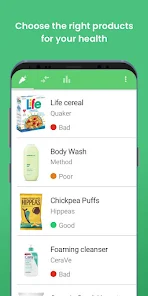
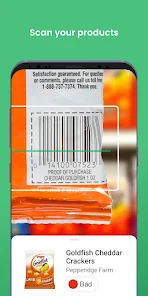
Yuka is a barcode-scanning app that helps you figure out just how good or bad packaged foods and cosmetics really are. It falls into the health and lifestyle category, and the idea is dead simple: you point your phone's camera at any barcode, and Yuka instantly scores the product on a scale from 0 to 100. The first time you open it, you're hit with a clean, white interface and a big camera button right in the middle, which makes it feel more like a utility than a social feed. It's free to download on Google Play and the App Store, with millions of installs, though you can pay for a premium subscription to unlock more detailed analysis and personalized advice. You don't really need to register right away to scan, which is nice—no forced signup just to try it out. The first impression is that it's fast and no-nonsense, but you do notice a small banner asking you to subscribe after scanning a few items.
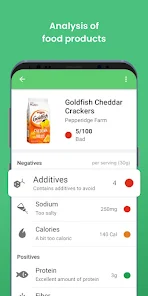
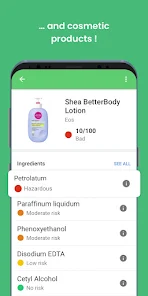
Once you start actually using Yuka, the flow is straightforward. You open the app, tap the scan button, and line up the barcode inside the frame. It takes about a second, then pops up the product page with a green, yellow, or red color score. For food, it breaks down nutritional quality, the presence of additives, and whether it's organic or not. For cosmetics, it grades based on ingredients and their potential risks. I found myself scanning everything in my fridge the first week—some results were surprising, like a “healthy” granola bar getting a poor score because of added sugar and a controversial preservative. The interface is easy to navigate, but I will say that the detailed ingredient lists can feel overwhelming if you're not used to scanning chemical names. A small practical tip: you can add products to a virtual pantry or wish list, but that feature feels a bit buried under the profile tab. The app also lets you compare similar items, which is helpful when you're at the store deciding between two jars of peanut butter.
After using Yuka for a couple of months, I think it's genuinely useful if you're someone who cares about what's in your food or lotions, but it's not perfect. I would recommend it to people who are curious about clean eating or avoiding certain additives, but it might feel a bit paranoid to someone who just wants to eat without overthinking every label. What sets it apart from apps like Fooducate or Open Food Facts is its simplicity and the traffic-light-style color coding, which makes it really quick to understand. However, I've noticed that the scoring system can sometimes feel harsh—an otherwise balanced product might get a low score just because it's processed, even if it's a reasonable treat. That said, I've kept it installed because it's handy when grocery shopping, and I've actually swapped a few items based on its suggestions. I can see why some people might uninstall it after the novelty wears off, especially if they aren't scanning regularly, but for me, it earns its spot on my phone.
features
- 📱 Barcode scanning is the core feature, and it works incredibly fast. You don't even need to type a product name—just scan and go. This makes it much more convenient than apps like Think Dirty, where you often have to search manually or rely on slower image recognition.
- 🍏 Nutritional breakdown goes beyond a simple grade. Yuga shows you the detailed impact of calories, fat, sugar, salt, and fiber individually. It also flags specific additives like carrageenan or sodium nitrite, with explanations of why they might be concerning. This level of detail is more transparent than what you get from similar apps like Fooducate.
- 🧴 Cosmetics evaluation covers ingredients, not just claims. It rates shampoos, lotions, and makeup based on potential irritants, allergens, or endocrine disruptors like parabens and phthalates. That's a feature many food-first scanners don't offer, so it's a standout if you care about both diet and personal care products.
- 📊 Product comparison tool lets you scan two similar items side by side. You can visually compare scores, additives, and nutritional profiles without flipping between pages. It's surprisingly handy when you're standing in the aisle trying to decide, something that apps like Open Food Facts don't make as easy.
pros
- ✅ Speed and simplicity are Yuka's biggest strengths. Scanning feels instant, and the color-coded result is immediately understandable. Compared to Fooducate, which sometimes loads slowly or asks for more input, Yuka gets you in and out faster.
- ✅ Database size is impressive. Yuka covers hundreds of thousands of products, including many international brands. That's a clear edge over smaller apps like EWG's Healthy Living, which can feel limited if you shop at non-specialty stores.
- ✅ Educational value is high. Each product page includes short blurbs explaining why a certain additive is rated poorly, which helps you learn over time. It's more informative than just a score without context, something that sets it apart from simpler calorie counters.
cons
- ❌ Scoring can be overly strict. A product with moderate sugar but otherwise good nutrients might get a red score, which feels unfair if you're looking for an occasional treat. Competitors like Open Food Facts use a more balanced Nutri-Score system that doesn't penalize as harshly.
- ❌ Premium subscription is pushed heavily. After just a few scans, you start seeing full-screen pop-ups asking you to pay for advanced analysis. Apps like Fooducate are more generous with free-tier features and less aggressive in their upsells.
- ❌ Limited for fresh or unpackaged items. Yuka relies on barcodes, so you can't scan loose fruits, vegetables, or bulk-bin items. This is a notable gap compared to apps like PlantSnap or even general health trackers that let you log unlabeled food manually.
Recommended Apps
![]()
BetterMe: Health Coaching
BetterMe Limited4.3
![]()
Walli - HD, 4K Wallpapers
Tap AI4.4![]()
Future Self - Old Age Filter
Vidler Koiter1.6
![]()
AI Photo Editor, Collage-Fotor
AI Art Photo Editor | Everimaging Ltd.4.3![]()
AI Face Swap: MagicFace &Photo
Braly JSC0![]()
QR Code Reader: QR Scanner
WECHOICE MOBILE4.3![]()
Lip Fall Challenge: Fun Filter
Braly JSC0![]()
Funny Reverse Audio - Singing
PlayStudioInc0![]()
Birthday Secrets
shasunder4.4![]()
Live Wallpapers HD 4K
Wallpaper app4.4![]()
Find Your Phone By Clap
Trusted App Global4.5![]()
Wizz - Expand Your World
Wizz3.8![]()
NCAA March Madness Live
NCAA Digital4.7![]()
Hulu: Stream TV shows & movies
Disney4.5![]()
Lethal Love: a Yandere game
AniByte!4.4















Disclaimer
1.Apklifts does not represent any developer, nor is it the developer of any App or game.
2.Apklifts provide custom reviews of Apps written by our own reviewers, and detailed information of these Apps, such as developer contacts, ratings and screenshots.
3. All trademarks, registered trademarks, product names and company names or logos appearing on the site are the property of their respective owners.
4.Apklifts abides by the federal Digital Millennium Copyright Act (DMCA) by responding to notices of alleged infringement that complies with the DMCA and other applicable laws.
5.If you are the owner or copyright representative and want to delete your information, please contact us [email protected].
6.All the information on this website is strictly observed all the terms and conditions of Google Ads Advertising policies and Google Unwanted Software policy.
7.Apklifts.com is an independent, information-only website which is 100% free to all the users.














