
Google Meet

5,000,000,000+
Installs
Google LLC
Developer
-
Social
Category
-
Rated for 3+
Content Rating
-
http://www.google.com/policies/privacy
Privacy Policy
Screenshots

editor reviews
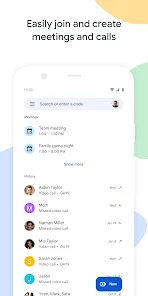
Google Meet is a video communication app developed by Google LLC that falls under the productivity and social networking categories. Users mainly rely on it for one-on-one calls, group video meetings, and live streaming sessions, often for work, school, or staying in touch with family. If you have a Google account, the app comes pre-installed on many Android phones, which is convenient, but you can also download it for free from Google Play and the App Store. The install count is massive, well over five billion on Android alone, and you don't need to register separately beyond your Google account. When I first launched it, the interface felt clean and minimal, with a prominent "New Meeting" button and quick access to scheduled events from Google Calendar. The initial impression was that it doesn't try to be flashy, which is refreshing for someone who just wants to jump into a call without being bombarded by ads or unnecessary features.
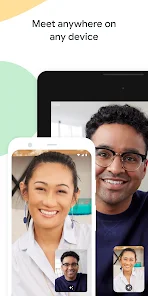
Moving into the hands-on experience, the interface is straightforward. When you start a meeting, you can choose to create a link instantly or schedule one later through Calendar. For a casual user, the onboarding is fast, you tap "Start Meeting," grant camera and microphone permissions, and you're in. During a call, the main controls are neatly tucked away at the bottom: mute, camera toggle, screen sharing, and captions. I found the screen sharing to be smooth, with low latency when presenting a document or a presentation. A small practical tip? The background blur feature works well even on older devices, so if you're in a messy room, it's worth turning on. One slightly confusing moment was figuring out how to pop a participant out into a small window while browsing other apps; on mobile, it requires a swipe gesture that isn't immediately obvious. But overall, Google Meet feels like a polished tool for group gatherings, though audio quality can dip a bit when too many people speak at once.
After using Google Meet for a few months, my personal take is that it's a solid choice for anyone already embedded in Google's ecosystem, especially if you use Gmail or Calendar daily. It shines for situations where you need quick, no-fuss meetings with colleagues or classmates, as it integrates seamlessly with those tools. But if you're looking for something more entertainment-focused or with heavy collaboration features like virtual whiteboards, you might check out alternatives like Zoom or Microsoft Teams. Zoom offers more playful features like virtual backgrounds without needing a green screen, while Teams has deeper file-sharing integration. What makes Meet stand out is its simplicity and reliability; there's no bloatware or aggressive upsells. I keep it installed because it just works for spontaneous calls, but I can see someone uninstalling it if they prefer apps with more social filters or custom emojis. It's a workhorse, not a show pony.
features
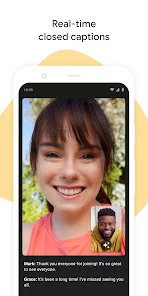
- 🎥 Real-time captions powered by Google's speech recognition are a standout. Zoom offers captions too, but Meet's are more accurate in my experience, especially for messy accents or background noise. They appear live during the call, which helps when someone has a weak microphone or speaks softly.
- 📅 Seamless Google Calendar integration is a huge time-saver. In Zoom, scheduling a meeting requires copying a link or a plugin. With Meet, you create an event in Calendar, and the meeting link is automatically embedded. No extra steps, no forgotten invites.
- 🔇 Noise cancellation that works passively. While Zoom has a manual noise suppression toggle, Meet's automatic filtering reduces keyboard clicks and dog barks without you having to touch a setting. It's not perfect, but it's less intrusive than adjusting sliders mid-call.
- 📱 No account needed for joining. Zoom requires downloading software and sometimes a login to join a meeting. Meet lets guests click a link and join directly in a browser, even from a non-Google account. This lowers barriers for quick catch-ups.
pros
- 🔒 End-to-end encryption for all calls. Unlike Zoom, which faced security issues early on, Meet encrypts data in transit and at rest by default. This gives peace of mind for confidential business chats or private conversations.
- 🎯 Simple, clutter-free interface. While Microsoft Teams overwhelms you with channels, tabs, and chat threads, Meet shows just what you need: the call controls. This minimalism reduces cognitive load during long meetings.
- 💻 Strong performance on low-end devices. On older laptops or phones with limited RAM, Meet runs smoother than Zoom, which can lag or overheat the device. I've used it on a 2015 Chromebook without stutter, while Teams struggled.
- 📞 Free tier allows 60-minute group calls. Zoom caps free calls at 40 minutes, which is annoying for extended catch-ups. Meet's hour-long limit for groups feels generous for personal use or one-off team huddles.
cons
- 🐌 Poor chat and breakout room features. Unlike Zoom, which offers persistent chat logs and easy breakout room creation, Meet's chat disappears after the call, and breakout rooms are clunky to set up. For workshops or large group work, this is a letdown.
- 🧩 Limited third-party integrations. Slack, Asana, and Trello don't have deep Meet integrations out of the box. In contrast, Teams hooks into hundreds of apps via plugins. Meet feels isolated if you're not fully using Google Workspace.
- 📱 Mobile app lacks some controls. On iOS and Android, you can't adjust video resolution or use virtual backgrounds as well as you can on Zoom's mobile app. The experience feels slightly stripped down compared to the desktop version.
- 🚫 No live streaming to social platforms. Zoom can stream directly to YouTube or Facebook Live, which is great for webinars. Meet requires an extra step using Google Workspace add-ons, so it's less convenient for content creators.
Recommended Apps
![]()
BetterMe: Health Coaching
BetterMe Limited4.3
![]()
Walli - HD, 4K Wallpapers
Tap AI4.4![]()
Future Self - Old Age Filter
Vidler Koiter1.6
![]()
AI Photo Editor, Collage-Fotor
AI Art Photo Editor | Everimaging Ltd.4.3![]()
AI Face Swap: MagicFace &Photo
Braly JSC0![]()
QR Code Reader: QR Scanner
WECHOICE MOBILE4.3![]()
Lip Fall Challenge: Fun Filter
Braly JSC0![]()
Funny Reverse Audio - Singing
PlayStudioInc0![]()
Birthday Secrets
shasunder4.4![]()
Live Wallpapers HD 4K
Wallpaper app4.4![]()
Find Your Phone By Clap
Trusted App Global4.5![]()
Wizz - Expand Your World
Wizz3.8![]()
NCAA March Madness Live
NCAA Digital4.7![]()
Hulu: Stream TV shows & movies
Disney4.5![]()
Lethal Love: a Yandere game
AniByte!4.4















Disclaimer
1.Apklifts does not represent any developer, nor is it the developer of any App or game.
2.Apklifts provide custom reviews of Apps written by our own reviewers, and detailed information of these Apps, such as developer contacts, ratings and screenshots.
3. All trademarks, registered trademarks, product names and company names or logos appearing on the site are the property of their respective owners.
4.Apklifts abides by the federal Digital Millennium Copyright Act (DMCA) by responding to notices of alleged infringement that complies with the DMCA and other applicable laws.
5.If you are the owner or copyright representative and want to delete your information, please contact us [email protected].
6.All the information on this website is strictly observed all the terms and conditions of Google Ads Advertising policies and Google Unwanted Software policy.
7.Apklifts.com is an independent, information-only website which is 100% free to all the users.














