

Shazam: Find Music & Concerts

500M+
Installs
Apple Inc.
Developer
-
Entertainment
Category
-
Teen
Content Rating
-
https://www.apple.com/legal/privacy/
Privacy Policy
Screenshots

editor reviews
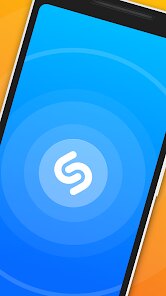
Shazam is an app that identifies music playing around you. It's been around for over two decades and is now owned by Apple. You mainly use it to tap one button, wait a few seconds, and get the song title, artist, and album name. It also links to Apple Music, Spotify, and other streaming services so you can save or listen to the full track right away. The reason most people download it is simple: you hear a song somewhere, maybe in a cafe or a store, and you have to know what it is. After installing it from the Google Play or App Store, where it sits with over a billion installs and is free to download, the first impression is how barebones it looks. A colorful Shazam-like button sits in the center, with nothing else screaming for attention. There's no forced registration to start using it, though Apple does prompt you to sign in with your Apple ID later if you want to sync history across devices. In-app purchases aren't really a thing here, but you might see a small ad banner sometimes. The simplicity feels refreshing.
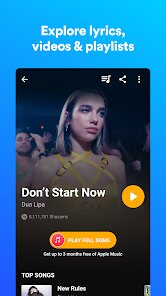
Once you start using it, the experience is incredibly straightforward. You open the app, tap the big button, and it listens. Within seconds, it usually spits out the correct result. If it's a live concert or a remix, it might take a few more seconds, but it's still impressive. After the song is identified, you can swipe up to see lyrics that scroll in sync with the music, which is a neat touch. You can also add the song to a playlist on Apple Music or open it in Spotify directly. A small but useful trick: if you set up Shazam to appear in your Control Center on iPhone, you don't even need to open the app itself. On Android, you can use the Auto Shazam feature that listens in the background. The interface never feels cluttered, which is good because you don't want to fumble with menus when the song is halfway over. It's smooth and responsive, though on older phones, the Auto Shazam mode can drain battery a bit if left on all day.
After living with Shazam for a while, I'd say it's one of those apps you install, use occasionally, and then forget how much you rely on it until you can't identify a song. It does one thing and does it well. People who constantly discover new music in random places, like commuters, shoppers, or nightlife goers, will get the most out of it. If you rarely hear tunes outside your own playlist, you probably don't need it. What sets it apart from similar apps like SoundHound is that Shazam is faster in noisy environments and has better accuracy with obscure tracks. Also, the Apple Music integration makes it almost essential for anyone in that ecosystem. But for someone who uses Spotify more, it's still useful, just not as seamless. I've kept it installed for years, mostly for those random moments. The only reason I'd uninstall it is if I switched fully to a streaming app with built-in identification, though none are quite as reliable yet.
features
- 🎵 One-tap song identification with lightning speed. You press the button, it listens for 5-10 seconds, and bam, you get the track. SoundHound also does this, but Shazam often wins in loud or distorted settings like concerts or bars.
- 📲 Integration with multiple streaming platforms. After identifying a song, you can open it in Apple Music, Spotify, YouTube Music, or Amazon Music. SoundHound only supports a few of those, and not as smoothly as Shazam does.
- 📃 Synchronized lyrics powered by Apple Music. When you swipe up on a recognized song, you see real-time scrolling lyrics. SoundHound has lyrics too, but Shazam's integration feels more polished and less buggy.
pros
- ⚡ Speed and accuracy. Shazam is consistently faster than SoundHound in real-world use. In a bustling coffee shop, it catches the song while SoundHound might still be thinking.
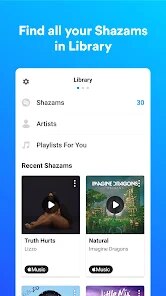
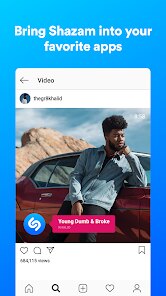
- 🔗 Apple ecosystem synergy. If you have an iPhone, Shazam lives in the Control Center. It syncs your history across devices via iCloud, and you can even Shazam songs from within apps like TikTok or Instagram. SoundHound can't match that depth.
- 🧠 Offline identification. Shazam stores a small database on your phone, so if you're in a tunnel or a spot with no signal, it can still identify a song and tag it for later. SoundHound needs a network connection to work.
cons
- 📱 Requires an internet connection for full results. If you're offline, Shazam can tag songs but it won't show album art or lyrics until you're connected again. SoundHound has similar limits, so this isn't unique, but still a pain.
- 🔊 Weak with acoustic or quiet recordings. When a song is very soft, like an acoustic guitar in a noisy room, Shazam might fail. SoundHound actually handles humming better, but Shazam doesn't have that feature at all.
- 📛 No built-in music player. Unlike SoundHound, which has a basic player, Shazam only identifies and links out. You need a separate app to actually listen to the full track. It feels like an incomplete experience sometimes.
Recommended Apps
![]()
BetterMe: Health Coaching
BetterMe Limited4.3
![]()
Walli - HD, 4K Wallpapers
Tap AI4.4![]()
Future Self - Old Age Filter
Vidler Koiter1.6
![]()
AI Photo Editor, Collage-Fotor
AI Art Photo Editor | Everimaging Ltd.4.3![]()
AI Face Swap: MagicFace &Photo
Braly JSC0![]()
QR Code Reader: QR Scanner
WECHOICE MOBILE4.3![]()
Lip Fall Challenge: Fun Filter
Braly JSC0![]()
Funny Reverse Audio - Singing
PlayStudioInc0![]()
Birthday Secrets
shasunder4.4![]()
Live Wallpapers HD 4K
Wallpaper app4.4![]()
Find Your Phone By Clap
Trusted App Global4.5![]()
Wizz - Expand Your World
Wizz3.8![]()
NCAA March Madness Live
NCAA Digital4.7![]()
Hulu: Stream TV shows & movies
Disney4.5![]()
Lethal Love: a Yandere game
AniByte!4.4















Disclaimer
1.Apklifts does not represent any developer, nor is it the developer of any App or game.
2.Apklifts provide custom reviews of Apps written by our own reviewers, and detailed information of these Apps, such as developer contacts, ratings and screenshots.
3. All trademarks, registered trademarks, product names and company names or logos appearing on the site are the property of their respective owners.
4.Apklifts abides by the federal Digital Millennium Copyright Act (DMCA) by responding to notices of alleged infringement that complies with the DMCA and other applicable laws.
5.If you are the owner or copyright representative and want to delete your information, please contact us [email protected].
6.All the information on this website is strictly observed all the terms and conditions of Google Ads Advertising policies and Google Unwanted Software policy.
7.Apklifts.com is an independent, information-only website which is 100% free to all the users.














