

Google Drive

5,000,000,000+
Installs
Google LLC
Developer
-
Productivity
Category
-
Rated for 3+
Content Rating
-
http://www.google.com/policies/privacy
Privacy Policy
Screenshots
editor reviews
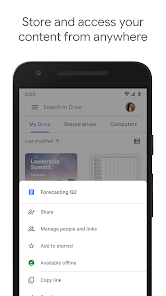
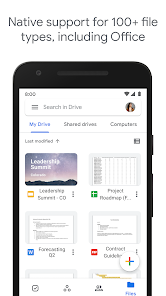
Google Drive is a cloud storage and file syncing service developed by Google LLC, falling squarely into the productivity and utility category. It's primarily used for storing files in the cloud, sharing them with others, and syncing documents across devices like phones, tablets, and computers. Most people download it because they need a reliable place to backup photos, or they're already knee-deep in Google's ecosystem with Gmail and Google Docs. After launching the app, the first impression is surprisingly clean and straightforward—Google knows how to keep things simple. The home screen greets you with a search bar up top and a grid of your recent files, with a big blue “+” button at the bottom to create or upload something new. It feels inviting, not cluttered, even though there's a ton of functionality hiding under the hood. You can download it for free from both Google Play and the App Store, and it already has billions of installs. There's no registration barrier if you already have a Google account, and while the base storage is free, you'll eventually hit the 15 GB limit shared with Gmail and Google Photos. In-app purchases exist for more storage, and yes, there are ads if you use the free tier—though they're tucked into the Google One upgrade prompts rather than being in-your-face.
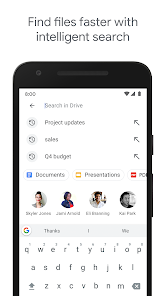
After you start using it, the hands-on experience feels like second nature if you've ever worked with files on a computer. The interface is basically three tabs at the bottom: Home, Starred (for your favorites), and Files (the full folder view). Onboarding is a quick slide-through if you're new, but most people skip it because it's self-explanatory. The main actions boil down to tapping the “+” button to upload a photo, create a Google Doc, or scan a document using your camera. A common usage flow might be: you snap a receipt with the scan feature, it saves as a PDF, then you share a link with your accountant from within the app. The smooth moments happen when files sync instantly between your phone and desktop, but the confusing bits crop up when you try to organize folders—you can't easily move files in bulk, and sorting options are hidden behind a three-dot menu. A small practical tip: if you use the “Offline” feature on important files, you won't need mobile data to view them later, which saved me during a subway commute with no signal. The search function is Google's usual magic, finding text inside PDFs or images, which feels like a cheat code when you're hunting for a specific invoice from months ago.
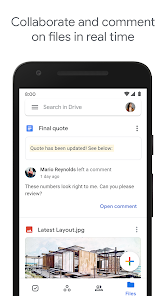
After sticking with it for a while, my personal judgment is that Google Drive is the Swiss Army knife of cloud storage—it does almost everything competently, but it shines brightest inside Google's own universe. People who already use Gmail, Google Photos, and Google Docs will find it indispensable because everything talks to each other seamlessly. On the flip side, if you're an Apple user fully committed to iCloud or a Microsoft fan living in OneDrive, you might feel like Drive is a bit of an outsider. What makes it different from Dropbox or Box is the deep integration with Google Workspace—you can edit a document without leaving the app, and collaborators can comment in real time, which Dropbox can't touch without third-party tools. I keep it installed because it's my go-to for sharing large video files, but I've thought about uninstalling it when the storage warning pops up and I have to decide which old photos to purge. It's a solid workhorse, not a flashy showboat, and that's honestly fine for most days.
features
- 📁 Smart Search and OCR: Google Drive can search through text inside scanned PDFs and images using optical character recognition. This is way more advanced than iCloud, which only searches file names. It means you can find that one receipt from three years ago by just typing “plumber” or “$150.”
- 🔄 Real-Time Collaboration: Unlike Dropbox, which requires file downloads or manual sync to edit documents, Google Drive lets multiple people work on the same Google Doc, Sheet, or Slide simultaneously. Changes appear instantly, and you can see who's typing what character by character—perfect for group projects without emailing versions back and forth.
- 📦 15 GB Free Storage (Shared Pool): While iCloud gives 5 GB free and OneDrive gives 5 GB, Google Drive offers 15 GB. However, that pool is shared across Gmail (emails with attachments), Google Photos (backed-up photos), and Drive files. That's both a feature and a gotcha—you get more space upfront, but it fills up faster if you don't manage backups.
pros
- 🎯 Seamless Google Workspace Integration: The standout strength is how Drive works like a native part of Google's suite. You can create a Google Doc directly from the app, and it saves automatically to Drive without tapping “save” once. In comparison, OneDrive integrates well with Office 365, but that requires a paid subscription for full editing, whereas Google Docs is completely free.
- 🎯 Link Sharing with Granular Permissions: Sharing files is dead simple—you generate a link, and you can set permissions to “Viewer,” “Commenter,” or “Editor.” I can share a folder of wedding photos with my family and set it so they can't accidentally delete anything. Dropbox has this too, but Google's link sharing feels faster and more intuitive, especially when using Gmail's built-in interface.
cons
- ❌ Limited Free Storage Shared Across Services: The 15 GB free tier sounds generous until you realize it's shared across Gmail, Google Photos (if you choose “High quality” backup), and Drive itself. Heavy Gmail users with large attachments can eat through that quickly, whereas iCloud separates storage per category, and Dropbox only counts files in the actual Dropbox folder.
- ❌ No End-to-End Encryption by Default: Unlike services like Tresorit or even Apple's iCloud with Advanced Data Protection, Google Drive does not encrypt your files end-to-end out of the box. Google can technically access your files, which is a privacy concern for sensitive documents. You'd need a third-party encryption tool to seal that gap, adding extra steps.
- ❌ Desktop Sync Client Can Be Glitchy: The mobile app is smooth, but the desktop sync app (Backup and Sync) sometimes desyncs or duplicates files, especially when you unplug an external drive mid-sync. OneDrive's integration with Windows feels more robust, and Dropbox's selective sync is less prone to folder conflicts.
Recommended Apps
![]()
Japevox - Funny Prank Sound
SecureTool4.3
![]()
AstroMatrix Birth Horoscopes
AstroMatrix4.7
![]()
Personalized Call from Santa (
www.PackageFromSanta.com4.3![]()
Prank Call - Fake Call & Chat
Bravestars Casual4.1![]()
Persona: Beauty Camera
TICKET TO THE MOON, INC.4.5![]()
Peacock TV: Stream TV & Movies
Peacock TV LLC4.5![]()
Instant Buttons Soundboard App
Snow Peak Apps2.1![]()
GPS Speedometer: Speed Tracker
SM Infotech3.2![]()
Subway®
SUBWAY Restaurants4.2![]()
Find Your Phone By Clap
Trusted App Global4.5![]()
Gorilla Skins for Monkey Arena
Dumitru Boico4![]()
Vimeo
Vimeo.com, Inc.3.8![]()
Vinted - Buy and sell clothes
Vinted4.6![]()
Galaxy Starry Keyboard Backgro
Fun Keyboard Theme for Android4.7![]()
Chat AI - Ask AI anything
AI Chat Bot, Ask AI4.4















Disclaimer
1.Apklifts does not represent any developer, nor is it the developer of any App or game.
2.Apklifts provide custom reviews of Apps written by our own reviewers, and detailed information of these Apps, such as developer contacts, ratings and screenshots.
3. All trademarks, registered trademarks, product names and company names or logos appearing on the site are the property of their respective owners.
4.Apklifts abides by the federal Digital Millennium Copyright Act (DMCA) by responding to notices of alleged infringement that complies with the DMCA and other applicable laws.
5.If you are the owner or copyright representative and want to delete your information, please contact us [email protected].
6.All the information on this website is strictly observed all the terms and conditions of Google Ads Advertising policies and Google Unwanted Software policy.
7.Apklifts.com is an independent, information-only website which is 100% free to all the users.













