

WhatsApp Messenger

10B+
Installs
WhatsApp LLC
Developer
-
Social
Category
-
Everyone
Content Rating
-
https://www.whatsapp.com/legal/privacy-policy
Privacy Policy
Screenshots



editor reviews
WhatsApp Messenger is a widely used cross-platform instant messaging app that relies on your phone's internet connection to send texts, make voice and video calls, share photos, documents, and voice messages. It's basically a replacement for standard SMS and phone calls, particularly useful for staying in touch with people across different countries without racking up carrier fees. People download it because pretty much everyone they know is already on it. After installing it from the Google Play or App Store, the first thing that hits you is the lack of fluff. You verify your number, restore a backup if you have one, and you're thrown straight into the conversation list. It's clean and feels very ordinary at first glance, but that's kind of the point, it doesn't try to be anything more than a reliable communication tool.
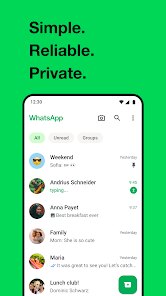
Using the app day to day is pretty straightforward. The main screen shows all your chats, and tapping any of them opens a thread that looks exactly like a standard text message interface with a text bar at the bottom. You'll find buttons for attaching media, recording voice messages, or initiating a voice or video call at the top. New users might be a bit confused by the fact that deleting a message for everyone only works for a short window after sending it, or that once you back up chats to Google Drive, restoring them later can sometimes be glitchy if you switch phones. A practical tip is to pin your most frequent contacts to the top, so you don't have to scroll forever. For group chats, the admin controls can be a lifesaver when someone gets too spammy. It all feels very familiar and works reliably across both Wi-Fi and mobile data, which is the main draw.
After using it for a while, I think it sticks around for a specific reason. It's perfect for people who just want a no-nonsense way to message others without social media clutter or flashy filters. You won't find sticker packs for every mood or elaborate custom themes like in Telegram. If you are someone who needs super customizable chat apps or large file sharing, you might get bored quickly. Its biggest strength is that it's become the default standard, everyone uses it, so keeping it installed is less about loving the features and more about being reachable. You might uninstall it if your entire social circle slowly migrates to Signal or Telegram, but for now, it remains the most universally adopted option. The end-to-end encryption is a nice security blanket for private chats, although the company's data-sharing history with Facebook makes some people wary. It just works, and for a messaging app, that's often enough.
features
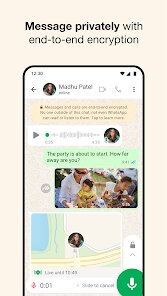
- 🔒 End-to-End Encryption: Unlike Telegram, which uses server-client encryption for regular chats and only offers end-to-end encryption in Secret Chats, WhatsApp applies E2E encryption to all messages, calls, photos, and videos by default. This gives users a consistent level of privacy without having to toggle any extra settings.
- 📱 Contact-Based System: WhatsApp syncs directly with your phone's address book, making it effortless to find and message anyone you already know. In contrast, apps like Telegram require manually creating a username or sending an invite link, which feels less seamless when you just want to talk to a new friend.
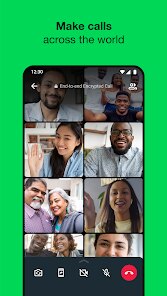
- 📹 Group Voice and Video Calls: It handles group calls across platforms smoothly, with support for up to 32 participants in video calls and even more in voice-only. While apps like FaceTime are locked to Apple devices, WhatsApp works on both Android and iPhone without a hitch.
pros
- ⚡ No Bloat: WhatsApp keeps the interface minimal. Unlike WeChat or Telegram, there are no channels, bots, or a built-in browser. It just does messaging, and it does it well.
- 📂 Document Sharing: Sending PDFs, spreadsheets, or even ZIP files is simple. You don't get file size limits as small as on iMessage, which struggles with larger documents.
- 🔄 Cross-Platform Syncing: You can use WhatsApp on your phone and desktop simultaneously, and messages sync almost instantly. That's better than Facebook Messenger, which sometimes takes a while to sync across devices.
cons
- 🐌 Slow Media Compression: Photos and videos get compressed noticeably, losing quality. Telegram allows sending files without compression if you choose, and even iMessage handles images better.
- 🔄 Backup Issues: Restoring from Google Drive can be troublesome, especially when switching from Android to iPhone. Signal's backup system, while more manual, is more reliable in this regard.
- 💬 Lack of Customization: You cannot change the default color scheme, bubble styles, or font sizes beyond system settings. Telegram offers extensive themes and custom stickers, making chats feel more personal.
- 🧑🤝🧑 Group Management: Group admin tools are limited. Unlike Telegram, where you can pin messages, set slow mode, or assign multiple admins easily, WhatsApp groups can get chaotic quickly.
Recommended Apps
![]()
BetterMe: Health Coaching
BetterMe Limited4.3
![]()
Walli - HD, 4K Wallpapers
Tap AI4.4![]()
Future Self - Old Age Filter
Vidler Koiter1.6
![]()
AI Photo Editor, Collage-Fotor
AI Art Photo Editor | Everimaging Ltd.4.3![]()
AI Face Swap: MagicFace &Photo
Braly JSC0![]()
QR Code Reader: QR Scanner
WECHOICE MOBILE4.3![]()
Lip Fall Challenge: Fun Filter
Braly JSC0![]()
Funny Reverse Audio - Singing
PlayStudioInc0![]()
Birthday Secrets
shasunder4.4![]()
Live Wallpapers HD 4K
Wallpaper app4.4![]()
Find Your Phone By Clap
Trusted App Global4.5![]()
Wizz - Expand Your World
Wizz3.8![]()
NCAA March Madness Live
NCAA Digital4.7![]()
Hulu: Stream TV shows & movies
Disney4.5![]()
Lethal Love: a Yandere game
AniByte!4.4















Disclaimer
1.Apklifts does not represent any developer, nor is it the developer of any App or game.
2.Apklifts provide custom reviews of Apps written by our own reviewers, and detailed information of these Apps, such as developer contacts, ratings and screenshots.
3. All trademarks, registered trademarks, product names and company names or logos appearing on the site are the property of their respective owners.
4.Apklifts abides by the federal Digital Millennium Copyright Act (DMCA) by responding to notices of alleged infringement that complies with the DMCA and other applicable laws.
5.If you are the owner or copyright representative and want to delete your information, please contact us [email protected].
6.All the information on this website is strictly observed all the terms and conditions of Google Ads Advertising policies and Google Unwanted Software policy.
7.Apklifts.com is an independent, information-only website which is 100% free to all the users.














