

Amazon Alexa

100,000,000+
Installs
Amazon Mobile LLC
Developer
-
Lifestyle
Category
-
Rated for 3+
Content Rating
-
https://www.amazon.com/gp/help/customer/display.html?nodeId=201909010
Privacy Policy
Screenshots


editor reviews
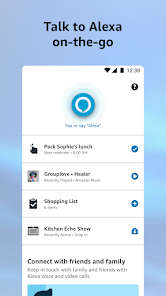
Amazon Alexa is a voice assistant app that acts as a digital companion for smart home management, daily scheduling, and quick information retrieval. It syncs directly with Amazon's smart speakers and devices, letting you control lights, thermostats, and music using just your voice. I downloaded it from the Google Play Store to expand what my Echo Dot could do beyond basic commands. The first impression after launching the app was a bit mixed—it looks clean enough, but the sheer number of options on the home screen felt overwhelming. There's a wide feed with suggested skills, reminders, and routines, which honestly made me pause before knowing where to tap first. Registration requires an Amazon account, and the app is free to download with no forced subscription, though certain premium skills or services might push you toward in-app purchases. The install count is huge; it's one of those apps most people grab while setting up their first smart device.
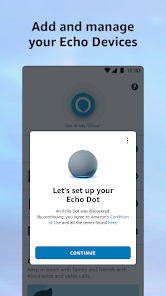
When I started using it daily, the interface became easier to navigate. The main actions revolve around adding devices, creating routines, and asking Alexa to perform tasks like playing music or setting alarms. Onboarding walked me through connecting my Echo device, which took just a couple of minutes. The most common flow is opening the app to set up a new routine—like saying "good morning" to trigger lights and news. I found the device discovery fairly smooth, but sometimes a light bulb wouldn't sync on the first try, requiring a quick refresh. One small tip: pin your most-used smart home devices to the favorites section for faster access. The app can feel a little sluggish when loading the skills store, but overall the experience gets better once you trim down the clutter. There's a microphone button on the main screen that lets you type commands if you're in a quiet room, which is handy.
After a few weeks, I see this app as a solid tool for anyone who already owns Amazon's hardware or wants to dip into home automation. It's not something you need if you solely use Google Home or Apple's ecosystem, since the integration leans heavily on Alexa-enabled devices. Compared to Google Home, the Alexa app offers more routine customization but lags in natural conversation flow. The skills library is vast, but many feel gimmicky and underused. I keep it installed because it's essential for managing my Echo devices, but I've disabled notifications from the feed to avoid spam. For someone who just wants basic voice commands without heavy setup, it does the job. Someone who values a minimal interface might find it bloated. Uninstalling it would break my smart home setup entirely, so it stays.
features
- 🎙️ Routines automation allows chaining multiple actions with a single voice command, which sets it apart from simpler assistants like Siri. You can set a "bedtime" routine to dim lights, lock doors, and play rain sounds simultaneously.
- 🎙️ Skills marketplace offers thousands of third-party integrations, from ordering pizza to meditation guides. Google Assistant has similar skills but Alexa's library is broader and more chaotic, offering both gems and junk.
- 🎙️ Multi-device management lets you group speakers for whole-home audio or set up intercom features. Google Home supports this too, but Alexa's grouping feels more straightforward once you figure out the settings.
- 🎙️ Voice profiles recognize different users, personalizing responses for each family member. The recognition accuracy is decent, though Google Home's voice match feels slightly snappier in my experience.
pros
- ✔️ Compatibility wins over most rivals—Alexa supports a wide range of smart home brands, from Philips Hue to lesser-known sensors. Google Home narrows this a bit, and Apple HomeKit is outright restrictive. If you mix brands, Alexa ties them together cleanly.
- ✔️ Learning curve is low for basic tasks like setting timers or playing music. You don't need to read manuals; just say what you want. Siri requires more specific phrasing, while Alexa forgives casual wording.
- ✔️ Regular updates add new features without manual downloads. I've seen improvements in voice recognition and new routines appear silently. Google Home updates are frequent too, but Alexa's changelog feels more user-focused.
cons
- ❌ App performance can be sluggish, especially when loading the skills store or browsing routines. Google Home's app runs smoother on the same device, making Alexa feel a step behind in responsiveness.
- ❌ Overbearing feed section pushes shopping deals and sponsored content, which clutters the main screen. Turning off notifications helps, but the feed remains loud. Google Home keeps its interface simpler and less commercial.
- ❌ Voice recognition sometimes fails in noisy environments or with accents, requiring repeated commands. Google Assistant handles background noise better, and Siri catches nuanced phrasing more reliably.
- ❌ Setup for complex routines requires navigating nested menus, which can confuse new users. Google Home's routine builder is more visual and intuitive, reducing trial and error.
Recommended Apps
![]()
BetterMe: Health Coaching
BetterMe Limited4.3
![]()
Walli - HD, 4K Wallpapers
Tap AI4.4![]()
Future Self - Old Age Filter
Vidler Koiter1.6
![]()
AI Photo Editor, Collage-Fotor
AI Art Photo Editor | Everimaging Ltd.4.3![]()
AI Face Swap: MagicFace &Photo
Braly JSC0![]()
QR Code Reader: QR Scanner
WECHOICE MOBILE4.3![]()
Lip Fall Challenge: Fun Filter
Braly JSC0![]()
Funny Reverse Audio - Singing
PlayStudioInc0![]()
Birthday Secrets
shasunder4.4![]()
Live Wallpapers HD 4K
Wallpaper app4.4![]()
Find Your Phone By Clap
Trusted App Global4.5![]()
Wizz - Expand Your World
Wizz3.8![]()
NCAA March Madness Live
NCAA Digital4.7![]()
Hulu: Stream TV shows & movies
Disney4.5![]()
Lethal Love: a Yandere game
AniByte!4.4















Disclaimer
1.Apklifts does not represent any developer, nor is it the developer of any App or game.
2.Apklifts provide custom reviews of Apps written by our own reviewers, and detailed information of these Apps, such as developer contacts, ratings and screenshots.
3. All trademarks, registered trademarks, product names and company names or logos appearing on the site are the property of their respective owners.
4.Apklifts abides by the federal Digital Millennium Copyright Act (DMCA) by responding to notices of alleged infringement that complies with the DMCA and other applicable laws.
5.If you are the owner or copyright representative and want to delete your information, please contact us [email protected].
6.All the information on this website is strictly observed all the terms and conditions of Google Ads Advertising policies and Google Unwanted Software policy.
7.Apklifts.com is an independent, information-only website which is 100% free to all the users.














