

Life360: Live Location Sharing

100,000,000+
Installs
Life360
Developer
-
Lifestyle
Category
-
Rated for 3+
Content Rating
-
http://www.life360.com/mobile_privacy_policy
Privacy Policy
Screenshots
editor reviews
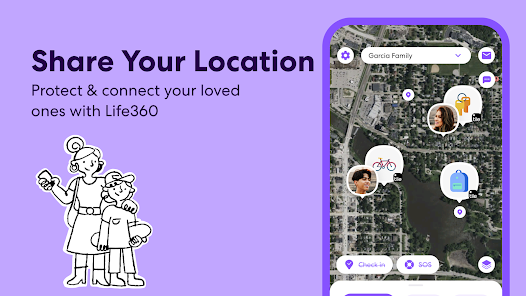
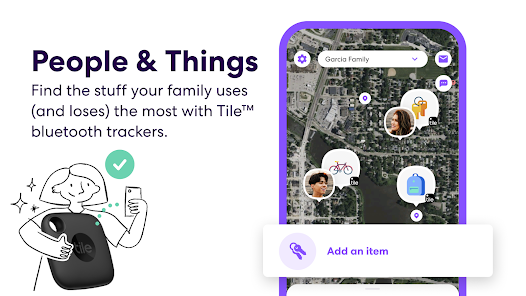
Life360 is a family location-sharing app that goes way beyond just pinging someone's GPS coordinates. You download it from Google Play or App Store to create a private circle, usually with family or close friends, so everyone can see each other's real-time location on a shared map. The app has been installed over 100 million times and is free to download, though it pushes a subscription pretty aggressively. My first impression after launching it was mixed — the setup asks for a ton of permissions right away, which feels invasive, but the map interface itself is clean and intuitive once you get past the warnings. It also offers driving alerts, crash detection, and check-in features, so it feels less like a stalker tool and more like a digital safety net for people who worry about their kids or elderly parents.
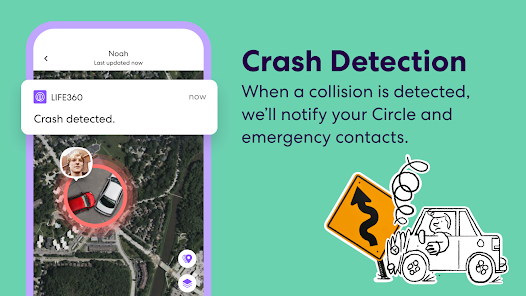
The actual hands-on experience starts with creating or joining a circle via invite link or phone number. Once you're in, the home screen shows a map with each member's avatar moving in real time — you can tap on a person to see their battery level, driving speed, or address history. Onboarding walks you through place alerts (like “arrived at school”) and driving reports, but I found some of the notification settings buried in menus. A smooth moment: the app sends a ping when someone leaves a preset location, which is handy for tracking curfew without constantly checking. One confusing part is the “Crash Detection” feature — it asks for emergency contacts during setup, but testing it feels morbid. A practical tip is to turn off “Places” if you don't want your home or work location logged, since that's on by default.
After using Life360 for a few weeks, I think it's solid for families with young drivers or elderly members who wander. It's more detailed than Google Maps location sharing, which just shows a static dot, and less creepy than Find My Friends because it focuses on driving alerts and SOS messages. But it's overkill for a couple or roommates — simpler apps like Zenly or Glympse handle basics without the constant subscription pop-ups. What stands out is the crash detection and roadside assistance, which actually feels like a legit feature, not just bloat. I kept it installed for trips but disabled background location on normal days — the battery drain is real. If you hate micromanaging notifications or sharing your every move, you'll probably uninstall it within a month.
features
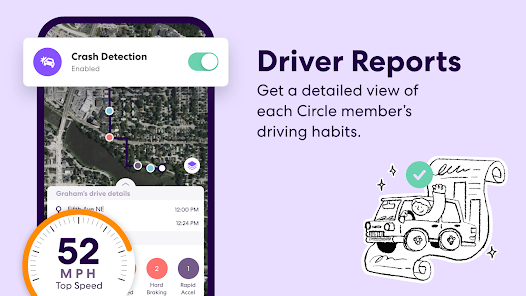
- 🔄 Real-time location with driving details: Life360 shows not just where someone is, but how fast they're driving, their route, and battery level. Google Maps location sharing only gives a static dot with no context — you can't tell if your kid is speeding or stopped.
- 🔄 Crash detection and emergency alerts: When it detects a car crash, it automatically texts your circle and emergency services. Find My Phone has zero safety features — it's just a locator.
- 🔄 Place alerts and geofencing: You can set zones like “school” or “home” and get notified when someone enters or leaves. Google Maps needs manual checking — no automated pings.
- 🔄 Driving reports: Tracks hard braking, phone use while driving, and speed. Most location apps like Zenly or Glympse have no driving analytics at all.
pros
- 👍 Crash detection actually works during real accidents, which is more trustworthy than Google Maps' bare-bones safety features.
- 👍 Geofencing alerts are immediate and customizable — much better than Find My Friends, which only sends static location updates.
- 👍 The community reporting feature for road hazards and police gives a Waze-like feel, making it more than just a family tracker.
cons
- 👎 Privacy feels invasive — Life360 collects browsing data and sells it to insurers, unlike Glympse which deletes locations after sharing.
- 👎 Free version is annoying with constant ads and subscription prompts — Zenly remains ad-free and simpler for basic needs.
Recommended Apps
![]()
BetterMe: Health Coaching
BetterMe Limited4.3
![]()
Walli - HD, 4K Wallpapers
Tap AI4.4![]()
Future Self - Old Age Filter
Vidler Koiter1.6
![]()
AI Photo Editor, Collage-Fotor
AI Art Photo Editor | Everimaging Ltd.4.3![]()
AI Face Swap: MagicFace &Photo
Braly JSC0![]()
QR Code Reader: QR Scanner
WECHOICE MOBILE4.3![]()
Lip Fall Challenge: Fun Filter
Braly JSC0![]()
Funny Reverse Audio - Singing
PlayStudioInc0![]()
Birthday Secrets
shasunder4.4![]()
Live Wallpapers HD 4K
Wallpaper app4.4![]()
Find Your Phone By Clap
Trusted App Global4.5![]()
Wizz - Expand Your World
Wizz3.8![]()
NCAA March Madness Live
NCAA Digital4.7![]()
Hulu: Stream TV shows & movies
Disney4.5![]()
Lethal Love: a Yandere game
AniByte!4.4















Disclaimer
1.Apklifts does not represent any developer, nor is it the developer of any App or game.
2.Apklifts provide custom reviews of Apps written by our own reviewers, and detailed information of these Apps, such as developer contacts, ratings and screenshots.
3. All trademarks, registered trademarks, product names and company names or logos appearing on the site are the property of their respective owners.
4.Apklifts abides by the federal Digital Millennium Copyright Act (DMCA) by responding to notices of alleged infringement that complies with the DMCA and other applicable laws.
5.If you are the owner or copyright representative and want to delete your information, please contact us [email protected].
6.All the information on this website is strictly observed all the terms and conditions of Google Ads Advertising policies and Google Unwanted Software policy.
7.Apklifts.com is an independent, information-only website which is 100% free to all the users.














