

PayByPhone

10M+
Installs
PayByPhone Technologies Inc .
Developer
-
Productivity
Category
-
Everyone
Content Rating
-
https://www.paybyphone.com/about/terms-privacy
Privacy Policy
Screenshots

editor reviews
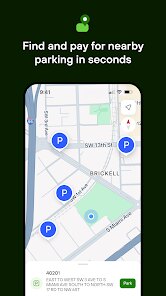
I first downloaded PayByPhone more out of convenience than anything else. It's a parking payment app, plain and simple, meant to replace the need for coins or digging for a credit card at a meter. You just set up an account once, and then you can pay for parking sessions right from your phone. On Google Play and the App Store, it's a free download and has been installed millions of times, so it's definitely not niche. When you first open it, you're met with a clean, no-nonsense screen asking for your location and vehicle details. It feels reassuringly purposeful, like the app knows you want to park quickly and doesn't waste your time with flashy animations.
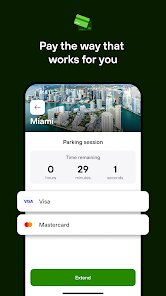
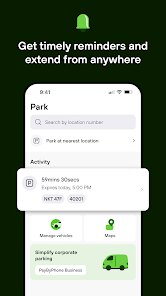
Using it day to day is where the app really earns its keep. The first time I tried it, I had to add my car's license plate and payment method, which took maybe two minutes. After that, the main screen shows a big “Park Now” button. You tap it, it finds your location automatically (or you can type in a zone number from a sign), selects your vehicle, and lets you choose how long you want to stay. There's a timer that shows you the cost in real time, which feels like being in a car park without any of the awkward math. A small but very handy feature is the reminder notification that pops up before your time expires, so you can easily extend it from wherever you are, which has saved me from a ticket more than once.
After a few months of using PayByPhone, I can say it's a solid tool that does exactly what it says. I'd recommend it to anyone who parks in cities regularly, especially if you hate carrying change. It's obviously not exciting, but it's polished enough that it feels reliable, which is what you need from an app like this. Compared to other parking apps like ParkMobile, PayByPhone feels slightly more minimal, but it charges the same convenience fees. For someone who parks occasionally, it might feel unnecessary since you can still use a meter. But for daily users, it's one of those small utilities that you keep installed because forgetting it would mean a much slower parking routine. I don't think I'll uninstall it unless my city stops supporting it.
features
- 🔍 Location-based zone entry – Instead of manually typing in your location, the app uses your GPS to show you nearby zones. It's not unique, but it works seamlessly, and the map adjusts quickly. In comparison, ParkMobile asks you to confirm by scanning a QR code on the sign, which feels like an extra step.
- ⏱ Real-time cost display – As you scroll the timer up or down, the total cost updates instantly. This is much better than the old guessing game at a meter. Another app, PayByPhone's direct rival RingGo, shows the same feature, but PayByPhone does it with a much less cluttered interface.
- 🛑 Reminder notifications – The app sends a text or push notification before your parking session ends. You can then extend it directly from that note without opening the app. Other apps like HonkMobile require you to go back into the menu to extend, which takes more taps.
- 📋 Multiple vehicle profiles – You can store more than one license plate under the same account and switch between them with one tap before paying. This is great if your household shares a car or you drive a rental. ParkMobile doesn't allow this as easily, needing you to delete and add again.
pros
- 🔒 Simple, secure payment setup – You link a credit card or PayPal once and forget about it. Compared to RingGo, which sometimes asks for extra verification, PayByPhone feels quicker and less intrusive.
- 📱 Clean user interface – The main screen has only what you need; no ads or unrelated offers. In contrast, Passport Parking often shows a busy dashboard with parking tips and offers that distract you from just paying.
- 🌐 Broad coverage – PayByPhone works in many cities across North America and Europe. It's about as widely accepted as ParkMobile, but in my experience, PayByPhone has fewer connectivity issues in underground lots.
cons
- 💰 Convenience fees can add up – You pay a small fee per transaction, usually around $0.35 to $0.50. Over a month of daily parking, this becomes noticeable. ParkMobile has similar fees, but RingGo sometimes runs promotions that waive them.
- 📉 App feels dated – The design hasn't changed much in years. It looks functional but not modern. ParkMobile has a more fresh, modern look with a nicer color scheme and smoother animations.
- ❌ No guest mode – You must create an account first. If you're in a hurry, that's frustrating. HonkMobile offers a “pay as a guest” option that lets you skip registration entirely.
Recommended Apps
![]()
Japevox - Funny Prank Sound
SecureTool4.3
![]()
AstroMatrix Birth Horoscopes
AstroMatrix4.7
![]()
Personalized Call from Santa (
www.PackageFromSanta.com4.3![]()
Prank Call - Fake Call & Chat
Bravestars Casual4.1![]()
Persona: Beauty Camera
TICKET TO THE MOON, INC.4.5![]()
Peacock TV: Stream TV & Movies
Peacock TV LLC4.5![]()
Instant Buttons Soundboard App
Snow Peak Apps2.1![]()
GPS Speedometer: Speed Tracker
SM Infotech3.2![]()
Subway®
SUBWAY Restaurants4.2![]()
Find Your Phone By Clap
Trusted App Global4.5![]()
Gorilla Skins for Monkey Arena
Dumitru Boico4![]()
Vimeo
Vimeo.com, Inc.3.8![]()
Vinted - Buy and sell clothes
Vinted4.6![]()
Galaxy Starry Keyboard Backgro
Fun Keyboard Theme for Android4.7![]()
Chat AI - Ask AI anything
AI Chat Bot, Ask AI4.4















Disclaimer
1.Apklifts does not represent any developer, nor is it the developer of any App or game.
2.Apklifts provide custom reviews of Apps written by our own reviewers, and detailed information of these Apps, such as developer contacts, ratings and screenshots.
3. All trademarks, registered trademarks, product names and company names or logos appearing on the site are the property of their respective owners.
4.Apklifts abides by the federal Digital Millennium Copyright Act (DMCA) by responding to notices of alleged infringement that complies with the DMCA and other applicable laws.
5.If you are the owner or copyright representative and want to delete your information, please contact us [email protected].
6.All the information on this website is strictly observed all the terms and conditions of Google Ads Advertising policies and Google Unwanted Software policy.
7.Apklifts.com is an independent, information-only website which is 100% free to all the users.













