

Google Chat

10,000,000+
Installs
Google LLC
Developer
-
Business
Category
-
Rated for 3+
Content Rating
-
apps-help@google.com
Developer Email
-
http://www.google.com/policies/privacy
Privacy Policy
Screenshots
editor reviews
Google Chat is Google's take on a team messaging app, sitting somewhere between a standard instant messenger and a full-blown collaboration hub. It's part of the Google Workspace family, so while you can download it for free from both Google Play and the App Store, it really shines when your workplace or school uses a Google account. After downloading and launching the app, the first impression is clean and familiar—it feels like a grown-up version of Google Messages, with that same Material Design look. The install count is in the billions, but the free download doesn't tell the full story; without a Workspace account, you only get basic features like 1-on-1 chats and limited file sharing. There are no annoying ads, but in-app purchases pop up if you try to access premium Workspace features.
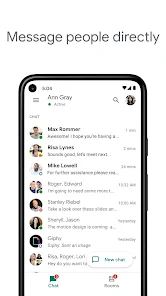
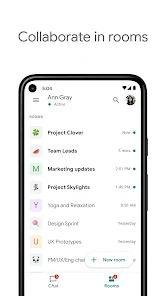
The actual hands-on experience starts with a straightforward onboarding that asks you to pick the right Google account. Once you're in, the main screen lists your direct conversations and spaces (which are group chat rooms). Tapping on a chat reveals a clean interface with a text bar, an emoji button, and a plus sign for sending files. The daily flow is simple: you reply to messages, maybe tag someone with @, and use the search bar at the top to find old conversations. What's a bit confusing at first is the difference between "Spaces" and standard group chats—Spaces feel more structured, with threads and tasks, while regular groups are just casual threads. A small practical tip is to use the "Pin" feature on important chats to keep them at the top. The app sometimes feels sluggish when switching between accounts, but overall, it's smooth for quick replies.
After using it for a while, my personal judgment is that Google Chat is a solid choice for teams already locked into Google's ecosystem, especially if you use Gmail, Drive, or Meet. It's not as flashy as Slack or as feature-packed as Microsoft Teams, but it's a lot less overwhelming for small teams who just need basic messaging with file sharing. The main difference is how deeply it integrates with Google tools—you can jump into a video call directly from a chat, or share a Doc without opening a new tab. The reason I'd keep it installed is the convenience of having everything tied to one Google account. But if your team relies on advanced workflows or custom integrations, you might eventually uninstall it for something like Slack. It's a decent app for casual business chats, but not for heavy project management.
features
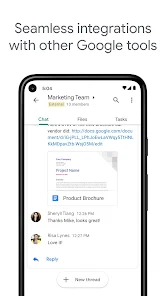
- 🔗 Direct integration with Google Workspace—Unlike Slack or Teams, Google Chat lets you edit a Google Doc, join a Google Meet, or access a Google Sheet without leaving the app. This seamless tie-in with Drive, Calendar, and Gmail is its standout feature.
- 💬 Threaded conversations in Spaces—While Slack also has threads, Google Chat's Spaces offer a more organized structure with assignable tasks and threaded replies. It feels less chaotic for project-based discussions.
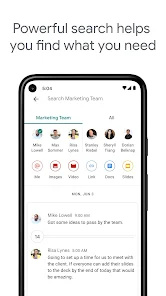
- 📁 Smart search across all Google apps—Search in Google Chat pulls results from Gmail, Drive, and Calendar. So if you're looking for a file from last month, you can find it without switching apps. Slack's search is limited to messages and files within the workspace.
pros
- 👍 Google Workspace integration is unmatched—For teams that already use Gmail, Drive, and Calendar, Google Chat feels like a natural extension. You don't need to install extra apps or sign up for new accounts. Slack requires more setup and subscription costs for full integration.
- 👍 Free tier is decent for casual use—Unlike Teams, which throttles free users with limited storage, Google Chat offers reasonable file sharing and chat history without paying. It's perfect for small groups or personal projects.
- 👍 Clean and minimal interface—The app avoids clutter. There are no sudden pop-ups or confusing menus. For someone switching from WhatsApp or Telegram, it's a familiar experience without the overload of Slack's sidebar.
cons
- 👎 Without a Workspace account, it's limited—Unlike WhatsApp or Telegram, which are fully functional for free users, Google Chat feels crippled if you're not on a paid plan. You lose Spaces, advanced search, and admin controls.
- 👎 Notification management is messy—On both Android and iOS, notifications from multiple accounts can overlap or get muted incorrectly. Slack does a much better job with customizable notification settings per channel.
- 👎 No custom emojis or stickers—While this sounds minor, competitors like Discord and Slack let users upload their own emojis. Google Chat sticks to basic emojis, which feels outdated for a modern messaging app.
Recommended Apps
![]()
Daily Horoscope
KADO Apps4.4
![]()
FOX Sports: Watch Live Games
Fox Digital Services, LLC3.7
![]()
Fake Call from Santa Claus
ThunderClap4.2![]()
Google Maps
Google LLC4.2![]()
PhotoLayers-Superimpose,Eraser
handyCloset Inc.4.6![]()
Healthy Benefits+
Solutran, Inc.4.5![]()
SuperMe - Avatar Maker Creator
THE.DEMON3.7![]()
Air Horn
Tenoku4.8![]()
Football Wallpaper HD 4K
Orange Infotech Studio4.6![]()
Artplay - AI Photo & Video
Hideaway Technology Limited4.5![]()
Horoscopes – Daily Zodiac Horo
Mail.Ru Group4.1![]()
Passport Parking
Passport Labs, Inc.2.5![]()
ParkMobile: Park. Pay. Go.
Parkmobile, LLC4.3![]()
FestAI: Ghost Detector App
Now Tech3.2![]()
Photo Tool
COLIFER LAB4





























