

Persona: Beauty Camera

5M+
Installs
TICKET TO THE MOON, INC.
Developer
-
Generative AI
Category
-
Rated for 3+
Content Rating
-
contact@persona.camera
Developer Email
-
https://persona.camera/privacy_policy_persona.html
Privacy Policy
Screenshots
editor reviews
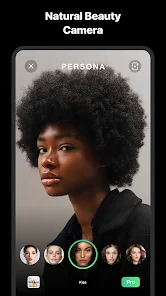
Beauty Camera is a selfie and portrait editing app developed by TICKET TO THE MOON, INC., designed specifically for people who want to enhance their facial features with minimal effort. When you first download and install it from Google Play or the App Store, the app greets you with a brightly designed interface that immediately suggests "prettiness" as a function, rather than professional photography. Many users, including myself, install it hoping for a quick way to look better in photos without learning complex editing tools. The first impression is fairly clean and modern, with large icons and a live preview of your camera, which makes you feel like you can start beautifying right away. It's free to download, though you'll quickly notice prompts for in-app purchases and occasional ads that interrupt the flow. Registration isn't mandatory, so you can jump straight into taking or uploading a photo, which is a relief for casual users who just want a fast fix.
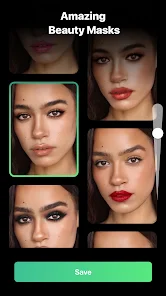
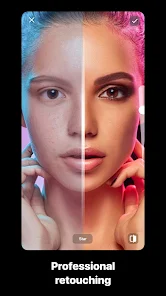
After you start using it, the hands-on experience is mostly straightforward but has a few rough edges. You snap a selfie or pick one from your gallery, and the app automatically applies a default smoothing effect to your skin, which some people love and others find a bit too aggressive. The main tools are laid out at the bottom: skin smoothing, eye enlargement, face slimming, and a few makeup filters. Navigating through these is easy, but adjusting the intensity requires sliding a bar that sometimes feels sensitive or laggy. I found myself occasionally resetting a change because the app over-corrected. A useful tip is to manually dial back the strength of each effect, since the defaults can make your face look unnaturally polished. The process feels quick for a simple edit, but switching between tools sometimes causes a brief freeze, which is annoying when you're in a hurry. Overall, it works fine for a touch-up, but it's not the smoothest ride.
After spending some time with Beauty Camera, my personal take is that it's best for users who want a one-tap solution without fuss, like someone posting a quick selfie on social media. It stands out from apps like Facetune or YouCam Perfect by being more beginner-friendly and less intimidating, but it falls short in customization and control. I could see someone keeping it installed if they just want a quick filter now and then, but power users will likely uninstall it because the effects are too generic and the ads become grating. Compared to Meitu, Beauty Camera feels less advanced and more limited, but it's also simpler to pick up. If you're someone who hates sliders and presets, this app might not win you over. For me, it was fun for a few days, but I ended up switching back to something with more room to tweak each feature.
features
- 🌸 One-tap beautification: Unlike Facetune, which requires manual pinpointing of each blemish, Beauty Camera applies a full-face smoothing and touch-up in a single button press. It's great for lazy users who want instant results without any precision work.
- 🌸 Real-time preview: While YouCam Perfect forces you to edit after taking a photo, Beauty Camera shows the beautified version live as you're framing the shot. This saves time and helps you adjust your angle before snapping.
- 🌸 Lightweight toolset: The app packs only the essential adjustments—skin, eyes, face shape—without burying you in menus. Meitu has dozens of filters and stickers that can overwhelm a beginner, but this app keeps everything visible on the main screen.
pros
- 🌟 Ease of use for non-techies: Beauty Camera requires no learning curve, unlike Photoshop Express or Snapseed, which demand familiarity with layers and masks. You literally open it, tap, and save your photo.
- 🌟 Fast processing speed: When you apply a filter or effect, the app renders changes almost instantly. Facetune can lag for a second or two after each slider move, but Beauty Camera feels snappier for basic edits.
- 🌟 Low storage footprint: The app is relatively small compared to Retrica or B612, which bundle in extra camera modes and stickers. If your phone is running low on space, this is a lighter choice that still delivers decent results.
cons
- 🔴 Lack of manual control: You can't erase or fine-tune specific areas like you can in Facetune. If you want to smooth just one cheek without touching the eyes, you're out of luck. The app treats the whole face as a single layer.
- 🔴 Aggressive defaults: The automatic smoothing is often too strong, making skin look waxy or plastic. You'll need to manually dial it back every time, which defeats the "one-tap" convenience you initially wanted.
- 🔴 Frequent ad interruptions: After every few edits, a full-screen video ad pops up. Meitu and YouCam Perfect have ads too, but they're less intrusive here because the app is so small that ads feel disproportionate.
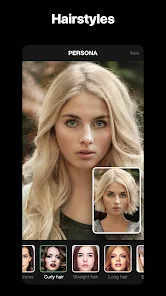
- 🔴 No advanced retouching tools: You can't whiten teeth, remove blemishes individually, or adjust hair color. If you're used to the depth of PicsArt or Remini, this app will feel like a toy rather than a utility.
Recommended Apps
![]()
Daily Horoscope
KADO Apps4.4
![]()
FOX Sports: Watch Live Games
Fox Digital Services, LLC3.7
![]()
Fake Call from Santa Claus
ThunderClap4.2![]()
Google Maps
Google LLC4.2![]()
PhotoLayers-Superimpose,Eraser
handyCloset Inc.4.6![]()
Healthy Benefits+
Solutran, Inc.4.5![]()
SuperMe - Avatar Maker Creator
THE.DEMON3.7![]()
Air Horn
Tenoku4.8![]()
Football Wallpaper HD 4K
Orange Infotech Studio4.6![]()
Artplay - AI Photo & Video
Hideaway Technology Limited4.5![]()
Horoscopes – Daily Zodiac Horo
Mail.Ru Group4.1![]()
Passport Parking
Passport Labs, Inc.2.5![]()
ParkMobile: Park. Pay. Go.
Parkmobile, LLC4.3![]()
FestAI: Ghost Detector App
Now Tech3.2![]()
Photo Tool
COLIFER LAB4





























