

Galaxy Starry Keyboard Backgro

1M+
Installs
Fun Keyboard Theme for Android
Developer
-
Productivity
Category
-
Rated for 3+
Content Rating
-
http://www.kikatech.com/privacy_en_kika_keyboard_theme.html
Privacy Policy
Screenshots

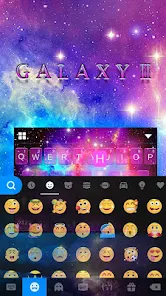
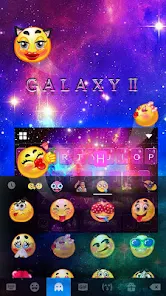

editor reviews
Galaxy Starry Keyboard Background is a customization app for Android that swaps out your default keyboard skin for space-themed visuals. It falls under the personalization category, aimed at people who want their phone's typing interface to look less boring. After downloading it from Google Play—where it shows a reasonable number of installs and is free to grab—you launch it and get hit with a gallery of starry, nebula-filled backgrounds right away. There's no account sign-up required, which is a relief, but you do notice that some of the nicer backgrounds are locked behind a payment or a short ad view. The first impression is that it's pretty, but the app feels a bit crowded with buttons trying to push you toward premium options.
When you actually start using it, the process is straightforward. You pick a background from the grid, tap "Apply," and the app walks you through enabling its own keyboard in your system settings. It's a typical step for these customization tools, so it didn't throw me off. Once enabled, the keyboard itself functions fine for basic typing—swipe typing works, and the keys are responsive. But I noticed that on some darker wallpapers, the letter labels can blend into the background, making you hunt for keys. A practical tip is to stick with backgrounds that have a clear contrast between the stars and the letters. The interface for browsing is just a simple list of thumbnails, and switching between wallpapers is quick, though the app sometimes stutters when loading a high-res preview over a slow connection.
After using it for a week, I'd say it's a decent pick if you're really into space aesthetics and get bored of your stock keyboard quickly. It's not for someone who needs advanced typing features like multilingual support or clipboard management—apps like Gboard or SwiftKey cover that ground much better. What sets it apart is the sheer variety of space images; some of them look genuinely stunning, like high-quality Hubble photos. But the constant nudge to watch ads or buy packs can get old, and the keyboard lacks extras like themes for key press sounds or popup styles. I'd keep it installed if I rotate wallpapers often, but for daily heavy typing, it feels more like a visual treat than a practical upgrade.
features
- 🚀 The main selling point is the collection of high-resolution space wallpapers, from glowing nebulas to detailed moon surfaces, which look more vibrant than what you get in Gboard's default theme gallery. The app updates its library occasionally, so you always have something new to try.
- 🚀 It offers a live preview feature where you can see how each background will look with a sample typing screen before applying it. SwiftKey doesn't have this exact preview tool, so it saves you from guessing how a dark wallpaper will affect readability.
- 🚀 You can mix and match keyboard backgrounds with different key press colors, giving you a bit of control over contrast. Gboard locks color changes behind its own theme editor, which can be slower to navigate.
- 🚀 The app runs entirely offline after you download a wallpaper pack, so you don't need an internet connection to switch skins. This is handy compared to SwiftKey, which often checks online for theme updates and can be sluggish without data.
pros
- 🌟 The wallpaper quality is noticeably better than what you find in free keyboard apps like GO Keyboard. The images are sharp and don't look pixelated on larger screens, which makes the typing area feel premium.
- 🌟 It requires zero permissions beyond basic keyboard access—no contact or storage permissions. This is a big win over older customization apps like Chrooma Keyboard, which ask for unnecessary access.
- 🌟 Applying a new background takes under ten seconds, even on budget phones. SwiftKey and Gboard can sometimes lag when loading a full theme, but this app keeps the process snappy.
cons
- 🌑 It lacks essential typing tools like swipe gestures for deleting words or a dedicated number row. Gboard has these built right into the keyboard, making daily messaging much faster.
- 🌑 The app doesn't support third-party dictionaries or multilingual typing. SwiftKey shines in this area with its multi-language prediction, so this app falls short for anyone who types in two languages.
- 🌑 Free wallpapers are limited; many of the best-looking ones require watching a video ad or paying a small fee. In comparison, Microsoft SwiftKey offers hundreds of free themes with no ad interruptions.
- 🌑 There's no dark mode for the app's own interface, so browsing backgrounds at night can be harsh on the eyes. Most competing keyboard apps now include a system-wise dark mode that this one doesn't.
Recommended Apps
![]()
Japevox - Funny Prank Sound
SecureTool4.3
![]()
AstroMatrix Birth Horoscopes
AstroMatrix4.7
![]()
Personalized Call from Santa (
www.PackageFromSanta.com4.3![]()
Prank Call - Fake Call & Chat
Bravestars Casual4.1![]()
Persona: Beauty Camera
TICKET TO THE MOON, INC.4.5![]()
Peacock TV: Stream TV & Movies
Peacock TV LLC4.5![]()
Instant Buttons Soundboard App
Snow Peak Apps2.1![]()
GPS Speedometer: Speed Tracker
SM Infotech3.2![]()
Subway®
SUBWAY Restaurants4.2![]()
Find Your Phone By Clap
Trusted App Global4.5![]()
Gorilla Skins for Monkey Arena
Dumitru Boico4![]()
Vimeo
Vimeo.com, Inc.3.8![]()
Vinted - Buy and sell clothes
Vinted4.6![]()
Galaxy Starry Keyboard Backgro
Fun Keyboard Theme for Android4.7![]()
Chat AI - Ask AI anything
AI Chat Bot, Ask AI4.4














Disclaimer
1.Apklifts does not represent any developer, nor is it the developer of any App or game.
2.Apklifts provide custom reviews of Apps written by our own reviewers, and detailed information of these Apps, such as developer contacts, ratings and screenshots.
3. All trademarks, registered trademarks, product names and company names or logos appearing on the site are the property of their respective owners.
4.Apklifts abides by the federal Digital Millennium Copyright Act (DMCA) by responding to notices of alleged infringement that complies with the DMCA and other applicable laws.
5.If you are the owner or copyright representative and want to delete your information, please contact us [email protected].
6.All the information on this website is strictly observed all the terms and conditions of Google Ads Advertising policies and Google Unwanted Software policy.
7.Apklifts.com is an independent, information-only website which is 100% free to all the users.













