Peacock TV: Stream TV & Movies

10,000,000+
Installs
Peacock TV LLC
Developer
-
Entertainment
Category
-
Rated for 12+
Content Rating
-
https://www.peacocktv.com/privacy
Privacy Policy
Screenshots
editor reviews
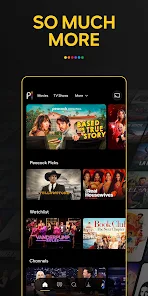
Peacock TV is a streaming service that mostly focuses on NBCUniversal's huge library of shows, movies, news, and live sports. You install it from the Google Play or App Store, and the download itself is free—no upfront cost to get the app on your phone or TV. When I first launched it, I was honestly a bit overwhelmed by the sheer amount of content staring back at me. The home screen throws a ton of tiles your way, with sections for trending shows, live channels, and recommendations all jumbled together. For a normal user, the main draw is the free tier, which gives you access to a surprising amount of stuff without needing to pay a cent, though you will see ads. Registration is required even for the free access, which is a minor hurdle, but once you're in, the sheer volume of classic sitcoms, reality TV, and recent movies makes it feel like a decent bargain.
After spending a few hours browsing, the interface feels functional but a bit clunky. The onboarding process just drops you into the main feed with a quick prompt to pick your favorite genres, which helps a little with personalization. When I wanted to watch an old episode of The Office, I tapped the search icon, typed the title, and the results popped up fast. The real hands-on experience, though, is navigating the live TV guide. It's tucked away in a side menu, and scrolling through those channels can be sluggish on older devices. A smooth moment was finding the “Continue Watching” row, which actually picked up right where I left off in a movie. But a confusing part was the pricing tiers—it's not immediately clear what's free versus what's locked behind the Peacock Premium paywall, leading to a few frustrating taps on locked content. A practical tip: always check the “Channels” tab, as it mimics traditional cable flipping.
After using it for a few weeks, I think Peacock is a solid choice if you're into NBC shows like Law & Order or Saturday Night Live, or if you want live sports like Premier League soccer without a huge cable bill. It really stands apart from Netflix or Hulu because of that live TV element and the massive back catalog of older series, but it doesn't have the polish of Disney+ or the original movie library of HBO Max. I could see someone keeping it installed if they already pay for the ad-free tier to avoid interruptions, but the free version's frequent commercials might push casual users to uninstall in favor of ad-free competitors like Paramount+. It's not a must-have app, but for those niche moments—live WWE events or a 30 Rock binge—it finds a cozy spot on my home screen.
features
- 🎬 Vast content library with a live TV twist: Unlike Netflix, which is purely on-demand, Peacock includes live channels. You can scroll through NBC News Now, WWE events, or Premier League matches in real time, then instantly switch to an on-demand series. This hybrid approach feels fresh.
- 🎬 Free tier that actually gives value: Most services like Disney+ or HBO Max don't offer a free ad-supported version. Peacock lets you watch thousands of hours of content without paying a dime, including full seasons of Parks and Rec or The Office, which is rare.
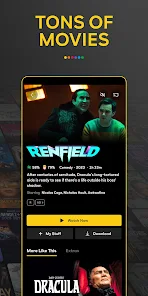
- 🎬 Niche content curation for specific audiences: Peacock excels at bundling weird but beloved stuff, like classic monster movies or The Real Housewives marathons. Hulu has similar content, but Peacock groups it into dedicated channels that feel like mini festivals for fans.
- 🎬 Seamless device syncing: I started a movie on my phone, then picked it up on my smart TV without any lag or login hassle. Apps like Paramount+ sometimes struggle with this, but Peacock's sync is quick and reliable.
pros
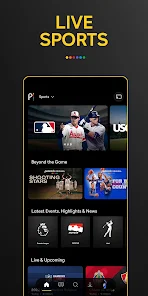
- 👍 Living TV channels for sports fans: Live sports on Peacock, like Premier League or golf, are integrated directly into the app. Services like Amazon Prime have live sports too, but Peacock makes finding upcoming games easier with a dedicated sports tab.
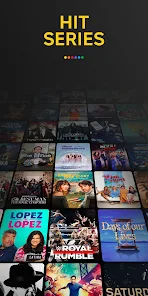
- 👍 Massive back catalog of older shows: While Netflix often removes older seasons, Peacock preserves classics like Cheers, Battlestar Galactica, and Downton Abbey. This library feels deeper than Hulu's for vintage content.
- 👍 No hidden fees for the base experience: You don't have to commit to a subscription upfront like Apple TV+. The free tier is generous, and you can watch ads instead of paying, which beats other free ad-supported apps like Pluto TV in content quality.
cons
- 👎 Annoyingly cluttered interface: The home screen is overcrowded compared to Apple TV's clean layout. Finding specific genres requires extra tapping, and the menu hierarchy feels messy.
- 👎 Premium tiers feel confusing: Unlike Netflix's clear subscription plans, Peacock has Premium and Premium Plus options with different ad levels and content access. It's easy to accidentally click a locked show and get frustrated.
- 👎 Performance issues on older devices: On a four-year-old smart TV, the app lagged when loading live channels or scrubbing through video. Other services like Disney+ or HBO Max ran much smoother on the same hardware.
- 👎 Limited offline downloads: Compared to Netflix's robust download feature, Peacock's offline option only works on the paid tiers, and the selection is smaller. You can't save most live events for later viewing.
Recommended Apps
![]()
Get Robux Gift Card RedeemCode
Pradeep Harsoor DEVs4.5

![]()
Google One
Google LLC4.1![]()
AI Video - AI Video Generator
HubX4.5![]()
Starla - Call the Universe
Mindbots LLC4.6![]()
Numerology Rediscover Yourself
Mirofox4.8![]()
DramaBox - Stream Drama Shorts
STORYMATRIX4.6![]()
GPS Maps Voice Navigation
Green Lines4.8![]()
Yousician: Learn & Play Guitar
Yousician Ltd.4.5![]()
Life Palmistry - Palm & Aging
Bluewolf Technology Limited4.3![]()
What is my name meaning
Code Play0![]()
Football Wallpaper HD 4K
Orange Infotech Studio4.6![]()
TeraBox: 1TB Cloud & AI Space
Flextech Inc.4.4![]()
Pencil Sketch
Dumpling Sandwich Software Inc.4.7![]()
Face Live Camera: Face Filters
Lyrebird Studio4.1![]()
Daily Horoscope 2024
Code Blenders4.3














Disclaimer
1.Apklifts does not represent any developer, nor is it the developer of any App or game.
2.Apklifts provide custom reviews of Apps written by our own reviewers, and detailed information of these Apps, such as developer contacts, ratings and screenshots.
3. All trademarks, registered trademarks, product names and company names or logos appearing on the site are the property of their respective owners.
4.Apklifts abides by the federal Digital Millennium Copyright Act (DMCA) by responding to notices of alleged infringement that complies with the DMCA and other applicable laws.
5.If you are the owner or copyright representative and want to delete your information, please contact us [email protected].
6.All the information on this website is strictly observed all the terms and conditions of Google Ads Advertising policies and Google Unwanted Software policy.
7.Apklifts.com is an independent, information-only website which is 100% free to all the users.