

Google Gemini

100M+
Installs
Google LLC
Developer
-
Generative AI
Category
-
Teen
Content Rating
-
apps-help@google.com
Developer Email
-
https://support.google.com/bard/answer/13594961
Privacy Policy
Screenshots
editor reviews
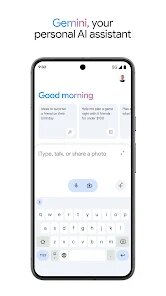
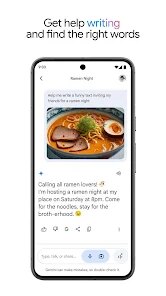
I've been using Google Gemini on and off since it launched. It's essentially Google's answer to the whole AI assistant space, sitting somewhere between a chatbot and a digital helper. You can use it for brainstorming, summarizing long articles, drafting emails, or even just having a casual conversation. I downloaded it from the Play Store after hearing about it during Google's I/O event last year. The install was quick, and it's free to download, though there's a paid tier that unlocks more advanced models. The first time I opened it, I was greeted by a clean, minimalist interface—just a text bar and a few suggestions. Honestly, my first impression was that it felt a lot like ChatGPT's app, but with Google's signature Material You design. You don't need to make an account if you already have a Google one, which is convenient. I haven't seen any ads so far, which is nice.
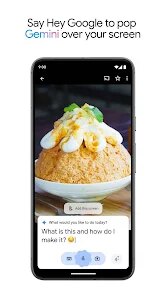
Once you start using it, the experience is pretty straightforward. You type your question or prompt into the chat bar, and it responds almost instantly. The onboarding is minimal—you get a few tips about what you can do, but then it throws you right into it. I found the interface smooth and responsive, though occasionally it would take a second or two to generate a longer response. A typical session for me involves asking for recipe ideas, getting summaries of news articles, or asking it to explain a complex topic in simple terms. One minor annoyance is that sometimes it struggles with conversation context in longer chats—it might forget what we talked about three messages back. A practical tip I picked up: if you want more accurate answers, be specific in your prompts. The app lets you upload images and PDFs, which is a huge plus for students or researchers. I tried uploading a screenshot of a spreadsheet, and it managed to read the data correctly, though it made a small error interpreting a column header. Small stuff like that reminds me it's still evolving.
After using it for a few weeks, I have mixed feelings. If you're someone who's already deep in Google's ecosystem—using Gmail, Drive, and Calendar—Gemini can be incredibly useful because it integrates with those services. For example, it can check your Google Calendar for free slots and suggest meeting times. That's something ChatGPT can't do out of the box. On the flip side, if you're just looking for a general-purpose chatbot, you might not notice a huge difference between Gemini and something like ChatGPT or Claude. What sets Gemini apart is its connection to Google's massive data and search capabilities, which makes it better at answering real-time questions—like current events or sports scores—without needing to manually enable web browsing. I've kept it installed mostly because of that integration, but I've seen others uninstall it because they preferred ChatGPT's more polished conversational style. It's not a bad app by any stretch, but it feels like it's still catching up in some areas.
features
- 🧠 Real-time search integration: Unlike ChatGPT, which requires a manual toggle to browse the web, Gemini can tap into Google Search automatically for live data. I asked it about yesterday's sports results, and it gave me accurate, up-to-date scores without any extra commands. This is a major time-saver for anyone who needs current information regularly.
- 📁 File upload for analysis: Gemini lets you upload images, PDFs, and even spreadsheets directly into the chat. I tested this by uploading a PDF of a research paper, and it summarized the key findings in seconds. ChatGPT Plus can do this too, but Gemini handles it on the free tier, which is a big deal for budget-conscious users.
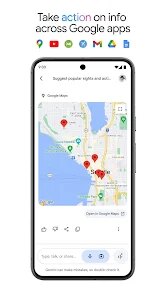
- 🌐 Google ecosystem integration: If you use Gmail, Google Calendar, or Drive, Gemini can pull information from those services to provide context-aware answers. For instance, I asked it to check my upcoming meetings, and it scanned my calendar and listed them. This seamless integration is something standalone chat assistants like Claude or Bing Chat can't offer without workarounds.
- 🎨 Material You design: The app looks and feels like a natural part of Android. The dynamic colors and clean layout make it pleasant to use, especially compared to some third-party AI apps that feel clunky. It's a small thing, but it makes daily interaction more enjoyable.
pros
- ✅ Free access to advanced AI: Unlike ChatGPT, which locks GPT-4 behind a $20 monthly subscription, Gemini offers a powerful model for free. I've used both, and while ChatGPT's paid version is more polished, Gemini's free tier is surprisingly capable for everyday tasks like writing and research.
- ✅ No ads: Many free apps, including some AI tools, bombard you with ads or upsells. Gemini is completely ad-free in my experience, which makes the user experience feel premium. Microsoft's Copilot, for comparison, sometimes pushes ads for Office 365.
- ✅ Fast response times: Gemini generally responds quicker than ChatGPT, especially for simple queries. I timed a few—while ChatGPT often takes 2-3 seconds, Gemini usually replies in under a second for short prompts. This speed makes it feel more conversational and less like you're waiting for a server.
cons
- ❌ Inconsistent memory: Gemini struggles to maintain context over long conversations. I've had it forget what we discussed just three messages back, which is frustrating when you're building on a previous idea. For example, after I asked it to suggest a workout plan, I followed up with “add more cardio,” and it restarted from scratch. ChatGPT handles long-term context much better.
- ❌ Occasional factual errors: While Gemini excels at real-time data, it sometimes makes mistakes with nuanced topics. I asked it to explain a legal concept, and it gave me an oversimplified answer that was technically incorrect. This is less common with something like Perplexity AI, which cites sources more clearly.
- ❌Limited creative writing: For creative tasks like poetry or storytelling, Gemini feels stiff. Its outputs are often more formal and less imaginative compared to Claude or ChatGPT. I tried asking it to write a short story, and the result felt robotic, with repetitive phrasing.
Recommended Apps
![]()
Daily Horoscope
KADO Apps4.4
![]()
FOX Sports: Watch Live Games
Fox Digital Services, LLC3.7
![]()
Fake Call from Santa Claus
ThunderClap4.2![]()
Google Maps
Google LLC4.2![]()
PhotoLayers-Superimpose,Eraser
handyCloset Inc.4.6![]()
Healthy Benefits+
Solutran, Inc.4.5![]()
SuperMe - Avatar Maker Creator
THE.DEMON3.7![]()
Air Horn
Tenoku4.8![]()
Football Wallpaper HD 4K
Orange Infotech Studio4.6![]()
Artplay - AI Photo & Video
Hideaway Technology Limited4.5![]()
Horoscopes – Daily Zodiac Horo
Mail.Ru Group4.1![]()
Passport Parking
Passport Labs, Inc.2.5![]()
ParkMobile: Park. Pay. Go.
Parkmobile, LLC4.3![]()
FestAI: Ghost Detector App
Now Tech3.2![]()
Photo Tool
COLIFER LAB4





























