

Prank Call - Fake Call & Chat

5M+
Installs
Bravestars Casual
Developer
-
Lifestyle
Category
-
Everyone
Content Rating
-
https://publish.bravestars.com/privacy.txt
Privacy Policy
Screenshots
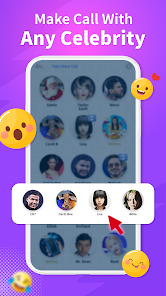
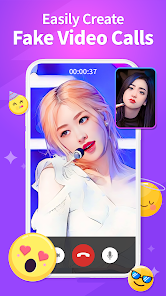


editor reviews
So I stumbled upon Prank Call - Fake Call & Chat by Bravestars Casual, which is basically a prank tool app designed to simulate incoming calls and text conversations. You download it, install it from Google Play or the App Store, and right away it's free, with a solid install count in the millions. The whole point is to give you a fake incoming call or chat that looks real, so you can slip out of awkward situations or just mess with friends. After launching, the first thing that hits you is this super clean, cartoonish interface with bright colors, and there's a quick tutorial that shows you how to set up a fake call with a custom contact name, photo, and even a voice option. It's surprisingly straightforward, and you don't need to sign up for anything, though there are in-app purchases if you want extra voice packs or to remove ads.
Once you start using it, the experience is pretty hands-on. You open the app, and you see a big button to "Create Fake Call" right on the home screen. You pick a contact from your phone or make one up, choose a ringtone, set a delay, and then it's ready. When the fake call comes in, the screen looks just like a real incoming call, with the contact photo and everything, and you can answer it to hear a pre-recorded voice on the other end. It's smooth, but sometimes the voice clips sound a bit robotic, which can ruin the illusion if someone's listening closely. The chat feature is similar, you set up a fake conversation with another person, and messages pop up in real time. I found it handy for getting out of boring meetings, just pretend you're getting an urgent call, but you have to be careful with the timing, because if you set the delay too short, it feels rushed.
After using it for a while, I'd say it's a fun little tool for specific moments, but it's not something you'll use every day. People who enjoy pranks or need a quick escape from social situations will get a kick out of it, but if you're looking for something more serious or permanent, this isn't it. Compared to other prank apps like Fake Call - Prank Call Simulator, this one stands out because of the voice feature and the easy customization, but the ads can be annoying, and some voice clips feel low quality. I kept it installed because it's handy for emergencies, but I can see others uninstalling it after a few uses because it's not really a long-term app. Overall, it's a decent prank tool that does what it says, but don't expect miracles.
features
- 😏 Customizable Fake Calls: You can set up a fake call with any contact name, photo, and even a pre-recorded voice from a library of options. It feels very real on the screen, and you can choose the delay time. Compared to Fake Call - Prank Call Simulator, which only lets you use preset contacts, this one gives you full control, so the prank feels more convincing.
- 😏 Chat Simulation: You can create a fake conversation with timed messages that appear one by one, making it look like you're texting someone. It includes stickers and emojis to make it more realistic. Other apps like Prank Chatting just show static messages, but here the messages pop up in real time, which adds to the illusion.
- 😏 No Registration Required: You don't need to sign up or create an account to use the core features. Just download, install, and start setting up pranks right away. Apps like Fake Caller often ask for permissions or account creation, which slows things down, so this is a big plus for quick use.
pros
- 👍 Easy to Use: The interface is really simple, with big buttons and clear instructions. Even if you're not tech-savvy, you can set up a fake call in under a minute. Compared to Prank Caller, which has a cluttered layout, this one is much more beginner-friendly.
- 👍 Realistic Call Screen: When the fake call comes in, the screen looks identical to a real incoming call, including the contact photo and ringtone. It's convincing enough to fool people nearby. Other apps often have a cheap-looking interface that gives the prank away.
- 👍 Good for Social Situations: It's perfect for getting out of awkward conversations or boring events. You can schedule a fake call to rescue yourself, and it works smoothly. Apps like Escape Call don't offer as much customization, so this one feels more tailored.
cons
- 👎 Voice Quality Issues: The pre-recorded voice clips sound robotic or unnatural at times, which can ruin the prank if someone listens closely. Fake Call - Prank Call Simulator has better voice quality, so this feels like a letdown.
- 👎 Ads Can Be Annoying: There are frequent ads, especially after setting up a fake call or chat. They interrupt the flow, and you have to wait or watch to continue. Other apps like Prank Chatting have fewer ads, making the experience smoother.
- 👎 Limited Free Content: While the app is free to download, many voice packs and customization options require in-app purchases. If you don't pay, you're stuck with a small selection, which feels limiting compared to Fake Caller, which offers more free features.
Recommended Apps
![]()
BetterMe: Health Coaching
BetterMe Limited4.3
![]()
Walli - HD, 4K Wallpapers
Tap AI4.4![]()
Future Self - Old Age Filter
Vidler Koiter1.6
![]()
AI Photo Editor, Collage-Fotor
AI Art Photo Editor | Everimaging Ltd.4.3![]()
AI Face Swap: MagicFace &Photo
Braly JSC0![]()
QR Code Reader: QR Scanner
WECHOICE MOBILE4.3![]()
Lip Fall Challenge: Fun Filter
Braly JSC0![]()
Funny Reverse Audio - Singing
PlayStudioInc0![]()
Birthday Secrets
shasunder4.4![]()
Live Wallpapers HD 4K
Wallpaper app4.4![]()
Find Your Phone By Clap
Trusted App Global4.5![]()
Wizz - Expand Your World
Wizz3.8![]()
NCAA March Madness Live
NCAA Digital4.7![]()
Hulu: Stream TV shows & movies
Disney4.5![]()
Lethal Love: a Yandere game
AniByte!4.4















Disclaimer
1.Apklifts does not represent any developer, nor is it the developer of any App or game.
2.Apklifts provide custom reviews of Apps written by our own reviewers, and detailed information of these Apps, such as developer contacts, ratings and screenshots.
3. All trademarks, registered trademarks, product names and company names or logos appearing on the site are the property of their respective owners.
4.Apklifts abides by the federal Digital Millennium Copyright Act (DMCA) by responding to notices of alleged infringement that complies with the DMCA and other applicable laws.
5.If you are the owner or copyright representative and want to delete your information, please contact us [email protected].
6.All the information on this website is strictly observed all the terms and conditions of Google Ads Advertising policies and Google Unwanted Software policy.
7.Apklifts.com is an independent, information-only website which is 100% free to all the users.














