

Google Meet (original)

500,000,000+
Installs
Google LLC
Developer
-
Business
Category
-
Rated for 3+
Content Rating
-
apps-help@google.com
Developer Email
-
http://www.google.com/policies/privacy
Privacy Policy
Screenshots


editor reviews
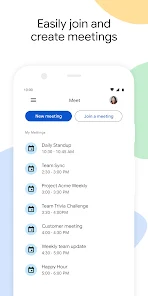
Google Meet is Google's no-fuss video calling app that comes baked right into most Android phones and Chromebooks these days. It's not really the app you seek out on your own—it's the one that's already there when you need to jump on a quick work call or join a family hangout. At its core, Meet handles one thing well: letting people chat face-to-face through a screen. Tons of folks download it by default on new devices, and it's free to grab from the Google Play Store or Apple's App Store, with no forced registration beyond your Google account. I remember the first time I opened it—it's almost boringly clean, just a big green button that says “New meeting” staring back at you. No flashy intro, no ads, no “upgrade now” nagging. That simplicity sticks with you, but you also can't help wondering if there's more hiding under the surface.
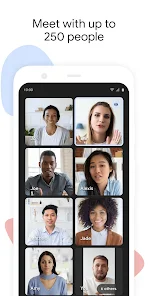
Actually using Google Meet is where it gets real. The interface is stripped down compared to something like Zoom. Once you start or join a meeting, the main video feed dominates the screen, with a small row of controls at the bottom: mute, camera toggle, captions, screen share, and the red hang-up button. The onboarding is almost nonexistent, which honestly works in its favor. You tap a link, grant camera and mic permissions, and you're in. For a casual user, the flow feels natural—no waiting for a virtual lobby or wrestling with settings. I've had moments where the audio crackled or the video lagged on a spotty connection, but the built-in noise cancellation does a decent job filtering out background hum. One small trick I picked up: you can pin a specific person's video if you want to keep them front and center during a group chat. It's these little touches that make daily use less frustrating, though the lack of reaction emojis or breakout rooms makes it feel a bit barebones for parties or classrooms.
After spending enough time with Google Meet, I've settled on a pretty balanced opinion. It's fantastic for anyone who needs zero-fuss calls—think remote workers hopping between meetings or grandparents wanting to see the grandkids without learning a new app each week. But if you're a teacher running interactive lessons or a host planning a virtual game night, you might feel cramped. Compared to FaceTime, Meet offers screen sharing and captions, which are huge pluses for work; compared to Zoom, it lacks the fun filters or robust meeting controls. The thing that keeps me from uninstalling it is just how seamless it is with my Google Calendar and Gmail—one click and I'm in a call, no extra steps. Still, I've had friends ditch it for Discord because Meet's mobile interface can feel sluggish during long chats, and the 60-minute time limit on free calls (before it kicked in during the pandemic) still lingers in my memory. It's a solid tool, but not a flashy one.
features
- 💻 Google Meet integrates directly with Google Calendar and Gmail. You click a meeting link in your event, and the app opens automatically—no downloading separate add-ons or copying codes. Zoom requires manual linking or plugins for calendar integration, which adds friction for everyday users.
- 🛡️ Built-in noise cancellation and live captions run in real-time. While Zoom also offers captions, Meet's are more accurate in my experience during English calls. The noise filter works even on a laptop's built-in mic, cutting out keyboard clatter or dog barks without extra setup.
- 🌐 No client download needed for guests. You can share a Meet link with someone, and they join through their browser—no plugin, no account creation. Zoom forces a download for full functionality, which can trip up less tech-savvy participants.
- 🔒 End-to-end encryption for all calls. Meet encrypts video and audio by default, unlike some competitors that reserve this for paid tiers. This gives a genuine privacy edge for personal or sensitive conversations.
pros
- 🔗 Seamless Google ecosystem integration. If you live in Gmail, Calendar, or Drive, Meet feels like an extension of those apps. Zoom or Microsoft Teams require separate logins and navigation, which adds clicks.
- 🎯 Lightweight and low-overhead design. The app uses less battery and RAM on older phones compared to FaceTime on heavy usage or Zoom during long sessions. It's ideal for budget devices.
- 🛑 No ad interruptions. Unlike free versions of Skype or some third-party video apps, Google Meet shows zero promotional banners before or during calls. This keeps the experience clean and focused.
cons
- 🧩 Limited features for interactive sessions. There are no breakout rooms, virtual backgrounds get messy with poor lighting, and you cannot react with emojis or raise a hand. Zoom handles these tasks far better for educators or event hosts.
- ⏳ Free calls cap at 60 minutes. After an hour, the call automatically ends, forcing a restart. Both FaceTime and Discord offer unlimited free call durations, which is a pain for long catch-ups or work sessions.
- 📱 Clunky mobile multitasking. Switching apps during a call often stops video or mutes the audio stream. Zoom's mobile app handles backgrounding more gracefully, keeping video running in a small window.
- 🎛️ Minimal customization in grid view. You cannot easily reorder participant tiles or have the app remember your preferred layout. Google Meet feels less polished than Microsoft Teams for managing large group calls.
Recommended Apps
![]()
Daily Horoscope
KADO Apps4.4
![]()
FOX Sports: Watch Live Games
Fox Digital Services, LLC3.7
![]()
Fake Call from Santa Claus
ThunderClap4.2![]()
Google Maps
Google LLC4.2![]()
PhotoLayers-Superimpose,Eraser
handyCloset Inc.4.6![]()
Healthy Benefits+
Solutran, Inc.4.5![]()
SuperMe - Avatar Maker Creator
THE.DEMON3.7![]()
Air Horn
Tenoku4.8![]()
Football Wallpaper HD 4K
Orange Infotech Studio4.6![]()
Artplay - AI Photo & Video
Hideaway Technology Limited4.5![]()
Horoscopes – Daily Zodiac Horo
Mail.Ru Group4.1![]()
Passport Parking
Passport Labs, Inc.2.5![]()
ParkMobile: Park. Pay. Go.
Parkmobile, LLC4.3![]()
FestAI: Ghost Detector App
Now Tech3.2![]()
Photo Tool
COLIFER LAB4





























