
Truecaller: Caller ID & Block

1,000,000,000+
Installs
Truecaller
Developer
-
Social
Category
-
Rated for 3+
Content Rating
-
https://www.truecaller.com/privacy-policy
Privacy Policy
Screenshots
editor reviews
Truecaller is one of those apps that almost feels like a necessity once you start using it, especially if you get a lot of spam calls or unknown numbers ringing your phone. It's a caller identification and spam blocking app available on both Google Play and the App Store. You download and install it for free from either platform, and right after launching, it asks for permissions to access your contacts and call logs. The first impression is a bit mixed, honestly — you get a clean interface but it immediately feels like you are handing over a lot of your phone's data to the app. Registration requires a phone number, and there are in-app purchases for premium features, plus ads in the free version. The install count is massive, over 100 million on Android alone, which makes sense because this app has been around for years.
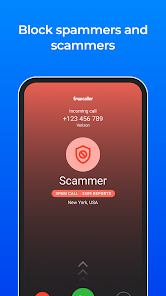
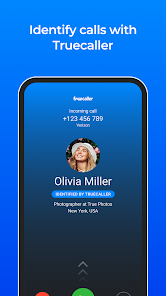
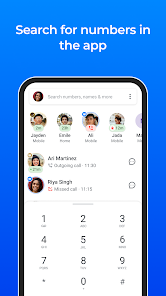
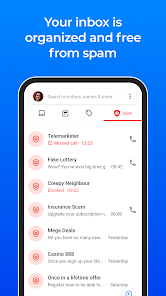
Once you actually start using Truecaller, the experience becomes more straightforward. After you give it the needed permissions, it begins identifying incoming calls automatically, showing the caller's name even if they are not saved in your contacts. The spam detection kicks in quickly, flagging telemarketers and scam numbers with a red warning. You can also manually search for unknown numbers by typing them into the search bar, and the app pulls up information from its community database. The onboarding process walks you through these main actions, and I found it decent, though having to manually toggle off some aggressive notification suggestions was a small annoyance. One tip I picked up is you can block specific country codes or number patterns, which cuts down on international spam nicely. Navigating between the recent calls, contacts, and spam list is simple enough, but the ads occasionally pop up and interrupt the flow.
After using Truecaller for a little while, my take is that it works exactly as advertised for call identification and blocking, which is great if you constantly get bothered by unknown callers. However, the app does require a lot of personal data access and sends notifications that can feel pushy unless you customize the settings. People who rarely get spam calls or who value privacy more than convenience might not need this app, and could stick with simpler built-in phone features. What makes Truecaller stand out from similar apps like Hiya is its massive user database that keeps the spam list updated, and the community reporting feature feels useful. Still, I can see why some users uninstall it after a while — the ad frequency, battery drain, and data permissions make it feel heavy for everyday use. I have kept it installed mainly for identifying delivery drivers and unknown business calls, but I am not fully convinced it is for everyone.
features
- 🔍 Live Caller ID: Truecaller shows caller names and details for unknown numbers in real time, including business profiles. It triggers automatically during incoming calls, with no manual search needed. Compared to Google Phone, which only identifies verified business numbers, Truecaller casts a wider net for individual and spam numbers. This feature stands out for cutting through the guessing game of who is calling.
- 🚫 Smart Spam Blocking: The spam filter uses community reports to flag telemarketers and scammers before you pick up. You can block entire categories like financial scams or robocalls. Against Hiya, Truecaller's database feels larger and more reactive to new spam tactics, though it does rely heavily on user-shared data.
- 🔎 Reverse Phone Lookup: You can search any unknown number directly in the app, and it returns the caller's name and location via crowd-sourced data. This is more thorough than the basic lookup in Should I Answer, which only gives spam status. It is useful for checking missed calls from businesses or strangers.
- 📲 SMS and Call Backup: Truecaller offers cloud backup for text messages and call logs, which is a bonus. Competitors like CallApp lack this feature. It is handy when switching phones, though the free storage limit pushes you toward a subscription.
pros
- ✅ Extensive Spam Database: Truecaller's strength lies in its enormous user-driven spam database, which catches new scam numbers faster than most similar apps. It outperforms Hiya in variety and region coverage.
- ✅ Cross-Platform Reach: Unlike many caller ID apps limited to Android, Truecaller works on iOS too with similar functionality, making it consistent across devices. Should I Answer lacks this ecosystem flexibility.
- ✅ Community Reporting Feature: Users can report numbers in real time, which keeps the database fresh and reduces false positives better than the automated systems in apps like CallApp.
cons
- ❌ Heavy Data Collection: Truecaller requires access to your entire contact list and call logs, which raises privacy concerns. Hiya is less intrusive, only scanning incoming numbers.
- ❌ Frequent Ads in Free Version: The free tier interrupts the user experience with ads after searches and call notifications. Google Phone does this without any ads at all.
- ❌ Battery Drain: Background processes for live caller ID drain the battery noticeably over the day. Should I Answer runs lighter on system resources without constant scanning.
- ❌ Spam Flag Inconsistencies: Some legitimate numbers occasionally get incorrectly flagged as spam, which can block important calls. Hiya handles this with a more cautious flagging algorithm.
Recommended Apps
![]()
BetterMe: Health Coaching
BetterMe Limited4.3
![]()
Walli - HD, 4K Wallpapers
Tap AI4.4![]()
Future Self - Old Age Filter
Vidler Koiter1.6
![]()
AI Photo Editor, Collage-Fotor
AI Art Photo Editor | Everimaging Ltd.4.3![]()
AI Face Swap: MagicFace &Photo
Braly JSC0![]()
QR Code Reader: QR Scanner
WECHOICE MOBILE4.3![]()
Lip Fall Challenge: Fun Filter
Braly JSC0![]()
Funny Reverse Audio - Singing
PlayStudioInc0![]()
Birthday Secrets
shasunder4.4![]()
Live Wallpapers HD 4K
Wallpaper app4.4![]()
Find Your Phone By Clap
Trusted App Global4.5![]()
Wizz - Expand Your World
Wizz3.8![]()
NCAA March Madness Live
NCAA Digital4.7![]()
Hulu: Stream TV shows & movies
Disney4.5![]()
Lethal Love: a Yandere game
AniByte!4.4















Disclaimer
1.Apklifts does not represent any developer, nor is it the developer of any App or game.
2.Apklifts provide custom reviews of Apps written by our own reviewers, and detailed information of these Apps, such as developer contacts, ratings and screenshots.
3. All trademarks, registered trademarks, product names and company names or logos appearing on the site are the property of their respective owners.
4.Apklifts abides by the federal Digital Millennium Copyright Act (DMCA) by responding to notices of alleged infringement that complies with the DMCA and other applicable laws.
5.If you are the owner or copyright representative and want to delete your information, please contact us [email protected].
6.All the information on this website is strictly observed all the terms and conditions of Google Ads Advertising policies and Google Unwanted Software policy.
7.Apklifts.com is an independent, information-only website which is 100% free to all the users.














