

Move to iOS

100,000,000+
Installs
Apple
Developer
-
Productivity
Category
-
Rated for 3+
Content Rating
-
http://www.apple.com/privacy/privacy-policy/
Privacy Policy
Screenshots

editor reviews
Move to iOS is a utility app developed by Apple to help Android users transfer their data over to an iPhone or iPad for the first time. It's not something you'd open daily – it's a one-time migration tool. Most people download it from the Google Play store after buying a new Apple device, and it's completely free to install with no in-app purchases or annoying ads. Once you launch the app, the first impression is pretty straightforward: a clean, minimal interface that asks for permissions and walks you through the connection process. It feels designed to reduce the anxiety of switching platforms, which is probably why Apple keeps it simple and doesn't clutter it with anything unnecessary.
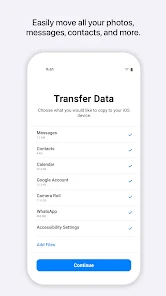
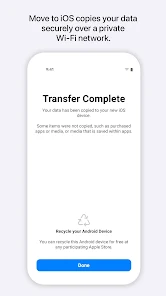
In practice, the experience is mostly smooth but has a few hiccups. When you start, you choose what to transfer: contacts, message history, photos, videos, mail accounts, calendars, and even WhatsApp data if you're on Android 5.0 or later. The app generates a temporary code on the iPhone side, which you enter on the Android phone to establish a peer-to-peer Wi-Fi connection. The handoff is easy to follow, but the waiting time depends on how much data you've got. For someone moving 20GB of photos, it might take over an hour, and the progress bar can sometimes freeze, making you wonder if anything's actually happening. A practical tip: keep both devices plugged into power and avoid switching apps during the transfer, or it'll drop the connection and you'll have to start over.
After using it, I'd say it's a solid choice for anyone switching from Android to Apple, especially if you want a straightforward, Apple-branded solution. But it's not perfect – it doesn't transfer app data (like game progress), home screen layouts, or system settings, so you'll still have to set those up manually. Compared to third-party tools like Samsung Smart Switch, which offer more granular control and faster speeds on some devices, Move to iOS feels slower and less flexible. Still, it's reliable enough for the basics, and since it's free and built by Apple, most new iPhone users will probably keep it installed only until the migration finishes, then delete it. People who love tinkering or have huge amounts of data might prefer something like CopyTrans PhoneTrans, but for a casual user with less than 10GB to move, this app does the job without any fuss.
features
- 📱 Wireless Transfer Without Cables – Unlike many Android migration tools that rely on USB-OTG cables or cloud uploads, Move to iOS sets up a direct peer-to-peer Wi-Fi link between devices. This means no tangled cables and no extra hardware needed, just a simple code entry to start moving data.
- 📱 Automatic WhatsApp Migration – Apple's app is one of the few that natively supports moving WhatsApp chat history from Android to iOS. Competing tools like Samsung Smart Switch or Google Drive backup don't handle this automatically, so you'd need extra software like WazzapMigrator, which adds complexity.
- 📱 Selective Data Transfer – You can pick exactly what moves over – contacts, messages, photos, videos, mail accounts, calendars, and WhatsApp data – without touching your Android phone's other files. PhoneTrans and dr.fone offer similar options, but Move to iOS keeps the selection screen much cleaner and less intimidating for first-time switchers.
pros
- ✅ Zero Cost, Zero Ads – Move to iOS is completely free with no in-app purchases or promotional interruptions. Other apps like PhoneTrans charge for premium features, and dr.fone requires a paid license for full transfers.
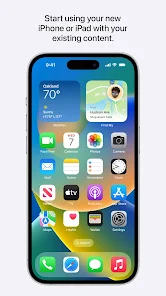
- ✅ Deep Apple Ecosystem Integration – Since it's developed by Apple, the transferred data syncs directly with iCloud and iOS defaults. For example, your mail accounts automatically configure with the Mail app and your calendars show up in Calendar, something third-party tools often mess up.
- ✅ Minimal Setup Overhead – The whole process only needs both devices on the same Wi-Fi network and a temporary code. Apps like Samsung Smart Switch demand more steps, like installing companion software on a PC or setting up a Samsung account.
cons
- ❌ Slow Transfer Speeds – Move to iOS uses a peer-to-peer Wi-Fi connection that can be noticeably slower than cable-based tools. Samsung Smart Switch via USB-C, for instance, transfers 20GB in under 30 minutes, while Move to iOS might take over an hour for the same amount.
- ❌ No App Data Transfer – Unlike dr.fone – Phone Transfer, which can move game progress and app settings from certain apps, Move to iOS only transfers system data and media. You'll lose all your logged-in app sessions and in-app purchases tied to Android accounts.
- ❌ Frequent Connection Drops – If you accidentally switch away from the Move to iOS app on Android during the transfer, the connection breaks and you have to restart the entire process. Other tools like PhoneTrans handle interruptions more gracefully by allowing partial restarts.
- ❌ Limited to One-Way Transfer – The app only works when moving from Android to iOS. If you ever switch back to Android, you'll need a completely different tool, whereas a service like Google Drive backup works in both directions.
Recommended Apps
![]()
Japevox - Funny Prank Sound
SecureTool4.3
![]()
AstroMatrix Birth Horoscopes
AstroMatrix4.7
![]()
Personalized Call from Santa (
www.PackageFromSanta.com4.3![]()
Prank Call - Fake Call & Chat
Bravestars Casual4.1![]()
Persona: Beauty Camera
TICKET TO THE MOON, INC.4.5![]()
Peacock TV: Stream TV & Movies
Peacock TV LLC4.5![]()
Instant Buttons Soundboard App
Snow Peak Apps2.1![]()
GPS Speedometer: Speed Tracker
SM Infotech3.2![]()
Subway®
SUBWAY Restaurants4.2![]()
Find Your Phone By Clap
Trusted App Global4.5![]()
Gorilla Skins for Monkey Arena
Dumitru Boico4![]()
Vimeo
Vimeo.com, Inc.3.8![]()
Vinted - Buy and sell clothes
Vinted4.6![]()
Galaxy Starry Keyboard Backgro
Fun Keyboard Theme for Android4.7![]()
Chat AI - Ask AI anything
AI Chat Bot, Ask AI4.4















Disclaimer
1.Apklifts does not represent any developer, nor is it the developer of any App or game.
2.Apklifts provide custom reviews of Apps written by our own reviewers, and detailed information of these Apps, such as developer contacts, ratings and screenshots.
3. All trademarks, registered trademarks, product names and company names or logos appearing on the site are the property of their respective owners.
4.Apklifts abides by the federal Digital Millennium Copyright Act (DMCA) by responding to notices of alleged infringement that complies with the DMCA and other applicable laws.
5.If you are the owner or copyright representative and want to delete your information, please contact us [email protected].
6.All the information on this website is strictly observed all the terms and conditions of Google Ads Advertising policies and Google Unwanted Software policy.
7.Apklifts.com is an independent, information-only website which is 100% free to all the users.













