QR Code Reader Barcode Scanner

10,000,000+
Installs
Celebrity App Studio
Developer
-
Productivity
Category
-
Rated for 3+
Content Rating
-
https://sites.google.com/view/celebrityappstudio-policy
Privacy Policy
Screenshots
editor reviews
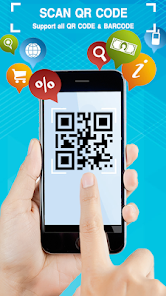
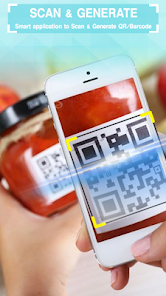
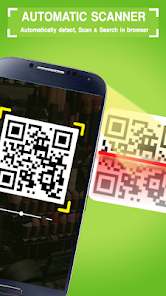
I grabbed QR Code Reader Barcode Scanner from the Play Store because I needed something quick to scan a package label. It's a straightforward utility tool, the kind you download, use once, and forget about until you need it again. Celebrity App Studio made this one, and it's been installed over a million times, which is a decent sign. After the download and install, I tapped it open and got a simple permission request for camera access, nothing aggressive or shady. The first impression was that the interface is really minimal, almost too bare, with just the camera viewfinder and a couple of buttons at the bottom. No login, no account setup, and no immediate push for in-app purchases, which I appreciated. There are a few ads that pop up after a scan, but they're not intrusive enough to ruin the experience.
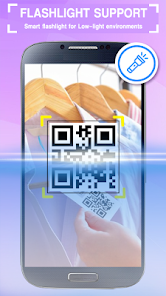
Using it in real life was pretty smooth. I held the camera over a shipping barcode and it picked it up in under a second, showing the decoded text right there on the screen. The onboarding is basically nonexistent; you just point and scan. For common tasks like reading a website QR code or a product barcode, you just tap the result to open it in your browser or copy the text. I tried it on a few dimly lit boxes and it still worked without needing a flashlight, which was a pleasant surprise. The app also has a history tab that stores all your previous scans, so you can go back later if you forgot to save something. There's a small button to toggle the flash for dark places, and a zoom slider that I never really used but found handy for tiny codes. One minor annoyance was that the app kept auto-detecting random objects as barcodes, but it happened rarely.
After a few days, I think this app is great for someone who just needs a no-fuss scanner that works reliably. It's not flashy or packed with extra features like batch scanning or custom actions, but it handles the basics well. If you compare it to something like Google Lens, which also scans codes but is heavier and slower, this one wins on pure speed and simplicity. I could see keeping it installed for quick package tracking or store loyalty codes, but I'd probably uninstall it if I found myself using a better-integrated scanning tool from my phone's camera app. The ads are there, but they're not overbearing. It's a solid tool for the job, nothing more, nothing less.
features
- 📷 Pretty much instant code detection, even on scratched barcodes or low-contrast QR codes, which is noticeably faster than apps like Barcode Scanner by ZXing Team that sometimes lag on older phones.
- 📷 A built-in history log that automatically saves every scan with a timestamp, so you don't have to manually copy results before moving on, unlike QR & Barcode Scanner by Gamma Play which clears history after a session.
- 📷 The app lets you export your scan history as a text file, useful for inventory tracking or keeping a log of package numbers, a feature missing from simpler tools like QR Scanner by Kaspersky.
- 📷 It handles multiple barcode formats at once without needing to switch modes, from standard EAN-13 to PDF417, which is more versatile compared to dedicated product scanners that only read retail barcodes.
pros
- ✅ The scanning speed stands out, especially in low light. Apps like Scandit or Honeycode require good lighting, but this one picks up codes in dim conditions almost instantly.
- ✅ It's completely ad-supported with no forced subscription, unlike QR Code Reader by Scan, which locks history behind a paywall. You get full functionality for free.
- ✅ The app doesn't bloat your phone with extra features you don't need. No AR gimmicks or photo editing tools, just pure scanning, unlike Google Lens which tries to do too much.
- ✅ The history export option is a lifesaver for people who scan multiple items daily, like warehouse workers or delivery drivers, something even premium apps like Kaspersky's QR Scanner don't offer.
cons
- ❌ The user interface feels dated and clunky, like something from 2015. Apps like QR & Barcode Scanner by Gamma Play have a sleeker, modern layout with dark mode support.
- ❌ No batch scan mode, so if you have multiple codes in a row, you have to scan them one by one. Tools like Scandit support continuous batch capturing for warehouse use.
- ❌ The app shows full-screen ads after every third or fourth scan, which can interrupt workflow. Competitors like Barcode Scanner by ZXing Team only show banner ads at the bottom.
- ❌ It lacks customization options like custom scan actions or sound toggles, which are available in premium scanners like QR Code Reader by Scan, letting you set default behaviors for different barcode types.
Recommended Apps
![]()
Japevox - Funny Prank Sound
SecureTool4.3
![]()
AstroMatrix Birth Horoscopes
AstroMatrix4.7
![]()
Personalized Call from Santa (
www.PackageFromSanta.com4.3![]()
Prank Call - Fake Call & Chat
Bravestars Casual4.1![]()
Persona: Beauty Camera
TICKET TO THE MOON, INC.4.5![]()
Peacock TV: Stream TV & Movies
Peacock TV LLC4.5![]()
Instant Buttons Soundboard App
Snow Peak Apps2.1![]()
GPS Speedometer: Speed Tracker
SM Infotech3.2![]()
Subway®
SUBWAY Restaurants4.2![]()
Find Your Phone By Clap
Trusted App Global4.5![]()
Gorilla Skins for Monkey Arena
Dumitru Boico4![]()
Vimeo
Vimeo.com, Inc.3.8![]()
Vinted - Buy and sell clothes
Vinted4.6![]()
Galaxy Starry Keyboard Backgro
Fun Keyboard Theme for Android4.7![]()
Chat AI - Ask AI anything
AI Chat Bot, Ask AI4.4










Disclaimer
1.Apklifts does not represent any developer, nor is it the developer of any App or game.
2.Apklifts provide custom reviews of Apps written by our own reviewers, and detailed information of these Apps, such as developer contacts, ratings and screenshots.
3. All trademarks, registered trademarks, product names and company names or logos appearing on the site are the property of their respective owners.
4.Apklifts abides by the federal Digital Millennium Copyright Act (DMCA) by responding to notices of alleged infringement that complies with the DMCA and other applicable laws.
5.If you are the owner or copyright representative and want to delete your information, please contact us [email protected].
6.All the information on this website is strictly observed all the terms and conditions of Google Ads Advertising policies and Google Unwanted Software policy.
7.Apklifts.com is an independent, information-only website which is 100% free to all the users.