

YouVersion Bible App + Audio

100M+
Installs
Life.Church
Developer
-
Books & Reference
Category
-
Teen
Content Rating
-
https://www.bible.com/privacy
Privacy Policy
Screenshots
editor reviews
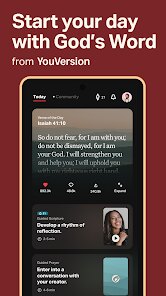
The YouVersion Bible App is massive — it's not just a digital Bible reader, it's a full-on study and spiritual growth platform that sits in the pocket of over half a billion people. I grabbed it from the Play Store thinking, sure, it's just another Bible app, and that I could probably find a church's free app or just use Google. But when I launched it, the first impression hit different. The setup walks you through picking translations and interests, making it feel personal right away. With 3000+ versions available in 2000+ languages, and it being completely free with no paywalls, you can see why it's been installed over 600 million times. There's no forced registration to start reading, though you'd want an account to sync bookmarks across devices.
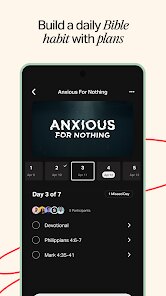
After diving in, the interface is clean and snappy — I could switch between a clean reading view and a study mode with notes and commentary within a tap. The daily verse widget on my home screen was a nice touch, almost like a calm reminder during a busy day. Moving through the app, the most practical thing is the "plans" feature. You pick a topic like anxiety or gratitude, set a reminder, and read and reflect for a few minutes daily. It's a lot smoother than I expected — you can highlight, bookmark, and even share verses with nice backgrounds. The audio part is solid too, with professional narrators. One small quirk: switching translations mid-reading can be a bit slow because it reloads the chapter, but nothing deal-breaking.
After a few weeks, I'd say it's a must-have if you're actively practicing your faith or curious about biblical teachings. Unlike apps like Bible Gateway or Olive Tree, which feel more academic or cluttered, YouVersion nails the accessible, social, and habit-forming experience. The community features — like seeing friends' prayer requests or daily plans — make it feel like you're not reading alone. But honestly, if you're not into daily reading or just want a plain Bible text, it might feel overwhelming with all the notifications and features. I still keep it installed because the plans and audio are genuinely useful for my morning routine, and the offline downloads make it perfect for commutes.
features
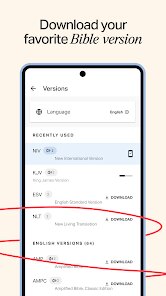
- 📖 Vast Translation Library: YouVersion offers over 3,000 Bible versions in 2,000+ languages, which crushes what most similar apps offer. In comparison, the Bible App by Olive Tree has fewer translations and often charges for premium versions. YouVersion covers obscure dialects that other tools ignore.
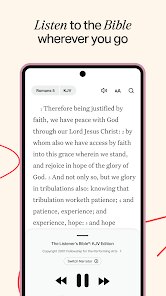
- 🎧 High-Quality Audio Bible: The audio feature is included for free across dozens of translations, with multiple narrators per version. Apps like Bible.is also offer audio but lack YouVersion's reading plan integration. I could listen while driving and then jump right back into the text, and it syncs perfectly.
- 📅 Guided Bible Plans: The daily plans system is the standout feature. You pick from thousands of plans on topics like parenting or anxiety. Apps like Blue Letter Bible don't have this at all, and Bible Gateway's plans feel tacked on. YouVersion's plans are curated and feel like a coach guiding you through the book.
pros
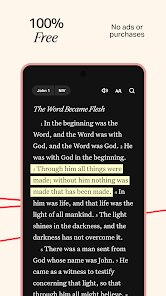
- 📱 Completely Ad-Free and Free: Unlike many spiritual apps, YouVersion has zero ads and zero premium subscriptions. Even Bible Gateway has pop-ups pushing purchases. This means your reading experience is distraction-free, which matters when you're trying to focus on reflection.
- 🌐 Social and Community Features: YouVersion lets you create public or private groups, share prayer requests, and follow friends' plans. Competitors like Logos Bible Software are more academic and solitary. YouVersion brings a church-like community feel to your phone.
- 🔄 Cross-Device Sync: Your highlights, bookmarks, and notes sync instantly across phone, tablet, and web. Olive Tree requires manual cloud backups and Bible Gateway syncs only some data. YouVersion makes it seamless — I started a plan on my phone and finished on my laptop without missing a beat.
cons
- 🔇 Overwhelming Notifications: YouVersion sends daily reminders, plan suggestions, and friend activity alerts. It can feel like a social media app. In comparison, apps like Bible is or the ESV Bible are more passive and quiet. I had to turn off most notifications to keep it from being annoying.
- 📂 Cluttered Interface for New Users: The main menu has too many sections — plans, audio, verses, community, events. Bible Gateway feels simpler by focusing on reading and study tools. YouVersion could use a more guided onboarding to reduce initial confusion.
- 🕑 No In-Depth Study Tools: For serious theological study, YouVersion lacks the lexicon tools and original language analysis found in Logos Bible Software or Blue Letter Bible. It's great for daily reading but falls short for deep exegesis or word studies.
Recommended Apps
![]()
BetterMe: Health Coaching
BetterMe Limited4.3
![]()
Walli - HD, 4K Wallpapers
Tap AI4.4![]()
Future Self - Old Age Filter
Vidler Koiter1.6
![]()
AI Photo Editor, Collage-Fotor
AI Art Photo Editor | Everimaging Ltd.4.3![]()
AI Face Swap: MagicFace &Photo
Braly JSC0![]()
QR Code Reader: QR Scanner
WECHOICE MOBILE4.3![]()
Lip Fall Challenge: Fun Filter
Braly JSC0![]()
Funny Reverse Audio - Singing
PlayStudioInc0![]()
Birthday Secrets
shasunder4.4![]()
Live Wallpapers HD 4K
Wallpaper app4.4![]()
Find Your Phone By Clap
Trusted App Global4.5![]()
Wizz - Expand Your World
Wizz3.8![]()
NCAA March Madness Live
NCAA Digital4.7![]()
Hulu: Stream TV shows & movies
Disney4.5![]()
Lethal Love: a Yandere game
AniByte!4.4















Disclaimer
1.Apklifts does not represent any developer, nor is it the developer of any App or game.
2.Apklifts provide custom reviews of Apps written by our own reviewers, and detailed information of these Apps, such as developer contacts, ratings and screenshots.
3. All trademarks, registered trademarks, product names and company names or logos appearing on the site are the property of their respective owners.
4.Apklifts abides by the federal Digital Millennium Copyright Act (DMCA) by responding to notices of alleged infringement that complies with the DMCA and other applicable laws.
5.If you are the owner or copyright representative and want to delete your information, please contact us [email protected].
6.All the information on this website is strictly observed all the terms and conditions of Google Ads Advertising policies and Google Unwanted Software policy.
7.Apklifts.com is an independent, information-only website which is 100% free to all the users.














