
Microsoft Outlook

500,000,000+
Installs
Microsoft Corporation
Developer
-
Productivity
Category
-
Rated for 3+
Content Rating
-
http://taps.io/outlookprivacy
Privacy Policy
Screenshots
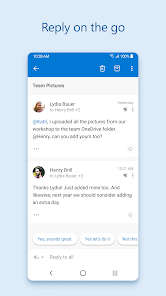
editor reviews
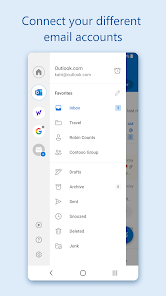
Microsoft Outlook is essentially the heavy lifter of email clients, a full-blown personal information manager rolled into one. You use it for email, sure, but also for managing a calendar, keeping track of contacts, and even juggling tasks. I ended up installing it from the Google Play Store because my work insisted on it for syncing our corporate Exchange accounts, and honestly, just managing multiple email addresses from one spot seemed like a no-brainer. The first launch gives you that typical Microsoft feel — a bit corporate, very structured, and it immediately asks for your email credentials. It's a free download, but the real meat of the app, especially the advanced security and storage, is tied to a Microsoft 365 subscription, so you get hit with that upgrade prompt pretty quickly if you're using the free version with a personal account.
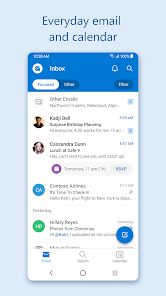
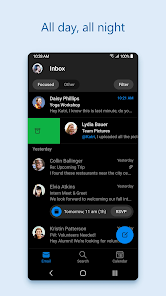
Once you're past the initial setup, the hands-on experience is pretty smooth, though it's not exactly lightweight. The interface is packed; your inbox is front and center, and a bottom bar lets you jump to Calendar, Files, and People. I found the "Focused Inbox" feature actually helpful — it automatically separates important emails from the noise, which saves me a few minutes every morning. Replying and attaching files is straightforward, but the app really shines when you schedule a meeting; you can check everyone's availability right there without jumping to a separate calendar app. A small tip I picked up: swiping right on an email in your inbox sets it as read or unread, and you can customize those swipe actions in settings, which sped up my triage a ton. It does get a bit sluggish when my mailbox is full, and the constant banner asking me to switch to the "new Outlook" design got old fast.
After a couple of months, I've settled into a love-hate relationship with it. If you're in a corporate environment or manage multiple Exchange or Office 365 accounts, this app is basically non-negotiable — it handles those links and calendar invites far better than any generic email client. That said, for someone just wanting a clean, fast email app for a Gmail or Yahoo account, Outlook feels bloated and pushy with its upsell. Compared to something like the standard Gmail app, Outlook gives you much better calendar integration and task management, but it loses out on simplicity and speed. I keep it installed for work because I have to, but I honestly can't see myself using it for personal stuff when there are leaner, more focused apps out there.
features
- 📅 Unified Calendar & Email: Unlike Gmail where the calendar is a separate entity, Outlook lets you view your schedule, accept invites, and see your day's agenda right inside the inbox. It is incredibly useful for professionals who live by their meetings.
- 🔍 Search & Filter Power: The search function in Outlook is leagues ahead of most. It can find emails from a specific date, with attachments, from a certain sender, all in one query. The default Gmail app's search is good, but Outlook's is structured better for business use.
- 🔗 Deep Microsoft Ecosystem Integration: If you use OneDrive, Teams, or SharePoint, Outlook is the hub. You can share files directly from your cloud storage, see shared document activity, and join Teams calls from calendar events seamlessly. The standalone email apps just cannot touch this depth of integration.
pros
- 💼 Superb Exchange/Office 365 Sync: This is its killer feature. It handles push notifications, server-side rules, and shared mailboxes flawlessly. For corporate users, this is a major strength over apps like Spark or Edison Mail, which can struggle with complex Exchange setups.
- 📌 Pinning & Custom Swipe Gestures: You can pin important emails to the top of your inbox and set custom swipe actions (e.g., left to delete, right to schedule). This flexibility is something the basic Apple Mail app simply doesn't offer.
- 🕐 "Play My Emails" (Audio): A unique strength for commuters. This feature reads your inbox out loud and even allows you to reply by voice. It is not perfect, but no other major email client on Android has this hands-free feature built in.
cons
- 📦 Bloated & Resource-Heavy: The app is a large download and tends to lag on older phones, especially compared to the lightweight Gmail app. It can take a few seconds to load your full inbox after a fresh launch, which feels sluggish.
- 🎨 Cluttered Interface: The constant promotional banners for OneDrive storage, Microsoft 365 trials, and the "new Outlook" toggle make the interface feel busy. Apps like Proton Mail or Edison Mail feel much cleaner and more focused.
- 🔋 Battery Drain: Keeping Outlook synced with multiple calendars and folders often uses more battery in the background than simpler apps. I've noticed my battery percentage drop faster on days I rely heavily on it versus using the native Samsung Email app.
- ⚠️ Free Tier Limitations: The free version is quite limited. You cannot schedule emails, and the mailbox size is capped. For a personal user, you get a better free experience from Yahoo Mail or Gmail without hitting a paywall so quickly.
Recommended Apps
![]()
Japevox - Funny Prank Sound
SecureTool4.3
![]()
AstroMatrix Birth Horoscopes
AstroMatrix4.7
![]()
Personalized Call from Santa (
www.PackageFromSanta.com4.3![]()
Prank Call - Fake Call & Chat
Bravestars Casual4.1![]()
Persona: Beauty Camera
TICKET TO THE MOON, INC.4.5![]()
Peacock TV: Stream TV & Movies
Peacock TV LLC4.5![]()
Instant Buttons Soundboard App
Snow Peak Apps2.1![]()
GPS Speedometer: Speed Tracker
SM Infotech3.2![]()
Subway®
SUBWAY Restaurants4.2![]()
Find Your Phone By Clap
Trusted App Global4.5![]()
Gorilla Skins for Monkey Arena
Dumitru Boico4![]()
Vimeo
Vimeo.com, Inc.3.8![]()
Vinted - Buy and sell clothes
Vinted4.6![]()
Galaxy Starry Keyboard Backgro
Fun Keyboard Theme for Android4.7![]()
Chat AI - Ask AI anything
AI Chat Bot, Ask AI4.4















Disclaimer
1.Apklifts does not represent any developer, nor is it the developer of any App or game.
2.Apklifts provide custom reviews of Apps written by our own reviewers, and detailed information of these Apps, such as developer contacts, ratings and screenshots.
3. All trademarks, registered trademarks, product names and company names or logos appearing on the site are the property of their respective owners.
4.Apklifts abides by the federal Digital Millennium Copyright Act (DMCA) by responding to notices of alleged infringement that complies with the DMCA and other applicable laws.
5.If you are the owner or copyright representative and want to delete your information, please contact us [email protected].
6.All the information on this website is strictly observed all the terms and conditions of Google Ads Advertising policies and Google Unwanted Software policy.
7.Apklifts.com is an independent, information-only website which is 100% free to all the users.













