

Revive: Animation & AI Photos

1,000,000+
Installs
REFACEAI LIMITED
Developer
-
Entertainment
Category
-
Rated for 3+
Content Rating
-
https://reviveapp.net/privacy
Privacy Policy
Screenshots
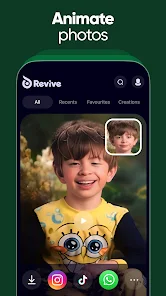
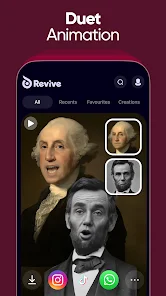
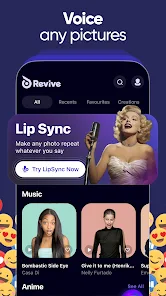

editor reviews
Revive is an AI-powered animation app that lets you take old or still photos and bring them to life with subtle movements and expressions. It belongs to the growing category of face animation and photo restoration tools that use machine learning to generate realistic motion. When you download and launch the app from Google Play or the App Store, you are met with a clean, minimal interface that immediately asks for access to your photo library. The first impression is that it feels like a magic trick — you pick a photo, and within seconds, faces start blinking, smiling, or turning their heads slightly. The app has millions of installs and is free to download, though you will need to register with an email or social account to use it beyond a handful of tries. In-app purchases unlock higher resolution exports and longer animations, and there are occasional ads during processing.
Actually using Revive is pretty straightforward after the onboarding, which consists of a short tutorial showing you how to select a photo and apply an animation preset. You pick an image from your gallery, and the app scans for faces. Most portraits work well, but side profiles or photos with heavy shadows sometimes get rejected or produce glitchy results. Once a face is detected, you choose from animation styles like "Subtle Smile," "Gentle Blink," or "Head Turn." The processing takes about fifteen to thirty seconds on a decent phone, and you can preview the result before saving. A neat practical tip is that older black-and-white photos with clear lighting tend to animate much more naturally than selfies taken in low light. The interface is smooth overall, but I found myself wishing for more control over the animation intensity, since sometimes the movement felt a bit too robotic or exaggerated for a nostalgic family photo.
After spending a few weeks with Revive, I can see why people might enjoy it for restoring memories or creating fun social media content. It feels great to see a long-gone grandparent smile again in an old wedding picture, and the novelty does not wear off quickly for casual users. But if you are looking for serious restoration or professional-grade animation, apps like MyHeritage's Deep Nostalgia or even Adobe After Effects with plugins offer more precision and fewer limits. Revive stands out because it is dead simple and works on almost any modern phone, but the free version restricts you to only a handful of animations per day, which can be frustrating. I ended up keeping it installed because it takes zero effort to use, but I can see some people uninstalling after the novelty fades if they do not want to pay for the premium tier. It is a fun toy more than a serious tool, and that is fine for most people.
features
- 🎭 Face Animation Presets: Revive offers a handful of ready-made animation styles that you can apply with one tap. Unlike MyHeritage's Deep Nostalgia, which focuses on subtle head movements, Revive gives you options like "Smile," "Blink," and "Head Turn," making it feel more playful and customizable for casual users.
- 🎭 Simple One-Tap Workflow: The app requires almost no learning curve. You just pick a photo, let it detect faces, choose an animation, and wait a few seconds. Competing tools like Pixbim's old photo animator often require manual adjustments or have clunkier interfaces, so Revive wins on pure ease of use.
- 🎭 Real-Time Preview with Export: Before saving, you can preview the animation loop to see how natural it looks. This is a big plus compared to some web-based tools that process without letting you see the result first. The export supports both video and GIF formats, which makes sharing on social media seamless.
- 🎭 Built-in Face Enhancement: Before animating, Revive lightly enhances facial details using AI, which helps older or blurry photos look sharper. This is a standout feature not always found in similar apps like Deep Nostalgia, which focuses only on motion without touching image quality.
pros
- 🌟 Extremely user-friendly interface that does not require any editing skills, unlike Adobe After Effects or even simpler apps like Movavi. You can animate a photo in under a minute.
- 🌟 Works well with vintage and low-quality photos because of the built-in enhancement step, which gives it an edge over apps like FaceApp that are designed for fresh selfies.
- 🌟 Free version is generous enough to let you test multiple times before committing to a purchase, which is rare compared to competitors that lock everything behind a paywall immediately.
cons
- ⚠️ Free version has a strict daily limit on animations, much tighter than MyHeritage's Deep Nostalgia, which allows a few free uses per week without feeling as restrictive.
- ⚠️ Animation results can look robotic or glitchy on photos with multiple faces or unusual angles, while apps like Pixbim handle complex group shots better.
- ⚠️ No manual adjustment sliders for animation intensity or speed, so you are stuck with presets, unlike more advanced tools like Deep Dream Generator that give you granular control.
- ⚠️ Exports are watermarked in the free tier, and the watermark is fairly large and intrusive compared to the subtle stamps used by similar apps in the same category.
Recommended Apps
![]()
BetterMe: Health Coaching
BetterMe Limited4.3
![]()
Walli - HD, 4K Wallpapers
Tap AI4.4![]()
Future Self - Old Age Filter
Vidler Koiter1.6
![]()
AI Photo Editor, Collage-Fotor
AI Art Photo Editor | Everimaging Ltd.4.3![]()
AI Face Swap: MagicFace &Photo
Braly JSC0![]()
QR Code Reader: QR Scanner
WECHOICE MOBILE4.3![]()
Lip Fall Challenge: Fun Filter
Braly JSC0![]()
Funny Reverse Audio - Singing
PlayStudioInc0![]()
Birthday Secrets
shasunder4.4![]()
Live Wallpapers HD 4K
Wallpaper app4.4![]()
Find Your Phone By Clap
Trusted App Global4.5![]()
Wizz - Expand Your World
Wizz3.8![]()
NCAA March Madness Live
NCAA Digital4.7![]()
Hulu: Stream TV shows & movies
Disney4.5![]()
Lethal Love: a Yandere game
AniByte!4.4















Disclaimer
1.Apklifts does not represent any developer, nor is it the developer of any App or game.
2.Apklifts provide custom reviews of Apps written by our own reviewers, and detailed information of these Apps, such as developer contacts, ratings and screenshots.
3. All trademarks, registered trademarks, product names and company names or logos appearing on the site are the property of their respective owners.
4.Apklifts abides by the federal Digital Millennium Copyright Act (DMCA) by responding to notices of alleged infringement that complies with the DMCA and other applicable laws.
5.If you are the owner or copyright representative and want to delete your information, please contact us [email protected].
6.All the information on this website is strictly observed all the terms and conditions of Google Ads Advertising policies and Google Unwanted Software policy.
7.Apklifts.com is an independent, information-only website which is 100% free to all the users.














