
QR & Barcode Reader

100,000,000+
Installs
TeaCapps
Developer
-
Productivity
Category
-
Rated for 3+
Content Rating
-
https://app.qrbot.net/privacy.html
Privacy Policy
Screenshots
editor reviews
So, QR & Barcode Reader by TeaCapps is exactly what it sounds like – a scanning app for those square QR codes and traditional barcodes you see on products, tickets, or flyers. You download it from the Google Play Store or the App Store, and it's free to install, which is pretty standard for this type of tool. After launching it for the first time, the first thing that hits you is how clean and straightforward the interface is. There's no clutter, no endless permissions begging, just a camera viewfinder and a button to flip the camera. I'd say it's one of those apps you grab when you need to scan a code quickly, but you're not sure if your phone's native camera can handle it, or you just want a dedicated tool that doesn't mess around.
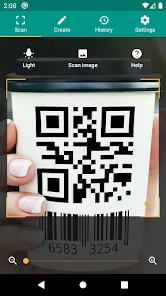
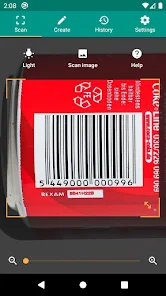
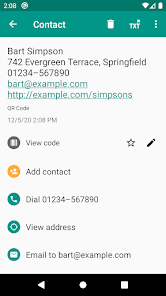
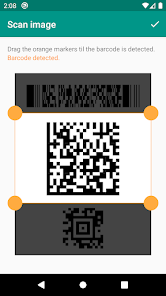
When you actually start using it, the experience is smooth and almost too simple. Point the camera at a QR code or barcode, and it reads it within a second or two. For products, it pulls up the item details or a link to a webpage; for QR codes, it shows the encoded text or URL right there on the screen. There's no onboarding tutorial or sign-up – you just open the app and scan. One thing I noticed is that it works well even in low light, but if the code is really tiny or on a weird curve, it can struggle a bit. If you want to scan from a photo in your gallery, there's a small icon for that too, which is useful if someone sends you a code via message. Overall, it feels like a tool that gets out of your way, which is exactly what you want from a scanner.
After using it for a while, I think this app is perfect for someone who scans codes maybe once or twice a week – like checking a menu link or scanning a boarding pass. It's not flashy, but it does the job without ads popping up every other second. Where it stands out from apps like QR & Barcode Scanner by Gamma Play or even Google Lens is that this one feels lighter and faster, with no extra bloat. That said, if you need advanced features like generating your own QR codes or batch scanning, you'll be disappointed. I kept it installed because it's small and works reliably, but I could see someone uninstalling it if their camera app already handles QR reading. It's a solid, no-nonsense tool, but nothing groundbreaking.
features
- 📷 The standout feature here is the quick scanning speed. Point, and it reads almost instantly, even with barcodes that are slightly damaged or not perfectly aligned. I've used Google Lens for this, and Lens often takes an extra second or two because it's processing more visual data; this app just focuses on the code and spits out the result.
- 📷 Unlike some free scanner apps that are littered with ads or pushy premium upgrades, TeaCapps keeps it pretty clean. You get a simple history log of scanned codes, which you can clear easily. No nagging pop-ups asking you to buy a pro version every time you scan a milk carton.
- 📷 The built-in flashlight toggle is another nice touch. In darker places, like a dimly lit restaurant or a bar, you can tap the torch icon to light up the code without having to leave the app. Apps like Barcode Scanner by ZXing require you to adjust your phone's brightness manually, which is less convenient.
- 📷 It also supports scanning from your camera roll, which is handy. If someone sends you a screenshot of a QR code on WhatsApp, you can just open the gallery import feature here, select the image, and it reads it. Some cheaper scanner apps don't include this and force you to point the camera at the screen.
pros
- ✨ The biggest plus is how lightweight it is. This app takes up barely any storage compared to something like Samsung's built-in scanner or Google Lens, which loads a whole digital assistant. If you have a phone with limited space, this is a lifesaver.
- ✨ No account or login required. You can start scanning right away without granting the app unnecessary permissions to your contacts or location, which is a privacy win over apps like NeoReader that often ask for more access than needed.
- ✨ It works offline. Scanned codes don't require an internet connection unless the URL inside them does. That's a small but important thing if you're in airplane mode or out of coverage.
- ✨ The whole interface is just a viewfinder with minimal buttons. It's perfect for older users or kids who just need to aim and tap, without getting confused by menus or settings.
cons
- 😕 There's no built-in QR code generator. If you need to create your own code for a business card or link, you'll have to download a separate app. Competitors like QR Code Reader by Simple Design Ltd. include a simple generator, which makes them more versatile.
- 😕 The app doesn't handle multiple codes on screen at once. If a menu or flyer has two QR codes side by side, it only reads the center one, and you have to manually point again. Google Lens can sometimes highlight both and let you choose.
- 😕 No batch scanning or history export. You can see your scanned codes in a list, but you can't share them in bulk or export them to a file. For someone who scans dozens of codes for inventory or research, apps like Scandit or Kaspersky QR Scanner offer better management.
- 😕 The app has almost no customization. You can't change the scan sound, vibration, or theme. Some people like a silent scan option, but this one always plays a tone unless the phone is on silent mode, which can be annoying in quiet places.
Recommended Apps
![]()
Japevox - Funny Prank Sound
SecureTool4.3
![]()
AstroMatrix Birth Horoscopes
AstroMatrix4.7
![]()
Personalized Call from Santa (
www.PackageFromSanta.com4.3![]()
Prank Call - Fake Call & Chat
Bravestars Casual4.1![]()
Persona: Beauty Camera
TICKET TO THE MOON, INC.4.5![]()
Peacock TV: Stream TV & Movies
Peacock TV LLC4.5![]()
Instant Buttons Soundboard App
Snow Peak Apps2.1![]()
GPS Speedometer: Speed Tracker
SM Infotech3.2![]()
Subway®
SUBWAY Restaurants4.2![]()
Find Your Phone By Clap
Trusted App Global4.5![]()
Gorilla Skins for Monkey Arena
Dumitru Boico4![]()
Vimeo
Vimeo.com, Inc.3.8![]()
Vinted - Buy and sell clothes
Vinted4.6![]()
Galaxy Starry Keyboard Backgro
Fun Keyboard Theme for Android4.7![]()
Chat AI - Ask AI anything
AI Chat Bot, Ask AI4.4















Disclaimer
1.Apklifts does not represent any developer, nor is it the developer of any App or game.
2.Apklifts provide custom reviews of Apps written by our own reviewers, and detailed information of these Apps, such as developer contacts, ratings and screenshots.
3. All trademarks, registered trademarks, product names and company names or logos appearing on the site are the property of their respective owners.
4.Apklifts abides by the federal Digital Millennium Copyright Act (DMCA) by responding to notices of alleged infringement that complies with the DMCA and other applicable laws.
5.If you are the owner or copyright representative and want to delete your information, please contact us [email protected].
6.All the information on this website is strictly observed all the terms and conditions of Google Ads Advertising policies and Google Unwanted Software policy.
7.Apklifts.com is an independent, information-only website which is 100% free to all the users.













