

Uber Eats: Food Delivery

100M+
Installs
Uber Technologies, Inc.
Developer
-
Food & Drink
Category
-
Everyone
Content Rating
-
https://www.uber.com/privacy
Privacy Policy
Screenshots

editor reviews
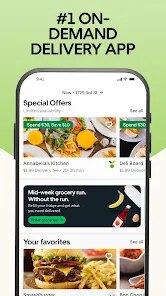
Uber Eats is a food delivery app that connects you with local restaurants and takeout spots. You basically browse menus from nearby places, place an order, and a driver brings it to your door. It's available on both Google Play and the App Store, and you can download it for free. Once you install it and open it up, the first thing you see is a map of your area with restaurant listings sorted by distance, cuisine, or ratings. Registration is quick—just log in with your Uber account or create a new one with your email. There are no upfront costs, but you'll pay delivery fees and service charges per order, plus tipping the driver. Ads pop up occasionally for promo deals, but they're not too intrusive.
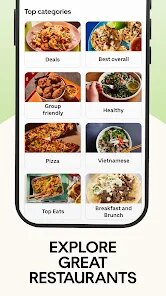
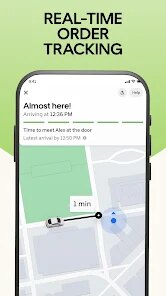
After you place your first order, the real experience kicks in. The interface is pretty straightforward: you search for a type of food or scroll through the categories, tap on a restaurant, and see their menu with prices and photos. Adding items to your cart is a simple tap, and you can adjust quantities or remove things before checking out. The checkout process asks for your delivery address, payment method, and any special instructions—like “extra napkins” or “leave at the door.” One thing that can feel a bit confusing is the estimated delivery time shifting as drivers get assigned, especially during peak hours. A small tip: if you're in a rush, filter by “nearby” or “fast delivery” to save time. The app tracks your driver live on a map, so you know exactly when they're pulling up. It's smooth most days, but sometimes the app lags when a restaurant is busy, and your order gets delayed without an immediate update.
After using it for a few weeks, I think Uber Eats is solid for people who live in big cities or suburbs with lots of options. It beats DoorDash in how clean and fast the interface feels—less clutter, fewer pop-ups. But if you're in a smaller town, you might get stuck with limited choices or high fees. What really stands out is the real-time tracking and the ability to combine orders from multiple places if you're ordering for a group, which Uber does better than Grubhub. On the flip side, the delivery fees can add up quickly, and I've had a few times where the driver took a weird route or the food arrived cold. For someone who eats out once a week, it's worth keeping installed. But if you cook most meals or live somewhere with cheap local spots, you might uninstall it after a month. It's not perfect, but it does the job without much fuss.
features
- 🛒 Real-time order tracking is a standout—you see exactly where your driver is on a live map, unlike some apps that just give vague ETAs. This makes waiting less stressful and helps you time when to grab the door.
- 🛒 The “Save for Later” feature lets you bookmark favorite restaurants or specific meals, so you don't have to scroll through the whole list every time. It's handy when you order from the same Thai place weekly, but it still feels a bit buried in the settings menu compared to DoorDash's more prominent favorites tab.
- 🛒 Group ordering is surprisingly smooth—you can send a link to friends or coworkers, and each person adds their own items to one cart with separate payments. It's less messy than DoorDash's group feature, which sometimes confuses who pays for what, though Uber Eats could improve by suggesting split amounts automatically.
- 🛒 The “Pickup” option is a hidden gem—you can order ahead from local spots and skip the delivery fees entirely, just walking in to grab your food. It's a money-saver compared to Grubhub, where pickup discounts are rare, but the app doesn't really push this feature, so many users miss it.
pros
- ✅ Faster interface than DoorDash—menus load quicker, and scrolling through categories feels less sluggish. I've noticed DoorDash often hangs when filtering by cuisine, while Uber Eats keeps things snappy.
- ✅ Better restaurant variety in urban areas, especially for smaller local joints that don't list on Grubhub or DoorDash. In my neighborhood, I find unique bakeries and taco stands here that I can't get elsewhere.
- ✅ Consistent driver tracking across most orders—even during busy times, the live map updates reliably. Competitors like Postmates sometimes lose the signal mid-delivery, which is frustrating.
cons
- ❌ Higher delivery fees than DoorDash, especially for short distances—a 1-mile order can cost $5 in fees, while DoorDash often has promos that cut that in half. It adds up fast if you order often.
- ❌ Customer support can be slow to respond—waiting 10 minutes in a chat for a missing item issue is common, whereas Grubhub usually replies within minutes. One time I had to wait 20 minutes for a refund on a cold pizza.
- ❌ Menu photos aren't always accurate—some restaurants upload blurry or outdated images, making it hard to decide. DoorDash tends to have fresher photos, likely because they verify menus more often.
Recommended Apps
![]()
BetterMe: Health Coaching
BetterMe Limited4.3
![]()
Walli - HD, 4K Wallpapers
Tap AI4.4![]()
Future Self - Old Age Filter
Vidler Koiter1.6
![]()
AI Photo Editor, Collage-Fotor
AI Art Photo Editor | Everimaging Ltd.4.3![]()
AI Face Swap: MagicFace &Photo
Braly JSC0![]()
QR Code Reader: QR Scanner
WECHOICE MOBILE4.3![]()
Lip Fall Challenge: Fun Filter
Braly JSC0![]()
Funny Reverse Audio - Singing
PlayStudioInc0![]()
Birthday Secrets
shasunder4.4![]()
Live Wallpapers HD 4K
Wallpaper app4.4![]()
Find Your Phone By Clap
Trusted App Global4.5![]()
Wizz - Expand Your World
Wizz3.8![]()
NCAA March Madness Live
NCAA Digital4.7![]()
Hulu: Stream TV shows & movies
Disney4.5![]()
Lethal Love: a Yandere game
AniByte!4.4















Disclaimer
1.Apklifts does not represent any developer, nor is it the developer of any App or game.
2.Apklifts provide custom reviews of Apps written by our own reviewers, and detailed information of these Apps, such as developer contacts, ratings and screenshots.
3. All trademarks, registered trademarks, product names and company names or logos appearing on the site are the property of their respective owners.
4.Apklifts abides by the federal Digital Millennium Copyright Act (DMCA) by responding to notices of alleged infringement that complies with the DMCA and other applicable laws.
5.If you are the owner or copyright representative and want to delete your information, please contact us [email protected].
6.All the information on this website is strictly observed all the terms and conditions of Google Ads Advertising policies and Google Unwanted Software policy.
7.Apklifts.com is an independent, information-only website which is 100% free to all the users.














