

Google One

1B+
Installs
Google LLC
Developer
-
Productivity
Category
-
Everyone
Content Rating
-
http://www.google.com/policies/privacy
Privacy Policy
Screenshots
editor reviews
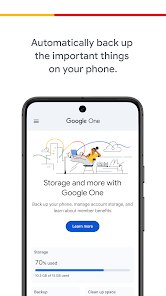
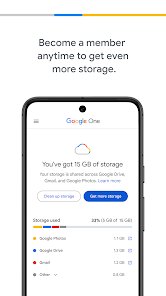
Google One is basically Google's own subscription service that bundles extra cloud storage with a few other perks. It's not a standalone app in the traditional sense—more like a control panel for managing your Google Drive, Gmail, and Google Photos storage all in one spot. Most people download it when they start running out of that free 15GB across Google's services, which honestly happens faster than you'd think if you back up photos or have a lot of emails with attachments. I installed it from the Play Store, and the download was quick and free, though the whole point is that you eventually pick a paid plan inside the app. The moment I launched it, the home screen laid out my current storage usage in a clean, color-coded circle graph, which made it immediately clear I was at 80% capacity. No registration hassle—it automatically signed me in with my Google account, which felt seamless but also a bit too automatic if you're privacy-conscious. You can browse through plans without buying, and there's no annoying ads popping up, which I appreciated.
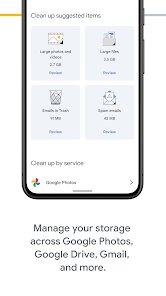
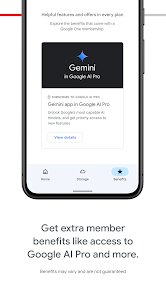
After using it for a few weeks, the hands-on experience is pretty straightforward but not always thrilling. The main interface has a few tabs: Storage, Overview, and Benefits. Storage is where you see what's eating up space—Drive files, Gmail attachments, and Google Photos backups. You can free up space directly from the app by deleting large files or clearing trash, which saves you from logging into a browser. The onboarding didn't ask me much; it just pushed me to choose a plan, but I could skip that and explore first. A daily usage step for me is checking the “Review and free up space” section every couple of days—it suggests removing blurry photos or old screenshots, which is actually handy. One smooth moment: tapping a file in Storage jumps you to Drive instantly. A confusing bit was finding the VPN perk—it's buried under Benefits, not immediately visible. Small tip: enable the “Backup for phones” feature early if you're on Android; it saves your photos, contacts, and app data without extra steps.
After sticking with it for a month, I'd say it's a solid tool for heavy Google users, but not everyone needs it. If you live in Google's ecosystem—tons of Drive documents, lots of photos, or emails with huge attachments—you'll probably keep it installed just to manage storage and maybe grab the 100GB plan. But if you use iCloud, Dropbox, or just don't store much, this app feels redundant since you can manage storage via Drive's settings. What makes it different from, say, Dropbox Plus is the extra stuff: Google Photos editing features, Google Workspace credits, and that VPN for Android. That said, the VPN is limited and not as robust as a dedicated service like NordVPN. I can see someone uninstalling this if they switch to a competitor like Microsoft OneDrive, especially since OneDrive's storage plans integrate better with Windows. For me, I'll keep it because the 15GB free limit was already a pain, and the paid plans are cheaper than Apple's iCloud for the same space.
features
- 📦 Storage Management: Google One gives you a clear breakdown of what's using your space across Drive, Gmail, and Photos. You can clean up old emails, large files, or duplicate photos directly in the app. Compared to Dropbox Plus, which only syncs files, Google One's cleanup tools are more integrated since they work across multiple Google services. The standout is the “Storage Saver” mode for Photos that compresses new uploads to save space without killing quality.
- 🔒 VPN Perk: The bundled Google One VPN is available with higher-tier plans (2TB and up). It's dead simple to turn on with one tap in the Benefits tab. Unlike standalone VPNs like Surfshark or ExpressVPN, you won't get advanced features like split tunneling or a kill switch. But for casual browsing on public Wi-Fi, it gets the job done without extra setup or logins.
- 📸 Google Photos Integration: You get access to Google Photos' best editing features, like Portrait Light and Color Pop, even if you have the free version of Photos. iCloud+ offers similar perks for Photos editing, but Google's AI tools feel more polished and require less manual tweaking. The real kicker is that backups count toward your plan, so you can store original quality images without worrying about space if you pay.
pros
- 🌟 Cheaper Plans: Google One's 100GB plan costs just $1.99 a month, which undercuts iCloud+'s 50GB plan at $0.99 (but iCloud gives less space for the same price tier). Dropbox Plus starts at $9.99 for 2TB, while Google One offers 2TB for $9.99, making it comparably priced but with extra benefits like the VPN and Google Workspace credits.
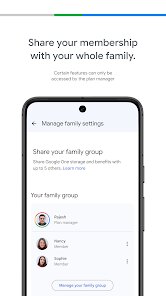
- 🌟 Family Sharing: You can share your storage plan with up to five family members at no extra cost, and each person keeps their own private files. Apple's iCloud+ also supports family sharing, but it's not as flexible—everything shares one pool, and you can't see individual usage as easily. Google One's dashboard shows per-member stats.
- 🌟 Customer Support: You get 24/7 access to Google experts for help with Google services, which is rare for cloud storage plans. Dropbox or OneDrive usually push you toward help articles or chatbots unless you're on business plans. I used the chat once for a billing question, and a real person responded within two minutes.
cons
- ⚠️ Limited Free Tier: The 15GB free storage is shared across Drive, Gmail, and Photos, which fills up way faster than iCloud's 5GB free (but iCloud separates device backups). Dropbox offers 2GB free, so Google One's free tier is generous in comparison, but it's still annoying when your free quota runs out after a year of backups.
- ⚠️ VPN Restrictions: The VPN only works on Android and a few other Google devices, not on iOS or desktop without workarounds. iCloud Private Relay is more seamless for Apple users, hiding your IP across Safari without any app. Google One's VPN also doesn't let you choose servers or bypass geo-blocks, making it less useful for streaming.
- ⚠️ Feature Clutter: The app feels crammed with offers for Google Photos editing, Google Workspace trials, and the VPN, which can overwhelm new users. Dropbox keeps its app cleaner with just files and a few extras. I'd prefer Google One to focus more on storage cleanup than pushing peripheral features.
Recommended Apps
![]()
Japevox - Funny Prank Sound
SecureTool4.3
![]()
AstroMatrix Birth Horoscopes
AstroMatrix4.7
![]()
Personalized Call from Santa (
www.PackageFromSanta.com4.3![]()
Prank Call - Fake Call & Chat
Bravestars Casual4.1![]()
Persona: Beauty Camera
TICKET TO THE MOON, INC.4.5![]()
Peacock TV: Stream TV & Movies
Peacock TV LLC4.5![]()
Instant Buttons Soundboard App
Snow Peak Apps2.1![]()
GPS Speedometer: Speed Tracker
SM Infotech3.2![]()
Subway®
SUBWAY Restaurants4.2![]()
Find Your Phone By Clap
Trusted App Global4.5![]()
Gorilla Skins for Monkey Arena
Dumitru Boico4![]()
Vimeo
Vimeo.com, Inc.3.8![]()
Vinted - Buy and sell clothes
Vinted4.6![]()
Galaxy Starry Keyboard Backgro
Fun Keyboard Theme for Android4.7![]()
Chat AI - Ask AI anything
AI Chat Bot, Ask AI4.4















Disclaimer
1.Apklifts does not represent any developer, nor is it the developer of any App or game.
2.Apklifts provide custom reviews of Apps written by our own reviewers, and detailed information of these Apps, such as developer contacts, ratings and screenshots.
3. All trademarks, registered trademarks, product names and company names or logos appearing on the site are the property of their respective owners.
4.Apklifts abides by the federal Digital Millennium Copyright Act (DMCA) by responding to notices of alleged infringement that complies with the DMCA and other applicable laws.
5.If you are the owner or copyright representative and want to delete your information, please contact us [email protected].
6.All the information on this website is strictly observed all the terms and conditions of Google Ads Advertising policies and Google Unwanted Software policy.
7.Apklifts.com is an independent, information-only website which is 100% free to all the users.













