
Facemoji:Emoji Keyboard&ASK AI

100M+
Installs
EKATOX APPS
Developer
-
Productivity
Category
-
Rated for 12+
Content Rating
-
https://www.facemojikeyboard.com/page/privacy/googleplay/privacy.html
Privacy Policy
Screenshots


editor reviews
Facemoji is a keyboard app that packs in a ton of personalization and AI extras, so it's more than just a standard typing tool. Available on Google Play and the App Store, you can download and install it for free, and it's been racking up millions of downloads based on the store listings. When you first launch it, you're hit with a bright, flashy interface that screams customization—there's a setup wizard that walks you through granting permissions and picking a default theme. The first impression is a bit overwhelming, honestly, because there's so much thrown at you at once: emojis, GIFs, stickers, and even an AI chat feature. But for someone who likes to tinker with their phone's look, it feels like a playground right out of the gate. Registration isn't mandatory to start typing, but in-app purchases pop up now and then for premium themes or removing ads, though free content keeps you busy for a while.
Once you get past the initial setup, the actual hands-on experience is a mixed bag. The keyboard itself loads quickly and offers a smooth typing feel, but the onboarding is a bit of a maze—there are too many tutorials and prompts asking you to enable different features. In daily use, you can swipe between keyboard layouts, access an emoji search bar, or jump into the “ASK AI” tab for quick answers or creative writing help. I found myself using the GIF and sticker search a lot because it's integrated seamlessly, but the app occasionally lags when switching between keyboards or themes. One small tip: if you disable the sound effects in settings, it's less jarring during quick typing sessions. Some menus feel cluttered, like the theme store, where you have to scroll past a bunch of options before finding free ones, but once you set your favorite look, it sticks without hassle.
After using Facemoji for a couple of weeks, I'd say it's best for people who love expressiveness and don't mind a bit of bloat. It's definitely different from something like Gboard, which is more streamlined and focused on typing accuracy—here, the strength is in the fluff: fonts, emoji art, and the AI assistant. But if you just want a no-fuss keyboard for work emails, this might feel like overkill, and you could end up uninstalling it because of the constant notification nag to try new features. I kept it around because the custom themes let me match my keyboard to phone wallpapers, and the AI feature is handy for quick replies without switching apps. It's not a daily driver for everyone, but for someone who wants their keyboard to feel alive, it's a solid pick.
features
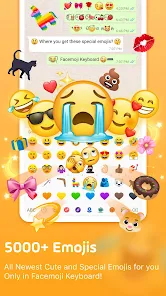
- 😊 Facemoji offers a massive library of emojis, stickers, and GIFs that you can search and use directly from the keyboard, which beats something like Gboard's basic emoji picker because it includes custom art and trending packs that update often, making chats more lively without extra taps.
- 🤖 The built-in “ASK AI” feature is a standout—it lets you type a question or request right in the keyboard, like asking for a joke or help rewriting a sentence, and you get a response without opening another app; compared to SwiftKey's smart predictions, this is more interactive and creative for quick tasks.
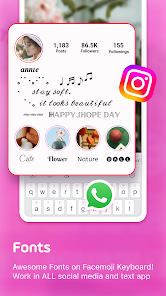
- 🎨 Customization is huge here—you can change fonts, colors, backgrounds, and key sounds with hundreds of free themes, and even create your own, which is way more flexible than the limited options in standard keyboards like Samsung Keyboard, where you're stuck with basic presets.
- 🔍 The emoji search includes text-to-emoji conversion, where typing “cat” suggests multiple emoji styles automatically, saving time compared to Apple's default keyboard that only offers a few options after manual scrolling.
pros
- 🛠 One major strength is the deep personalization—unlike Microsoft SwiftKey, which focuses on typing predictions, Facemoji lets you tweak every visual element, from key borders to custom fonts, giving your phone a unique feel that stands out in group chats.
- ⚡ The AI assistant is a practical boost for multitaskers—while Gboard has a built-in search, Facemoji's AI can generate catchy captions or quick notes without leaving the message app, saving you from app switching for small tasks.
- 🔇 It handles silent mode well—you can set specific key sounds or vibrations per theme, which is more granular than the on/off toggle in standard Android keyboards, letting you keep subtle feedback without annoying others.
cons
- ⚠️ The app is ad-heavy and pushes in-app purchases aggressively—for example, after typing a few messages, a full-screen ad for a premium theme pops up, which is far more intrusive than the subtle ads in something like Chrooma Keyboard, making free use feel clunky.
- 🐢 Performance can dip on older phones—while Gboard runs smoothly even on low-end devices, Facemoji sometimes lags when loading the theme store or switching keyboards, and the AI feature takes a few seconds to respond, which slows down quick typing sessions.
- 🔋 Battery drain is noticeable—because it runs background services for live themes and AI suggestions, it uses more power than a basic keyboard like AOSP Keyboard, so you might charge your phone more often if you're a heavy texter.
- 🧠 The AI can feel gimmicky—unlike SwiftKey's practical clipboard and prediction tools, Facemoji's AI often gives generic answers (like “I don't know” to simple queries), which makes it less useful for real tasks and more of a novelty that wears off fast.
Recommended Apps
![]()
Japevox - Funny Prank Sound
SecureTool4.3
![]()
AstroMatrix Birth Horoscopes
AstroMatrix4.7
![]()
Personalized Call from Santa (
www.PackageFromSanta.com4.3![]()
Prank Call - Fake Call & Chat
Bravestars Casual4.1![]()
Persona: Beauty Camera
TICKET TO THE MOON, INC.4.5![]()
Peacock TV: Stream TV & Movies
Peacock TV LLC4.5![]()
Instant Buttons Soundboard App
Snow Peak Apps2.1![]()
GPS Speedometer: Speed Tracker
SM Infotech3.2![]()
Subway®
SUBWAY Restaurants4.2![]()
Find Your Phone By Clap
Trusted App Global4.5![]()
Gorilla Skins for Monkey Arena
Dumitru Boico4![]()
Vimeo
Vimeo.com, Inc.3.8![]()
Vinted - Buy and sell clothes
Vinted4.6![]()
Galaxy Starry Keyboard Backgro
Fun Keyboard Theme for Android4.7![]()
Chat AI - Ask AI anything
AI Chat Bot, Ask AI4.4















Disclaimer
1.Apklifts does not represent any developer, nor is it the developer of any App or game.
2.Apklifts provide custom reviews of Apps written by our own reviewers, and detailed information of these Apps, such as developer contacts, ratings and screenshots.
3. All trademarks, registered trademarks, product names and company names or logos appearing on the site are the property of their respective owners.
4.Apklifts abides by the federal Digital Millennium Copyright Act (DMCA) by responding to notices of alleged infringement that complies with the DMCA and other applicable laws.
5.If you are the owner or copyright representative and want to delete your information, please contact us [email protected].
6.All the information on this website is strictly observed all the terms and conditions of Google Ads Advertising policies and Google Unwanted Software policy.
7.Apklifts.com is an independent, information-only website which is 100% free to all the users.













