

Emoji Home: Make Messages Fun

5M+
Installs
Emoji Home
Developer
-
Productivity
Category
-
Rated for 12+
Content Rating
-
https://myhomeapps.com/legal/privacy.html
Privacy Policy
Screenshots


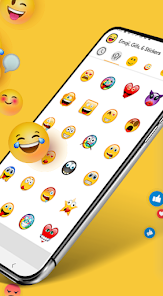
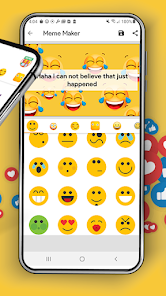
editor reviews
Emoji Home: Make Messages Fun is a keyboard customization app available on the Google Play Store. It lets users replace their stock keyboard with one that offers thousands of emojis, stickers, GIFs, and customizable themes. I downloaded it out of sheer boredom—my default keyboard felt painfully dull, and I wanted something that could make casual chats with friends feel less robotic. After installing it (which took maybe a minute) and launching it, I was immediately hit with a colorful, almost overwhelming interface. It's free to download, though there are in-app purchases for premium theme packs and sticker sets, and I noticed a few ads popping up right away. Honestly, my first impression was mixed: it felt exciting but also a bit cluttered, like walking into a store that has way too much on the shelves.
After granting the required permissions (which is a bit of a hassle, but standard for this type of app), I started playing around. The onboarding walks you through enabling the keyboard in your system settings and setting it as default—pretty straightforward if you've done it before. The keyboard itself feels smooth once you get past the initial setup. I found myself tapping through different theme collections, from cute animal prints to neon gamer vibes. The emoji search is surprisingly quick, which saved me a ton of scrolling. One small trick I stumbled upon: you can long-press a sticker to preview it before sending. Daily use was mostly smooth, though I did experience a slight lag when switching between the sticker library and the regular text input. The main actions—sending emojis, mixing stickers with text, and flipping through theme categories—feel natural after a few minutes of poking around.
After using it for a solid week, I'd say it's great for someone who loves expressing themselves with visuals rather than plain text. If you're the type who sends a meme or sticker in every reply, this app will feel like a playground. But if you prefer a clean, distraction-free typing experience, you'll probably find it overwhelming. Compared to something like Gboard, which offers a similar sticker and emoji library but keeps things more restrained and polished, Emoji Home feels like the wild party version—it's fun and colorful, but it also hogs a lot of screen real estate with banners and pop-ups for premium content. I kept it installed because I genuinely enjoy the sticker variety, but after a while, the ads started grating on me. I removed it once I realized I was spending more time navigating the keyboard's interface than actually typing.
features
- 😀 The emoji and sticker library here is massive. Where Gboard feels more curated, Emoji Home throws thousands of options at you, from classic smileys to niche meme stickers. That variety makes it feel fresh whenever you need a quick reaction.
- 🎨 Keyboard themes are the main draw. You can pick from hundreds of pre-designed skins, and they change the entire look of your keyboard—colors, fonts, even the key shapes. Gboard offers themes too, but Emoji Home's selection is way more playful and diverse.
- ⚡ The emoji search is surprisingly snappy. You type a keyword like “cry” or “coffee,” and it pulls up matching emojis, stickers, and GIFs instantly. On Gboard, the search is good but sometimes feels slower or less complete.
- 🖼️ Sticker preview on long-press is a small but useful feature. It lets you see the full sticker before committing to send it, which helps when you're scrolling through a huge pack and don't want to guess.
pros
- 🎯 Huge sticker variety compared to SwiftKey or Gboard—you get access to themed packs that cover everything from holidays to specific anime memes.
- 🛠️ Keyboard themes are genuinely customizable. You can mix backgrounds with key text colors and even adjust the key border style, which is more flexible than most default keyboard apps.
- ⏱️ Emoji search feels faster than in Gboard—typing a keyword returns results almost instantly without lag.
cons
- 🔔 Ads are everywhere. There are banner ads at the top, pop-ups after theme changes, and occasional full-screen video ads that break the flow. Gboard has zero ads.
- 🐢 Interface can feel cluttered. Navigating between sticker packs, themes, and settings feels messy compared to the clean layout of SwiftKey or Gboard.
- ⚠️ Lag during sticker transitions. When switching from the sticker library back to text typing, there's a noticeable delay that Gboard doesn't have.
- 🔒 Permission setup is more involved than average. You need to manually enable the keyboard, grant full access, and set it as default—a bit tedious compared to SwiftKey's smoother onboarding.
Recommended Apps
![]()
Japevox - Funny Prank Sound
SecureTool4.3
![]()
AstroMatrix Birth Horoscopes
AstroMatrix4.7
![]()
Personalized Call from Santa (
www.PackageFromSanta.com4.3![]()
Prank Call - Fake Call & Chat
Bravestars Casual4.1![]()
Persona: Beauty Camera
TICKET TO THE MOON, INC.4.5![]()
Peacock TV: Stream TV & Movies
Peacock TV LLC4.5![]()
Instant Buttons Soundboard App
Snow Peak Apps2.1![]()
GPS Speedometer: Speed Tracker
SM Infotech3.2![]()
Subway®
SUBWAY Restaurants4.2![]()
Find Your Phone By Clap
Trusted App Global4.5![]()
Gorilla Skins for Monkey Arena
Dumitru Boico4![]()
Vimeo
Vimeo.com, Inc.3.8![]()
Vinted - Buy and sell clothes
Vinted4.6![]()
Galaxy Starry Keyboard Backgro
Fun Keyboard Theme for Android4.7![]()
Chat AI - Ask AI anything
AI Chat Bot, Ask AI4.4















Disclaimer
1.Apklifts does not represent any developer, nor is it the developer of any App or game.
2.Apklifts provide custom reviews of Apps written by our own reviewers, and detailed information of these Apps, such as developer contacts, ratings and screenshots.
3. All trademarks, registered trademarks, product names and company names or logos appearing on the site are the property of their respective owners.
4.Apklifts abides by the federal Digital Millennium Copyright Act (DMCA) by responding to notices of alleged infringement that complies with the DMCA and other applicable laws.
5.If you are the owner or copyright representative and want to delete your information, please contact us [email protected].
6.All the information on this website is strictly observed all the terms and conditions of Google Ads Advertising policies and Google Unwanted Software policy.
7.Apklifts.com is an independent, information-only website which is 100% free to all the users.













