

Phone Tracker By Number

50M+
Installs
Family Locator Inc.
Developer
-
Productivity
Category
-
Rated for 3+
Content Rating
-
https://www.locatorprivacy.com
Privacy Policy
Screenshots
editor reviews
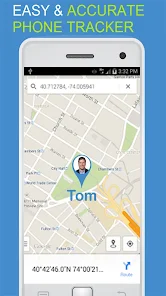
Phone Tracker By Number, developed by Family Locator Inc., sits firmly in the utility and productivity category on Google Play. The main idea is straightforward: it helps you locate a phone using its number, with features like a phone finder, family locator, and GPS tracker. I downloaded it because I sometimes worry about my younger brother not answering his phone after school, and I wanted something simpler than the full-blown family tracking apps I've seen. After launching the app, my first impression was mixed. The interface is basic, with a simple map and a search bar, but it immediately asked for a ton of permissions, including access to my contacts and SMS, which felt a bit invasive before I'd even done anything. It's free to download and install, with in-app purchases to unlock premium features like location history, and there are occasional ads that pop up. The install count seems decent, but I didn't see any mandatory registration, just an optional account setup.
Getting into the actual hands-on experience, the onboarding process is quick but leaves you guessing. You're dropped onto a screen with a map and a button that says "Start Tracking." I typed in my brother's number, hit the button, and waited. The app then sent a verification SMS to his phone, which he needed to approve. That's where things got tricky. He didn't trust the message, thought it was spam, and ignored it. Once I explained it to him and he clicked the link, the app showed his approximate location on the map, usually within a few blocks. The interface is simple but a bit clunky; the map loads slowly sometimes, and switching between the tracker and the history tab isn't smooth. A practical tip: make sure the other person knows you're using this, because the verification step requires their cooperation. I also noticed that the GPS tracking drains battery pretty fast, so keep that in mind for daily use.
After using it for a few weeks, I have a fair judgment on who this is for. It might work for parents who want a very basic way to check on their kids' whereabouts, especially if the kids are old enough to understand the app. But for anyone needing reliable, real-time tracking without manual approval, this isn't it. Compared to something like Life360, which offers automatic location sharing without constant phone verification, Phone Tracker By Number feels like a stripped-down version. The standout difference is that it relies on SMS verification, which introduces friction every time you want to check a location. I wouldn't recommend it for daily tracking, and I eventually uninstalled it because my brother kept forgetting to approve the requests, making the app useless. Someone might keep it for occasional use, like finding a lost phone among family members, but for regular monitoring, there are better options.
features
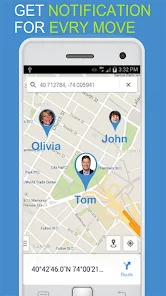
- 📍 Real-Time Location Tracking: The app uses GPS and network data to show the target phone's location on a map. Compared to Google Maps' location sharing, which requires both parties to manually enable sharing in Google Maps, Phone Tracker By Number tries to pull the location from the number directly, which is a more aggressive approach. However, Google Maps' location sharing is smoother and doesn't need SMS verification, making it less intrusive.
- 🔍 Phone Finder Feature: It includes a phone finder that rings the target device, even if it's on silent. This is similar to "Find My Device" on Android, but Find My Device is more reliable because it doesn't depend on the other person approving a request. The app's finder worked once for me, but other times it just said "unable to locate."
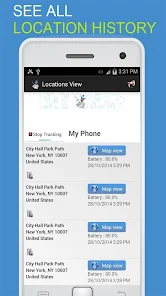
- 🗺️ Location History: Premium users get access to location history, showing where the phone has been over a period. Compared to Life360's history, which is more detailed and includes driving routes, this app's history is basic and sometimes inaccurate, showing random spots that don't match actual movements.
pros
- 🔒 No Registration Required: You don't need to create an account to start tracking, which is different from apps like Life360 that force you to sign up. This makes it quicker to use for a one-time check.
- 📲 SMS-Based Verification: The verification via SMS makes it feel more secure since the target person must approve, reducing privacy concerns compared to apps like mSpy that track without consent.
- 💸 Free Basic Version: The core tracking feature is free, unlike many competitors that charge a subscription for even basic functions. Life360, for instance, requires a paid plan for location history.
cons
- 🚫 Dependent on Cooperation: The SMS verification means the target must approve every tracking request, which is a big flaw compared to apps like Glympse or Life360 that allow automatic sharing after initial setup.
- 📶 Inconsistent Accuracy: The location is often off by several blocks, sometimes showing wrong addresses. Google Maps location sharing is way more precise, usually accurate to a few meters.
- 🔋 High Battery Drain: Keeping the tracker active drains the battery quickly on both phones. In contrast, Life360 optimizes battery usage better, lasting a full day without major impact.
- 📺 Intrusive Ads: The free version has frequent pop-up ads that make the app feel cheap. Paid alternatives like Family Locator (by similar developers) often have a cleaner, ad-free experience.
Recommended Apps
![]()
Japevox - Funny Prank Sound
SecureTool4.3
![]()
AstroMatrix Birth Horoscopes
AstroMatrix4.7
![]()
Personalized Call from Santa (
www.PackageFromSanta.com4.3![]()
Prank Call - Fake Call & Chat
Bravestars Casual4.1![]()
Persona: Beauty Camera
TICKET TO THE MOON, INC.4.5![]()
Peacock TV: Stream TV & Movies
Peacock TV LLC4.5![]()
Instant Buttons Soundboard App
Snow Peak Apps2.1![]()
GPS Speedometer: Speed Tracker
SM Infotech3.2![]()
Subway®
SUBWAY Restaurants4.2![]()
Find Your Phone By Clap
Trusted App Global4.5![]()
Gorilla Skins for Monkey Arena
Dumitru Boico4![]()
Vimeo
Vimeo.com, Inc.3.8![]()
Vinted - Buy and sell clothes
Vinted4.6![]()
Galaxy Starry Keyboard Backgro
Fun Keyboard Theme for Android4.7![]()
Chat AI - Ask AI anything
AI Chat Bot, Ask AI4.4















Disclaimer
1.Apklifts does not represent any developer, nor is it the developer of any App or game.
2.Apklifts provide custom reviews of Apps written by our own reviewers, and detailed information of these Apps, such as developer contacts, ratings and screenshots.
3. All trademarks, registered trademarks, product names and company names or logos appearing on the site are the property of their respective owners.
4.Apklifts abides by the federal Digital Millennium Copyright Act (DMCA) by responding to notices of alleged infringement that complies with the DMCA and other applicable laws.
5.If you are the owner or copyright representative and want to delete your information, please contact us [email protected].
6.All the information on this website is strictly observed all the terms and conditions of Google Ads Advertising policies and Google Unwanted Software policy.
7.Apklifts.com is an independent, information-only website which is 100% free to all the users.













