

Step Tracker - Pedometer

10M+
Installs
Leap Fitness Group
Developer
-
Health & Fitness
Category
-
Rated for 3+
Content Rating
-
https://leap.app/privacypolicy.html?pkg=steptracker.healthandfitness.walkingtracker.pedometer
Privacy Policy
Screenshots
editor reviews
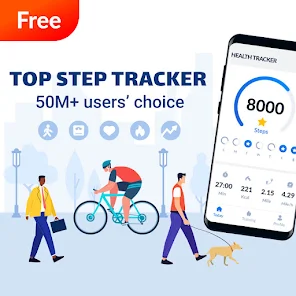
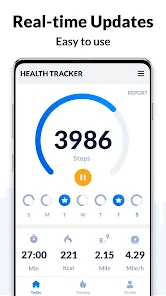
Step Tracker - Pedometer is a straightforward health and fitness app designed to count your daily steps using your phone's built-in sensors. It falls under the category of wellness and activity trackers, and most people download it to keep an eye on their daily movement without needing a smartwatch or a dedicated fitness band. After installing it from Google Play or the App Store—it's free to download, by the way, and has been installed over 50 million times—you're asked for permission to access your phone's motion sensors. The first impression is clean and minimal. The main screen shows a big number of your current step count right in the center, surrounded by a simple progress ring. There's no clutter or flashy animations, which feels refreshing. You don't even need to create an account to start using it, so within seconds you're already tracking.
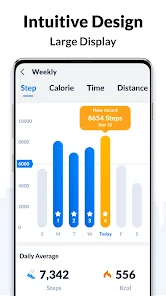
Once you start walking, the app works quietly in the background. The interface is mostly about displaying your steps, distance covered, calories burned, and active time. Onboarding is basically nonexistent—you just open it and it's running. The main actions are swiping between tabs to see daily, weekly, or monthly stats, and you can tap on any day to see a more detailed breakdown. One thing I noticed is that it doesn't drain battery as badly as I expected, which is a common worry with step-tracking apps. A small practical tip: if you carry your phone in a bag or a pocket that moves a lot, it might occasionally miscount steps, but for typical walking or jogging it feels accurate enough. The app also lets you set a daily step goal, and you get a little vibration or notification when you hit it, which is satisfying. Navigating through the history section is smooth, although the graphs could be a bit more interactive.
After using Step Tracker for a while, I find it does exactly what it promises and nothing more. It's perfect for someone who just wants a simple, no-fuss way to keep track of their daily movement and doesn't care about social features, workout routines, or meal logging. If you're looking for a more comprehensive fitness app, you might find it too basic. Compared to something like Google Fit, it feels more focused and less distracting, but it lacks the integration with other health services. What makes it different is the sheer simplicity—there are no ads popping up every few minutes, and it doesn't nag you to upgrade. I can see someone keeping it installed as a lightweight daily tracker, but if you already have a smartwatch or a phone with a built-in step counter, you might uninstall it after a week. It's a solid choice for its niche.
features
- 🛰️ The app relies entirely on your phone's built-in accelerometer and gyroscope, so you don't need any extra hardware like a wearable device. That means it's completely free to start using, unlike dedicated pedometers or fitness bands that cost money.
- 📊 It provides a very clear breakdown of your daily activity into steps, distance, calories, and active time. The main screen shows a progress ring that fills up as you approach your goal, which is more visually intuitive than the simple number-based display in apps like Samsung Health.
- 🔋 One standout feature is its low battery consumption. It runs in the background without constantly pinging GPS or keeping the screen on, so your phone lasts all day. In contrast, many other step trackers, including Google Fit, often drain more power when they try to track other activities.
- 📅 You can also view your entire step history in daily, weekly, or monthly views, which helps you spot trends without jumping through multiple menus. That's more straightforward than the cluttered timeline in some competing apps.
pros
- 👍 It's completely free with no ads interrupting your experience every few minutes, which is a huge plus compared to apps like Pedometer++ that eventually push premium versions.
- 👍 The automatic step tracking works right after installation without any complex setup process—no signing up, no connecting to other apps, no calibration required. That's simpler than Fitbit's app, which demands an account and device pairing.
- 👍 The user interface is extremely clean and focused, showing only the essential information. It avoids the overwhelming dashboard that apps like Apple Health present, which can confuse new users.
cons
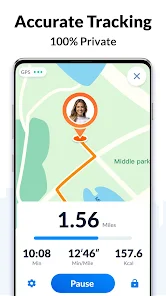
- 👎 There's no GPS tracking for outdoor walks or runs, so distance and pace calculations are less accurate than what you'd get from Runkeeper or Strava, which use your phone's location services.
- 👎 The app doesn't integrate with other health platforms like Apple Health or Google Fit, so your step data stays isolated. This makes it less useful than apps like Pedometer++ that sync automatically.
- 👎 It lacks advanced features like goal setting for different activities, workout logging, or social challenges. If you want more than basic step counting, you'll quickly outgrow it compared to something like MyFitnessPal's companion apps.
- 👎 Some users report occasional miscounts, especially when the phone is in a loose pocket or bag. This happens less frequently with dedicated accelerometers in smartwatches like the Apple Watch.
Recommended Apps
![]()
BetterMe: Health Coaching
BetterMe Limited4.3
![]()
Walli - HD, 4K Wallpapers
Tap AI4.4![]()
Future Self - Old Age Filter
Vidler Koiter1.6
![]()
AI Photo Editor, Collage-Fotor
AI Art Photo Editor | Everimaging Ltd.4.3![]()
AI Face Swap: MagicFace &Photo
Braly JSC0![]()
QR Code Reader: QR Scanner
WECHOICE MOBILE4.3![]()
Lip Fall Challenge: Fun Filter
Braly JSC0![]()
Funny Reverse Audio - Singing
PlayStudioInc0![]()
Birthday Secrets
shasunder4.4![]()
Live Wallpapers HD 4K
Wallpaper app4.4![]()
Find Your Phone By Clap
Trusted App Global4.5![]()
Wizz - Expand Your World
Wizz3.8![]()
NCAA March Madness Live
NCAA Digital4.7![]()
Hulu: Stream TV shows & movies
Disney4.5![]()
Lethal Love: a Yandere game
AniByte!4.4















Disclaimer
1.Apklifts does not represent any developer, nor is it the developer of any App or game.
2.Apklifts provide custom reviews of Apps written by our own reviewers, and detailed information of these Apps, such as developer contacts, ratings and screenshots.
3. All trademarks, registered trademarks, product names and company names or logos appearing on the site are the property of their respective owners.
4.Apklifts abides by the federal Digital Millennium Copyright Act (DMCA) by responding to notices of alleged infringement that complies with the DMCA and other applicable laws.
5.If you are the owner or copyright representative and want to delete your information, please contact us [email protected].
6.All the information on this website is strictly observed all the terms and conditions of Google Ads Advertising policies and Google Unwanted Software policy.
7.Apklifts.com is an independent, information-only website which is 100% free to all the users.














