Planner 5D: Home Design, Decor

10M+
Installs
Planner 5D
Developer
-
Lifestyle
Category
-
Everyone
Content Rating
-
https://planner5d.com/pages/privacy/
Privacy Policy
Screenshots

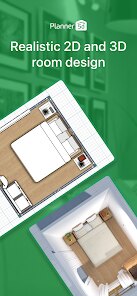

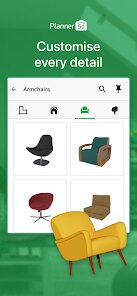


editor reviews
I stumbled upon Planner 5D when my wife and I started talking about finally redoing our cramped kitchen. It's basically a home design and interior decoration tool that lives on your phone or tablet, and honestly, it feels a lot more polished than most of the free stuff you find on the Play Store. After downloading it, which was a breeze since it's free with optional in-app purchases, the first thing that hit me was how clean the opening screen looked. No annoying video tutorials forced on you, just a simple menu to start a new project or browse community designs. It doesn't shove registration down your throat either, which I really appreciated as a first-time user just poking around.
Once you get into the actual app, the interface is surprisingly intuitive for a mobile design tool. You start by picking a room template or drawing your own floor plan by tracing on a grid, which sounds technical but actually works pretty well with finger drags. After you've got your basic walls and windows set, the real fun begins. You tap a big plus button to bring up a catalog of furniture, from sofas to kitchen islands, and then you just drop them into your 2D layout. What caught me off guard was that you can switch to a 3D view instantly by tilting your phone or hitting a toggle. One small tip I picked up fast: use two fingers to pan the camera in 3D mode, or you'll keep accidentally moving the furniture instead. The app felt smooth navigating between rooms, though placing a table exactly where I wanted took a few tries because the snap-to-grid is a little touchy.
After a few weekends of tinkering, I can honestly say this app nailed it for casual home planners like us, but it's not for professional architects. The sheer variety of free items is decent, but a lot of the nice modern furniture is locked behind a purchase or a subscription, which can get frustrating if you're just browsing ideas. Compared to something like Houzz, which is more about inspiration photos, Planner 5D actually lets you build your own space, so it feels more hands-on. My wife and I both ended up keeping it because it's perfect for arguing over couch colors without buying anything real. That said, if you want super accurate measurements or advanced rendering, you'll probably uninstall it for something like SketchUp. It's more of a sandbox for dreaming than a serious drafting tool.
features
- 🎨 You can instantly switch between 2D and 3D views by tapping or tilting your device, which makes it easy to see how your floor plan translates into a real-looking room without any complicated toggles.
- 🛋️ The furniture catalog has hundreds of items from sofas to lamps, and they are sorted by room type like bathroom or bedroom, so you don't have to scroll through random stuff to find a toilet.
- 🖼️ Unlike apps like HomeByMe that force you into a browser version, Planner 5D works fully offline for basic editing, so you can design your dream basement even on a subway with spotty signal.
- 📐 The app has a smart measurement tool that calculates square footage automatically when you draw walls, which helped me figure out if my new sofa would physically fit without pulling out a tape measure.
pros
- 🌳 The free tier actually gives you a solid library of furniture and textures compared to MagicPlan, which basically locks everything behind a paywall after the first room.
- 🎨 The visual quality in 3D mode is genuinely impressive for a mobile app, with realistic lighting and shadow effects that make your design feel less like a toy and more like a real rendering tool.
- 💾 Saving projects to the cloud is seamless and lets you pick up on your tablet exactly where you left off on your phone, something that Roomstyler still hasn't figured out how to do properly.
cons
- 🎨 The free catalog has a limited selection of modern furniture styles, and many of the nicer items like a sectional sofa require a separate coin purchase that feels overpriced compared to HomeByMe's subscription model.
- 📐 Precision is a bit of a joke when you try to place items with exact inches, because the snap-to-grid often overrides your manual positioning. That makes it frustrating for anyone wanting to match real room dimensions precisely.
- 💾 The app does have a tendency to lag and even crash when you have more than a few rooms filled with furniture, especially on older devices. I lost a kitchen layout once because I didn't manually save often enough, which was a hard lesson learned.
- 🔄 Importing your own photos or textures to use as wallpapers or flooring is impossible without paying for the premium version, unlike MagicPlan which allows this for free.
Recommended Apps
![]()
BetterMe: Health Coaching
BetterMe Limited4.3
![]()
Walli - HD, 4K Wallpapers
Tap AI4.4![]()
Future Self - Old Age Filter
Vidler Koiter1.6
![]()
AI Photo Editor, Collage-Fotor
AI Art Photo Editor | Everimaging Ltd.4.3![]()
AI Face Swap: MagicFace &Photo
Braly JSC0![]()
QR Code Reader: QR Scanner
WECHOICE MOBILE4.3![]()
Lip Fall Challenge: Fun Filter
Braly JSC0![]()
Funny Reverse Audio - Singing
PlayStudioInc0![]()
Birthday Secrets
shasunder4.4![]()
Live Wallpapers HD 4K
Wallpaper app4.4![]()
Find Your Phone By Clap
Trusted App Global4.5![]()
Wizz - Expand Your World
Wizz3.8![]()
NCAA March Madness Live
NCAA Digital4.7![]()
Hulu: Stream TV shows & movies
Disney4.5![]()
Lethal Love: a Yandere game
AniByte!4.4















Disclaimer
1.Apklifts does not represent any developer, nor is it the developer of any App or game.
2.Apklifts provide custom reviews of Apps written by our own reviewers, and detailed information of these Apps, such as developer contacts, ratings and screenshots.
3. All trademarks, registered trademarks, product names and company names or logos appearing on the site are the property of their respective owners.
4.Apklifts abides by the federal Digital Millennium Copyright Act (DMCA) by responding to notices of alleged infringement that complies with the DMCA and other applicable laws.
5.If you are the owner or copyright representative and want to delete your information, please contact us [email protected].
6.All the information on this website is strictly observed all the terms and conditions of Google Ads Advertising policies and Google Unwanted Software policy.
7.Apklifts.com is an independent, information-only website which is 100% free to all the users.