

Home Design 3D

10M+
Installs
Anuman
Developer
-
Lifestyle
Category
-
Everyone
Content Rating
-
https://en.homedesign3d.net/privacy-policy/
Privacy Policy
Screenshots

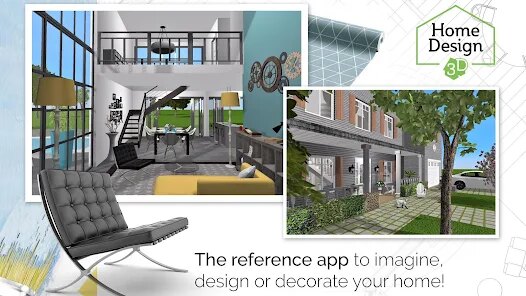
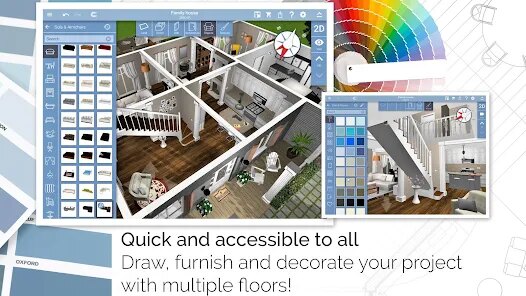


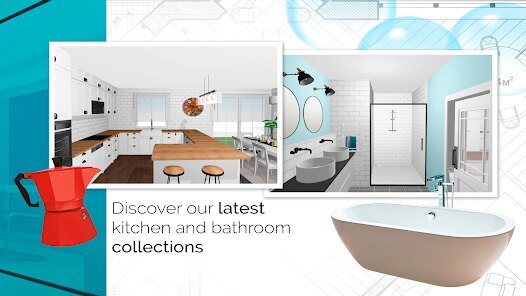
editor reviews
Home Design 3D is a mobile interior design and architectural planning tool that lets you sketch floor plans, furnish rooms, and view your creations in a 3D walkthrough. It's the kind of app you download when you're moving into a new place or just daydreaming about a living room makeover. I grabbed it from the Google Play store after seeing it had over 10 million installs and mostly decent reviews. The first time I opened it, the interface felt a bit like a stripped-down CAD program—lots of tools packed into a small screen, which can feel overwhelming at first. There's no forced account creation to start experimenting, which is nice, but the free version does throw a few ads your way. You can start drawing walls right away, but some premium furniture items are locked behind in-app purchases, so the initial impression is that it's generous enough to explore but pushy enough to remind you what you're missing.
Getting into the actual work, the app walks you through a short tutorial that shows you how to tap and drag to create rooms. After that, you're pretty much on your own. Drawing the layout is surprisingly tactile—you can pinch to zoom and rotate the 2D view, and switching to 3D mode is as simple as tapping a button in the corner. Placing furniture is where the app shines: you pick a category like “Living Room” or “Kitchen,” choose an item, and tap where you want it. You can resize, rotate, and even change the color of many items. A small trick I picked up is that you can duplicate a room layout quickly by selecting all objects and copying them—saves time if you're designing multiple floors. The 3D walkthrough mode is smooth most of the time, but if you add too many objects, the frame rate can stutter on older phones. Also, snapping walls to a grid isn't automatic, so you'll sometimes end up with slightly crooked rooms if you aren't careful with your finger placement.
After playing around for a few days, I think this app is perfect for casual planners or anyone who wants a rough visual of a renovation idea without learning proper software. For someone like me who just wanted to see if a new sofa fits in the corner, it worked great. But if you're a serious architect or need precise measurements for construction, you'll be frustrated by the lack of snap tools and exact numeric inputs. Compared to something like MagicPlan, which uses your phone's camera to scan rooms automatically, Home Design 3D feels more manual but also more creative. The biggest difference is that this app feels like a toy with professional pretensions—it's fun to use for an evening, but I can see myself uninstalling it once my current project is done. Still, for free, it's a solid way to waste an hour imagining a better living room.
features
- 🛋️ The app offers a huge library of furniture and decor items across categories like living room, bedroom, kitchen, and garden. Each item can be resized, rotated, and recolored with a simple tap, which gives you way more customization than MagicPlan's more limited object catalog. The free version includes plenty of items, but premium packs unlock designer-brand furniture if you want something fancier.
- 📐 You can switch between 2D blueprint mode and 3D walkthrough mode seamlessly. In 2D mode, you can measure room dimensions and tweak wall placements with precise numeric input if you're using a tablet. This dual-view feature is smoother than many rivals—Room Planner sometimes lags when switching views, but this app handles it well on mid-range devices.
- 🏠 The export feature lets you save your project as an image, PDF, or even a 3D model file. You can also export a 360-degree panorama view of your room, which is rare among free apps. MagicPlan charges extra for similar export options, so this is a standout benefit for anyone who needs to share designs with a contractor or friend.
pros
- 🎨 The drag-and-drop interface is much more beginner-friendly than professional tools like SketchUp. You don't need to watch hours of tutorials to place a couch or paint a wall—just tap and drag. The learning curve is shallow enough that my non-designer friends could start building rooms in under five minutes.
- 📱 It works both offline and online, which is a big plus over apps like Planner 5D that require a constant internet connection for most features. You can plan your dream house on a subway ride without worrying about signal drops.
- 💰 The free version actually gives you a lot of content before asking for money. You get access to dozens of furniture items and floor plan tools without a subscription, whereas apps like Homestyler lock basic features like room drawing behind a paywall.
cons
- 📏 Precision is weak compared to professional tools. There's no automatic wall alignment or snapping to grid, so rooms can end up looking slightly off unless you measure manually. Apps like Sweet Home 3D offer snap tools that make layout much cleaner.
- 📺 The free version shows frequent banner ads and occasional full-screen video ads that interrupt your workflow. They appear right when you're trying to place a window, which gets annoying fast. Room Planner's free version is much less intrusive.
- 🌀 The 3D walkthrough can get laggy when you add multiple walls and furniture pieces, especially on phones with less than 4GB of RAM. MagicPlan's performance holds up better with similar project loads.
Recommended Apps
![]()
BetterMe: Health Coaching
BetterMe Limited4.3
![]()
Walli - HD, 4K Wallpapers
Tap AI4.4![]()
Future Self - Old Age Filter
Vidler Koiter1.6
![]()
AI Photo Editor, Collage-Fotor
AI Art Photo Editor | Everimaging Ltd.4.3![]()
AI Face Swap: MagicFace &Photo
Braly JSC0![]()
QR Code Reader: QR Scanner
WECHOICE MOBILE4.3![]()
Lip Fall Challenge: Fun Filter
Braly JSC0![]()
Funny Reverse Audio - Singing
PlayStudioInc0![]()
Birthday Secrets
shasunder4.4![]()
Live Wallpapers HD 4K
Wallpaper app4.4![]()
Find Your Phone By Clap
Trusted App Global4.5![]()
Wizz - Expand Your World
Wizz3.8![]()
NCAA March Madness Live
NCAA Digital4.7![]()
Hulu: Stream TV shows & movies
Disney4.5![]()
Lethal Love: a Yandere game
AniByte!4.4















Disclaimer
1.Apklifts does not represent any developer, nor is it the developer of any App or game.
2.Apklifts provide custom reviews of Apps written by our own reviewers, and detailed information of these Apps, such as developer contacts, ratings and screenshots.
3. All trademarks, registered trademarks, product names and company names or logos appearing on the site are the property of their respective owners.
4.Apklifts abides by the federal Digital Millennium Copyright Act (DMCA) by responding to notices of alleged infringement that complies with the DMCA and other applicable laws.
5.If you are the owner or copyright representative and want to delete your information, please contact us [email protected].
6.All the information on this website is strictly observed all the terms and conditions of Google Ads Advertising policies and Google Unwanted Software policy.
7.Apklifts.com is an independent, information-only website which is 100% free to all the users.














