
Pedometer - Step Counter

50M+
Installs
Simple Design Ltd.
Developer
-
Health & Fitness
Category
-
Rated for 3+
Content Rating
-
https://simpledesign.ltd/privacypolicy.html?pkg=pedometer.stepcounter.calorieburner.pedometerforwalking
Privacy Policy
Screenshots
editor reviews
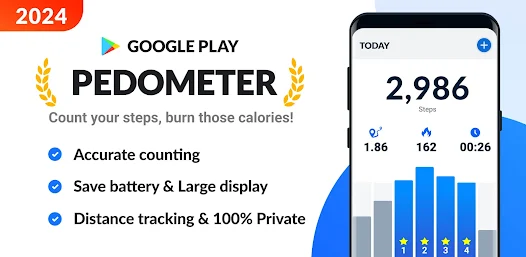
Pedometer - Step Counter by Simple Design Ltd. is a straightforward health and fitness app built around one core purpose: tracking your daily steps. You install it from the Google Play Store or App Store, and once launched, it starts counting using your phone's built-in motion sensors. The first impression is refreshingly simple—no clutter, no mandatory sign-up, just a clean interface showing your current step count as soon as you open it. A normal user might download this because they want a no-fuss way to stay mindful of daily movement without committing to a full fitness ecosystem. The app is free, though there are small banner ads at the bottom, and you can unlock a few extra features through an optional in-app purchase. The moment you open it, you see your step total for the day, and that's honestly the best part—it just works.
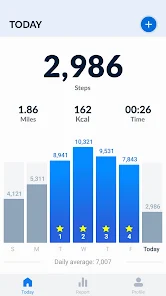
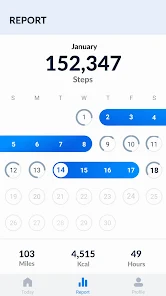
Using it day to day feels natural because there's almost no learning curve. The main screen shows steps, distance, calories burned, and active time, all updated in real time. Tapping the menu reveals a basic weekly chart and a daily history log, which is helpful for checking patterns. One small tip: the step counter works even if the app is running in the background, so you don't have to keep it open. I did notice that on bumpy car rides it might pick up a few extra steps, but for walking it's pretty accurate. The onboarding is minimal—just a simple permission request for motion tracking—and then you're off. It doesn't push you to sync with health platforms or create a profile, which feels refreshing compared to apps that ask for too much upfront. If you're looking for a quick look at how active your day actually was, this app delivers without fuss.
After a few weeks, I'd say this app works best for people who want casual step tracking without extra layers. I can see someone keeping it installed if they just want a daily goal reminder and don't care about social challenges or workout integration. It's simpler than Google Fit, which often feels like it wants you to log every activity, and more focused than Samsung Health, which packs in a huge suite of tools. What makes it different is the lack of pressure—no constant notifications telling you to move more or hit a goal. That said, if you're someone who loves data trends, detailed sleep tracking, or competing with friends, this isn't built for you. It does the one thing well, but it stays small by design. I ended up keeping it as a secondary tracker for lazy days, and it serves that purpose just fine.
features
- 🐾 Simple step counting without extras: The app focuses entirely on step tracking, so there's no clutter or unrelated features. Compare this to Google Fit, which bundles in heart points and workout logging—useful for some, but overwhelming if you just want steps.
- 🐾 Battery-friendly background tracking: It runs quietly in the background without draining your phone fast. My battery dropped only about 3% over an 8-hour walk day, while Samsung Health tends to use noticeably more power with its always-on sensor polling.
- 🐾 No account required for basic use: You can track steps immediately without creating an account or signing in. Apps like Pacer and Pedometer++ often nag you to log in early, which feels unnecessary when the core feature works fine without it.
pros
- 👍 Barebones and fast to start: The biggest strength is how little you need to do to begin. Unlike MapMyWalk, which asks you to pick goals and connect accounts first, this app just counts your steps right out of the gate.
- 👍 Clean interface with no learning curve: The design is straightforward, so anyone can use it without reading a manual. Stepz, for instance, has a nice look but buries historical data behind a few taps—this app shows your week at a glance.
- 👍 Low commitment for casual users: For someone who only wants a glance at their daily movement, it's perfect. Fitbit's app is richer but demands constant interaction to feel useful, while this one stays out of your way.
cons
- 👎 Limited data and no deep insights: You get daily totals and a basic chart, but no trends over months or breakdowns by hour. Google Fit and Pedometer++ offer more detailed history, which helps if you're analyzing your activity patterns.
- 👎 Occasional step overcount on bumpy surfaces: It can register steps from car rides or hand movements, so daily totals might be a bit inflated. Apps like Accupedo use better filtering to avoid this, so they're more reliable for precise tracking.
- 👎 No integrations with health platforms: You can't sync data with Apple Health or Google Fit, meaning all your steps stay inside this app. If you use multiple tools, you'll have to manually compare numbers—Pacer and Stepz handle this integration smoothly.
Recommended Apps
![]()
BetterMe: Health Coaching
BetterMe Limited4.3
![]()
Walli - HD, 4K Wallpapers
Tap AI4.4![]()
Future Self - Old Age Filter
Vidler Koiter1.6
![]()
AI Photo Editor, Collage-Fotor
AI Art Photo Editor | Everimaging Ltd.4.3![]()
AI Face Swap: MagicFace &Photo
Braly JSC0![]()
QR Code Reader: QR Scanner
WECHOICE MOBILE4.3![]()
Lip Fall Challenge: Fun Filter
Braly JSC0![]()
Funny Reverse Audio - Singing
PlayStudioInc0![]()
Birthday Secrets
shasunder4.4![]()
Live Wallpapers HD 4K
Wallpaper app4.4![]()
Find Your Phone By Clap
Trusted App Global4.5![]()
Wizz - Expand Your World
Wizz3.8![]()
NCAA March Madness Live
NCAA Digital4.7![]()
Hulu: Stream TV shows & movies
Disney4.5![]()
Lethal Love: a Yandere game
AniByte!4.4















Disclaimer
1.Apklifts does not represent any developer, nor is it the developer of any App or game.
2.Apklifts provide custom reviews of Apps written by our own reviewers, and detailed information of these Apps, such as developer contacts, ratings and screenshots.
3. All trademarks, registered trademarks, product names and company names or logos appearing on the site are the property of their respective owners.
4.Apklifts abides by the federal Digital Millennium Copyright Act (DMCA) by responding to notices of alleged infringement that complies with the DMCA and other applicable laws.
5.If you are the owner or copyright representative and want to delete your information, please contact us [email protected].
6.All the information on this website is strictly observed all the terms and conditions of Google Ads Advertising policies and Google Unwanted Software policy.
7.Apklifts.com is an independent, information-only website which is 100% free to all the users.














