

MyHyundai with Bluelink

1M+
Installs
Hyundai Motor America
Developer
-
Auto & Vehicles
Category
-
Everyone
Content Rating
-
https://www.hyundaiusa.com/privacy-policy.aspx
Privacy Policy
Screenshots
editor reviews
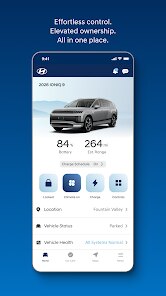
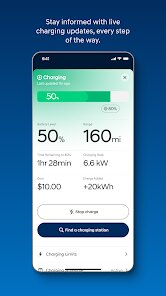
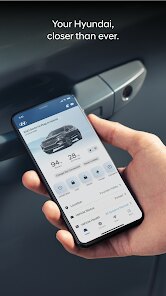
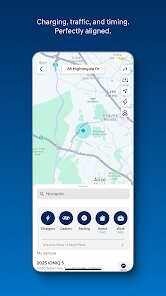
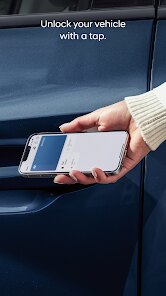
MyHyundai with Bluelink is a vehicle companion app specifically for Hyundai owners, falling squarely into the automotive utility category. You use it primarily to remotely control your car's climate, lock or unlock the doors, and even start the engine from your phone. For anyone who drives a modern Hyundai, downloading this from Google Play or the App Store is basically the first thing you do after buying the car, since it's free to install and the basic features come with a complimentary trial period. The first impression after launching is split between excitement and a bit of overwhelm — the dashboard throws a lot of info at you: fuel level, tire pressure, and last parked location, all on one screen. It feels powerful, but you might spend a minute just figuring out which icon starts the engine.
Once you get past the initial setup, the hands-on experience is surprisingly smooth. The onboarding walks you through linking your vehicle using the VIN and your Hyundai account, which takes maybe five minutes if you have the paperwork handy. In daily use, the main actions are tapping the "Remote Start" button in the morning on a cold day or hitting "Lock" when you're already walking away from the car. The interface is clean, with large buttons that are hard to miss, but the app can sometimes lag for a second or two when sending commands. A practical tip is to keep the app updated, as older versions tend to disconnect from the car's modem more often. The navigation feature also lets you send a destination directly to the car's built-in GPS, which saves you from typing on the small screen.
After using it for a few months, my personal judgment is that MyHyundai with Bluelink really shines for people who live in extreme weather — being able to warm up the car from inside your house is a game-changer. But if your driving habits are simple and you never park in a strange lot, you might not use it much beyond the first week. Compared to similar apps from other automakers, like FordPass or Toyota's Remote Connect, Hyundai's version feels more polished visually but occasionally suffers from slower response times. What makes it different is the inclusion of safety features like automatic collision notification, which can alert emergency services if the airbags deploy. Some people will keep it installed for that peace of mind alone, while others might uninstall it if they find the free trial expires and they don't want to pay the subscription for remote features.
features
- 🔑 Remote Start and Climate Control — Unlike Toyota's Remote Connect, which often limits climate control to basic settings, MyHyundai lets you adjust the temperature and defroster directly from the app, so your car is actually comfortable when you get in.
- 📍 Stolen Vehicle Recovery — If your car gets taken, you can track its location in real-time through the app, and Hyundai works with law enforcement. This is something competitors like FordPass offer too, but Hyundai's integration feels tighter with the Bluelink system.
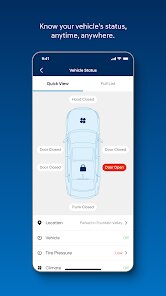
- 🔔 Vehicle Health Reports — Every month, the app sends you a summary of your car's diagnostic status, including battery voltage and tire pressure. HondaLink offers something similar, but Hyundai presents it in a clearer, less cluttered layout.
- 🚗 Last Parked Location — Automatically saves where you parked, which sounds basic, but the execution is great — it uses GPS and even shows a photo from the car's surround-view cameras if equipped, something most rivals skip.
pros
- 📈 Free Trial Period — Unlike BMW's ConnectedDrive, which often charges from day one for basic remote functions, MyHyundai comes with a generous three-year complimentary trial on most models, making it easy to test without commitment.
- ⏱ Intuitive Command Center — The main dashboard puts everything in one place, from oil life to a valet alert mode. Compared to NissanConnect, which buries features in nested menus, Hyundai's layout is way easier to navigate at a glance.
- 🔁 Over-the-Air Updates — The app and the car's software update automatically through Wi-Fi, so you don't need to visit a dealership for minor fixes. Kia's UVO offers this too, but Hyundai provides more detailed update notes in the app.
cons
- ⏳ Slower Remote Responses — Sending a command to start the engine or lock doors often takes 10-15 seconds, while FordPass usually responds in under 5. It's not a dealbreaker, but it can feel clunky when you're in a hurry.
- 💰 Subscription Needed After Trial — Once the free period ends, you have to pay monthly for remote features, which is common among rivals like Toyota, but the price is higher than what some competitors charge, and the feature tiers can be confusing.
- 🔋 Battery Drain Concerns — Some users, including myself, notice that the app drains the phone's battery faster when left running in the background, an issue that seems less pronounced with Tesla's app due to its optimized background sync.
Recommended Apps
![]()
Japevox - Funny Prank Sound
SecureTool4.3
![]()
AstroMatrix Birth Horoscopes
AstroMatrix4.7
![]()
Personalized Call from Santa (
www.PackageFromSanta.com4.3![]()
Prank Call - Fake Call & Chat
Bravestars Casual4.1![]()
Persona: Beauty Camera
TICKET TO THE MOON, INC.4.5![]()
Peacock TV: Stream TV & Movies
Peacock TV LLC4.5![]()
Instant Buttons Soundboard App
Snow Peak Apps2.1![]()
GPS Speedometer: Speed Tracker
SM Infotech3.2![]()
Subway®
SUBWAY Restaurants4.2![]()
Find Your Phone By Clap
Trusted App Global4.5![]()
Gorilla Skins for Monkey Arena
Dumitru Boico4![]()
Vimeo
Vimeo.com, Inc.3.8![]()
Vinted - Buy and sell clothes
Vinted4.6![]()
Galaxy Starry Keyboard Backgro
Fun Keyboard Theme for Android4.7![]()
Chat AI - Ask AI anything
AI Chat Bot, Ask AI4.4















Disclaimer
1.Apklifts does not represent any developer, nor is it the developer of any App or game.
2.Apklifts provide custom reviews of Apps written by our own reviewers, and detailed information of these Apps, such as developer contacts, ratings and screenshots.
3. All trademarks, registered trademarks, product names and company names or logos appearing on the site are the property of their respective owners.
4.Apklifts abides by the federal Digital Millennium Copyright Act (DMCA) by responding to notices of alleged infringement that complies with the DMCA and other applicable laws.
5.If you are the owner or copyright representative and want to delete your information, please contact us [email protected].
6.All the information on this website is strictly observed all the terms and conditions of Google Ads Advertising policies and Google Unwanted Software policy.
7.Apklifts.com is an independent, information-only website which is 100% free to all the users.













